


Your support queue keeps growing, your team is stretched thin, and every outsourcing website promises the same thing. This guide is for founders and support leads who need a clear way to filter that noise. It covers how to choose a customer service provider in 20 steps. You'll move from basic company checks to the security and pricing questions that decide whether a partnership lasts.
Key Takeaways
- Start with basics like location, services, and industry experience, and a long vendor list shrinks to a realistic shortlist in a few hours.
- Reviews and reference calls reveal more about a provider's quality than any sales deck, so plan time to talk to the people it supports now.
- Operational fit comes down to coverage hours, metrics written into the contract, and how well the team works inside the tools you already run.
- Treat security certifications as a filter, not a bonus, since a vendor with weak controls can become the easiest way into your customer data.
The pool of outsourcing partners won't shrink anytime soon. Grand View Research projects the global outsourced customer care market will reach $113.2 billion by 2030. More options sound like good news, but they also mean more providers making identical claims about quality, speed, and care.
Customer service isn't a side task you hand off and forget. The right partner keeps response times short, speaks your customers' languages, and frees your in-house team to work on the product. The wrong one creates churn you'll spend months fixing, which is why the selection process deserves more than a quick pricing comparison.
If you're moving from an in-house team to an outside customer service provider for the first time, use the steps below as your structure. Adjust each one to your own goals, and drop the ones that don't apply to your business.
Criteria for Choosing a Customer Service Provider
Every company brings its own goals to this decision. Your industry, team size, growth plans, and communication style all change which steps carry the most weight. Use the checklist as a frame, then add your own requirements as you go, especially anything your legal or security team already demands from vendors.
The 20 steps fall into five groups. Each group answers a different question about the provider. The table below shows where every step belongs, so you can split the review between people on your team and compare notes later.
Customer service provider evaluation criteria
| Group | Steps | What it tells you |
| Basic information | Steps 1 to 7 | Whether the vendor fits your size, region, services, and industry |
| Expertise and reputation | Steps 8 to 12 | How well the team talks to your customers and what clients say about it |
| Operational capabilities | Steps 13 to 18 | Coverage hours, performance, scalability, integrations, and reporting |
| Data security | Step 19 | Which certifications and controls protect your customer data |
| Strengths and weaknesses | Step 20 | How each shortlisted vendor compares before you sign |
Basic Information About Customer Service Vendors
Start wide and filter early. A quick look at each company's basics knocks out the providers that clearly don't fit, which saves hours of sales calls later. Keep a simple spreadsheet with one row per vendor, and fill it in as you work through the first seven steps.
Step 1. Company Name
It sounds obvious, but check that you can find the company's legal name and that the market recognizes it. Search the name on review platforms, LinkedIn, and business registries. A provider that's hard to identify outside its own website deserves extra questions before it reaches your shortlist.
Step 2. Company Size
The bigger your customer base, the more agents you'll need and the more ticket volume your provider has to absorb. Smaller vendors tend to give you a closer relationship with the account team. Larger ones usually bring deeper benches, 24/7 coverage, and more room to grow, so match their size to your volume.
Step 3. Office Location
Where a provider operates affects time zones, language skills, and cultural fit. It also changes the price. A North American support team usually costs more than an Eastern European one with similar skills. Location shapes your budget as much as your service quality.
Map where your customers live and which languages and accents they use. Location matters less when consultants work remotely across regions. You still want agents who understand local holidays, payment habits, and how your customers expect agents to talk to them.
Step 4. Years on the Market
Time in the industry shows both experience and staying power. A provider that has run support projects for years has seen where setups break. It has also managed its finances well enough to stay in business. A long track record doesn't guarantee quality, but it lowers the risk of a partner disappearing mid-contract.
Step 5. Sales Contact Information
You should be able to reach a person at the company without hunting for an email address. Look for a direct sales contact, a phone number, or a booking form on the website. If finding a contact takes effort now, expect the same friction later when you need a quick answer about your account.
Step 6. Services Offered
Your goals come first, so the provider's services should match what you need from them. Some vendors stick to chat and email, while others run omnichannel support across phone, social media, messengers, and self-service. Some add sales or back-office work, and others only resolve tickets. List the channels and tasks you need before your first call.
Step 7. Industry Experience
Experience in your industry saves weeks of training. A fintech provider already knows how to talk about chargebacks and identity checks, and a SaaS-focused team understands bug reports and feature requests. Industry knowledge also covers jargon, common customer complaints, and compliance traps that a generalist team can miss in its first months.
Industry fit belongs near the top of any list of what to look for in a customer service provider. Ask each vendor for examples from companies like yours. Their answers show whether the experience matches your product or only your general category.
Expertise and Reputation
The basics tell you whether a vendor could work for you, while expertise and reputation tell you whether it will. Expertise is the skill level of the team that talks to your customers every day. Reputation is the record of how that team has performed for other clients over time.
Step 8. Languages Supported
Speaking your customers' language builds trust faster than any discount. International companies often hear complaints about agents who sound scripted or miss local expressions. If your customer base spans several countries, look for native or fluent speakers in each language you support, not translation tools covering the gaps.
Language coverage also has to hold up as you grow. Cardo Systems, a maker of communication devices for riders, worked with SupportYourApp on multilingual support across the US and Europe. When Cardo launched direct service in new European markets in 2025, the team doubled in size. CSAT stayed at 82+ and QA scores at 80+ through that growth.
Step 9. Omnichannel Support
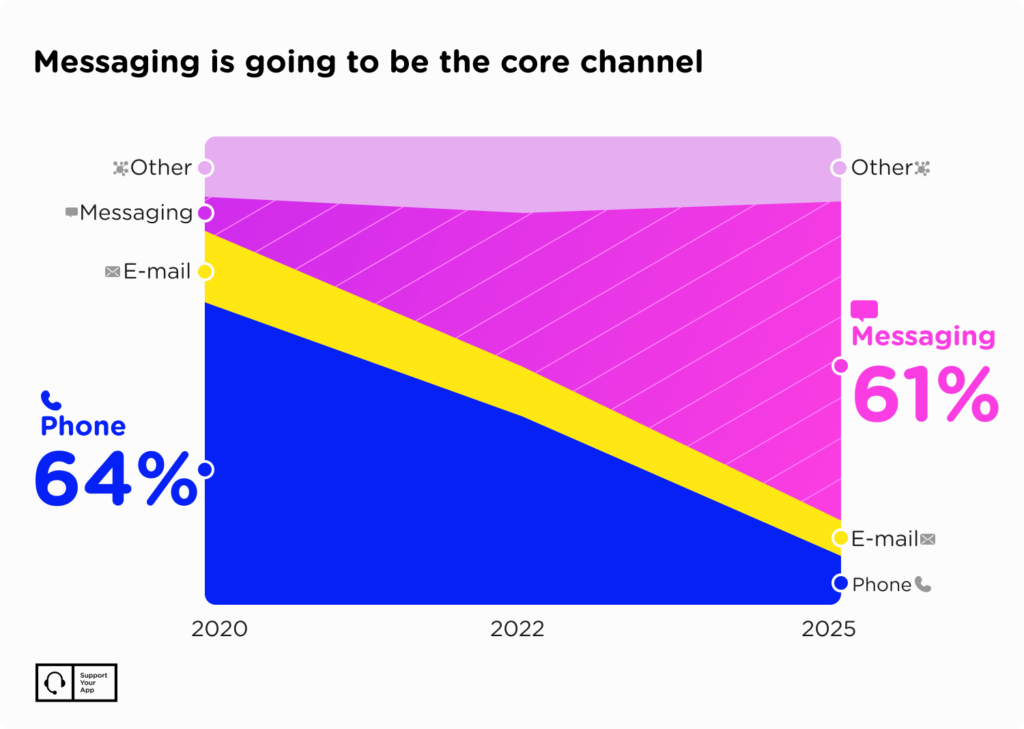
Phone and email still matter, but many customers, especially younger ones, would rather type than call. Whatever your audience's age, they expect to reach you on the channel that suits them at that moment. A strong provider covers live chat, email, social media, SMS, and self-service, and keeps the conversation history intact when a customer switches channels.
Step 10. Reference Contacts
References from past and current clients show how a provider behaves after you sign the contract. Ask for a few contacts and call each of them. Ask about response times, how the vendor handled mistakes, and which problems came up early. These calls are one of the most honest tools you have when you're learning how to choose a customer service provider.
Step 11. Clutch Rating and Third-Party Reviews
Platforms like Clutch, G2, and Trustpilot publish verified reviews from clients. A vendor's own website shows its best side, so independent reviews give you a fuller picture of the service. Read the negative reviews as carefully as the positive ones, and look at how the provider responded to criticism in public.
Step 12. Regulatory and Sanctions Compliance
If you operate globally, your provider has to follow the same rules you do. That includes GDPR for European customers, HIPAA for healthcare data, and international sanctions lists that restrict who you can work with. Legal compliance protects you from fines and from the reputational damage that follows a public violation.
How to Evaluate Customer Service Providers on Operations
A provider's daily operations decide what your customers experience. The term covers a lot of ground, so break it into the six checks below and score each vendor separately. Ask for evidence at every step, such as dashboards, sample reports, or the SLA template they use with current clients.
Step 13. Availability and Time Zones
Your provider needs to cover the hours your customers are awake, not only your office hours. If you need 24/7 support across several time zones, ask how the vendor staffs nights, weekends, and holidays. Check whether the same team covers every shift or whether coverage depends on a separate overflow crew.
Many vendors now pair human teams with AI for off-hours volume. For repetitive questions on chat, email, or messengers, an autonomous agent like SupportResponse resolves routine tickets 24/7 and escalates complex cases to a human. Ask any provider which tasks its AI handles alone and where people step in.
Step 14. End-to-End Solutions
Some companies need ticket handling and nothing else. Others want a partner that also covers technical support, data analysis, or customer engagement work. If you want more than core support, review each pricing plan and ask what every option includes. One provider that bundles these services can save you from managing several separate vendors.
Step 15. Efficiency and Performance
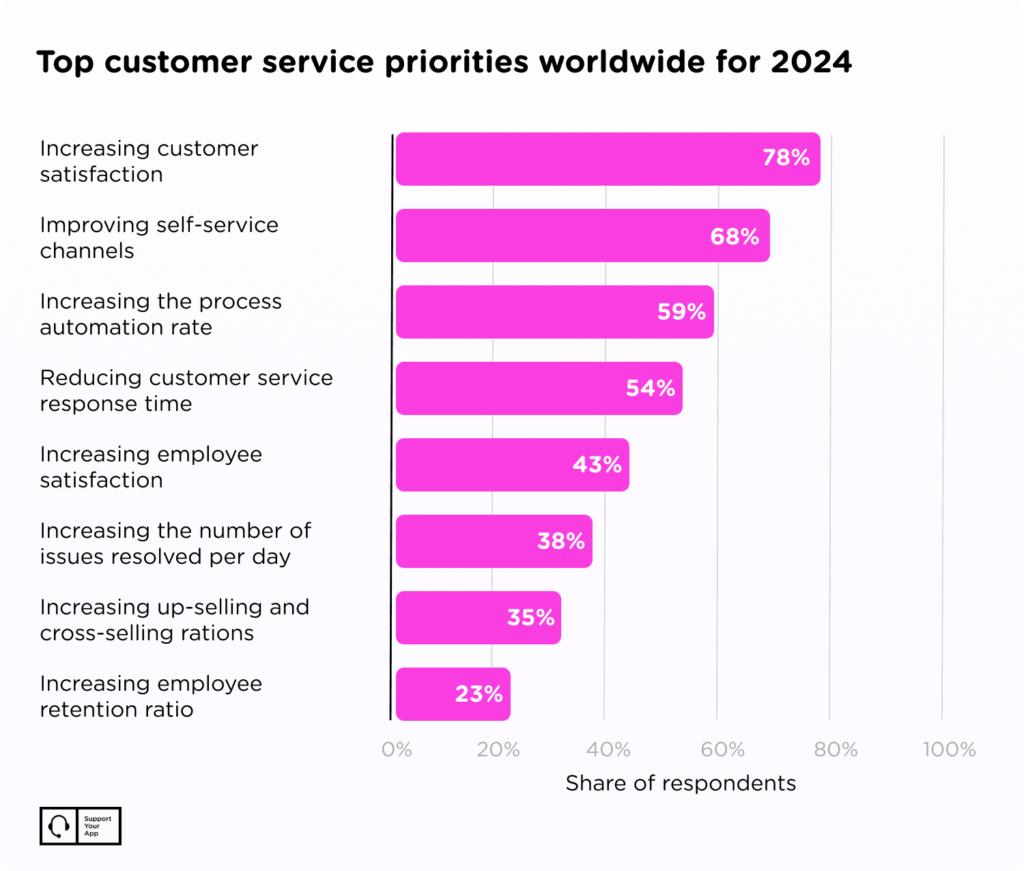
For most companies, this step carries the most weight. Ask each vendor about average response time, workload per agent, first contact resolution (FCR), customer satisfaction (CSAT), and Net Promoter Score (NPS). Then compare their answers with what you found in reviews and reference calls, and note any gaps between the two.
If you interview candidates, request their service level agreements and the KPIs they report on. A well-written customer service SLA spells out response times, resolution targets, and what happens when the provider misses them. A vague SLA usually means vague accountability once problems start.
Step 16. Scalability
A good support team grows with you. Switching vendors hurts, because you rebuild workflows, retrain agents, and risk service gaps during the move. Pick a provider that can add agents quickly during launches or seasonal peaks and scale back when volume drops. Ask how long onboarding takes and how they keep quality steady during fast growth.
Flexible pricing helps here too. A pay-as-you-go support model lets you pay for the volume you handle instead of committing to a fixed team size from the start. That matters most for seasonal businesses and startups whose ticket volume swings from month to month.
Step 17. Integration With Your Systems
Your business already runs on a CRM, a help desk, and a handful of internal tools. Your provider should work inside those systems instead of asking you to move to theirs. Ask which platforms their agents already know, and whether they can handle help desk integration and migration if you plan to switch tools.
Tool fit is a common blind spot when teams work out how to choose customer support provider partners. It shows up later as slow tickets, manual copying between systems, and agents who can't see a customer's full history.
Step 18. Reporting and Analytics
Your provider sees patterns in customer conversations that your product and marketing teams need. Ask what reporting tools the vendor uses and how often you'll get reports. Useful reports cover two sides: what customers ask about and complain about, and how the support team performs against its targets each month.
Step 19. Data Security and Certifications
Data protection is where a weak vendor turns into your problem. Verizon's 2025 Data Breach Investigations Report found that third-party involvement in breaches doubled to 30%. Every outside team with access to your help desk adds another path into your customer data. That's why security belongs at the top of your vendor review.
The cost of getting it wrong adds up fast. IBM's Cost of a Data Breach Report 2025 puts the global average cost of a breach at $4.44 million. For a growing company, one incident at a support partner can wipe out the savings that made outsourcing attractive in the first place.
Certifications show that a provider follows tested security practices. Look for these:
- ISO/IEC 27001. The provider follows an internationally recognized standard for managing information security.
- PCI DSS. The provider can process and store payment card data safely, which matters if your agents ever see card details.
- Industry-specific compliance. Your industry may require GDPR, HIPAA, CCPA, or other frameworks, so confirm the vendor meets them before you sign.
During the comparison, ask each provider for its current certificates and the date of its last audit.
Step 20. How to Compare Customer Service Vendors' Strengths and Weaknesses
Before you decide, write down the strengths and weaknesses that matter most to your business. The table below lists the pros and cons we see most often when companies compare outsourcing partners. Score every shortlisted vendor against each row.
Pros and cons to weigh before you sign
| Factor | Pro or con | What it means for you |
| 24/7 availability | Pro | Customers get help at any hour, which lifts satisfaction and cuts backlogs |
| Advanced technology and CRM integration | Pro | AI tools and a strong CRM lower costs and speed up replies |
| Customer-centric approach | Pro | Agents adapt to each customer's needs, which builds trust |
| Flexible contracts | Pro | Pay-as-you-go or short terms let you test a vendor before committing |
| High costs | Con | A price you can't sustain long term forces another switch later |
| Cultural and time zone gaps | Con | Agents who miss local nuances can hurt your connection with customers |
| Lack of transparency | Con | Without open reporting, you can't track progress or performance |
Cost deserves its own close look, since pricing models vary a lot between vendors. Our breakdown of customer service outsourcing costs explains what drives the price and how to read quotes side by side. It'll help you tell a fair offer from a cheap one with hidden gaps.
Summary: How to Choose a Customer Service Provider
Data-driven decisions lead to better partnerships. When you score each vendor on the same 20 steps, you replace gut feeling with evidence and spot weak points before they reach your customers. The right partner lowers your team's workload, frees time for core work, and gives you skills and tools you'd struggle to build in-house.
Take your time with the shortlist. Knowing how to choose a customer service provider means asking every vendor the same hard questions about expertise, operations, security, and performance. Do that well, and your customers will notice the difference in faster replies and fewer repeated explanations.