

Every outsourcing quote looks different, which makes budgeting for support harder than it should be. The customer service outsourcing cost you'll pay depends on the pricing model, agent location, ticket complexity, and volume. This guide is for founders and support leads comparing quotes or weighing outsourcing against an in-house hire. It explains each pricing model, including pay-as-you-go, and shows where your budget goes.
Key takeaways
- The pricing model you pick shapes your monthly bill as much as the hourly rate does, so compare models before you compare vendors.
- Pay-as-you-go billing ties cost to the tickets and minutes your customers generate, which suits teams with uneven or seasonal volume.
- Agent location, support complexity, and coverage hours move the price more than most buyers expect when they request their first quote.
- Pairing AI with human agents changes the math, because routine tickets stop eating into paid agent hours.
Why Companies Choose Outsourced Support
A US customer service representative earned a median of $42,830 a year in 2024, according to the Bureau of Labor Statistics. That figure covers salary only. Benefits, recruiting, training, software licenses, and a manager's time all sit on top, and one agent can't cover nights or weekends alone.
Running support in-house also means juggling time zones, labor rules, and channel choices. An outsourcing partner takes those decisions off your plate and turns support into a predictable customer service outsourcing cost. The provider handles staffing and the queue, and your team stays on the product. The diagram below sums up the main benefits.
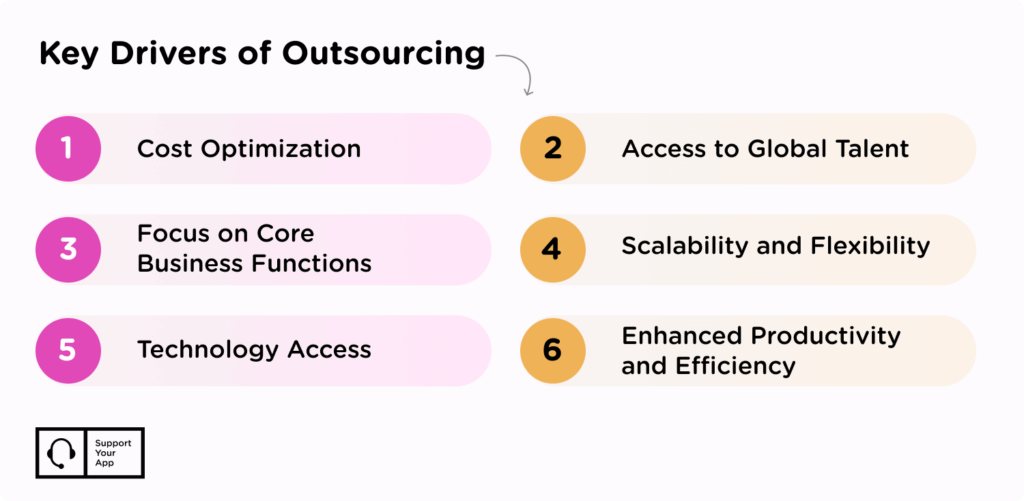
- Lower overhead: outsourcing removes the cost of hiring, training, and managing an in-house team and its infrastructure. That money can go elsewhere.
- Easier scaling: as your customer base grows, an outsourced team adjusts its headcount quickly and keeps the queue from backing up.
- Access to trained talent: outsourcing companies train agents on a regular schedule, so they keep up with current tools and support practices.
- More time for your core business: with support covered, you can put your energy into running and growing the company.
Customer Service Outsourcing Pricing Models
Your provider's pricing model decides how your invoice is calculated. It also shapes the service you get, because each model rewards different things. A model that suits a steady SaaS help desk can overcharge a seasonal store. Rates vary by company, but most providers bill using one of the structures below.
Flat Rate Model
With a flat rate, the vendor charges you a fixed amount every month, whatever your ticket count. It's less common than it used to be, since most companies see their volume shift from month to month. Flat rate answering still works well for businesses with steady demand and a strict budget ceiling.
Per Minute/Per Hour Model
This model bills for agent time. The cost of outsourcing customer service here depends on how long agents spend resolving issues, at a fixed rate per minute or hour. The number of calls or chats doesn't matter. It's easy to audit, though long, complicated conversations raise the bill quickly.
Pay-As-You-Go Model
Pay-as-you-go charges for work delivered, not for seats or idle hours. With pay-as-you-go customer support, chat, email, in-app, and social tickets are billed per resolved ticket. Voice calls are billed per connected minute. Quiet weeks cost less, and a busy week scales up without a contract renegotiation.
The unit price stays fixed, so your finance team can forecast cost per ticket the same way it forecasts any variable expense. You can also split pricing by channel, keeping per-ticket billing for email and per-minute billing for phone. That's handy when customers reach you through several channels with very different conversation lengths.
This model fits retail, travel, and eCommerce brands with holiday spikes, product launches, or long quiet stretches between promos. If your volume later settles into a steady pattern, a dedicated team on per-seat billing can make more sense. Review the numbers every quarter, since the right model changes as your company grows.
Shared Agent Model
A pool of agents works across several clients, which keeps the price below a dedicated team. It's usually a good fit for companies with low ticket volume or a single channel, like email. The trade-off is attention. Shared agents juggle several products, so they depend on a clear, up-to-date knowledge base to answer quickly.
Dedicated Agent Model
If you want a team trained only on your brand, products, and services, this is the model to look at. It costs more than the others, but you get more control over quality and a team that knows your product inside out. Companies with complex products or strict compliance needs often start here.
SupportYourApp's pricing works around three paths. Human Team adds trained agents to the AI and tools you already use. AI & Human Agents layers AI onto your existing team. AI & Systems runs support fully for you, with AI and human agents together. Billing is per seat or pay-as-you-go, and each path can launch from one week.
Key Factors That Influence Customer Support Outsourcing Costs
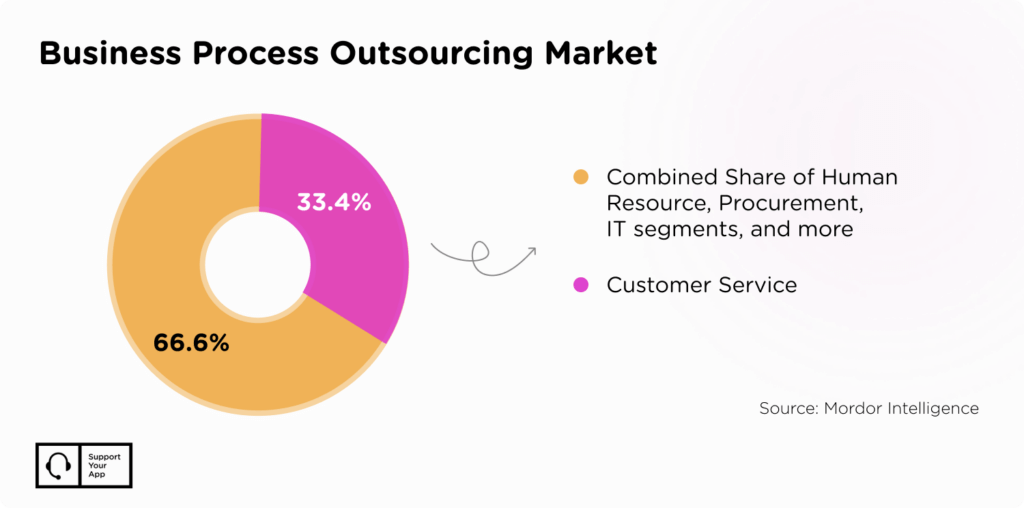
Customer service is the biggest slice of the outsourcing market. Mordor Intelligence found that customer services made up 32.14% of business process outsourcing revenue in 2025, more than any other function. That popularity means plenty of vendor choice, and a wide spread in prices.
Beyond the pricing model, five elements have the biggest effect on what you'll pay each month. Some of them you control directly, like coverage hours and add-ons. Others, like seasonal volume, you can only plan around. Here's how each one moves the final number on your quote.
1. Geographic Location
Location is one of the biggest factors behind the price of outsourced support. Onshore and nearshore contact centers sit closer to your business and usually charge more than offshore teams. Offshore teams cost less, but language skills and time zone gaps can affect quality. Find the balance that matches your customers, not only your budget.
2. Type of Support
The type of support you need has a big effect on price. IT support pricing is generally higher than standard customer support because the work is more technical. Basic L1 support over email and phone is the most affordable option. Technical support, live chat, and especially 24/7 coverage all push the rate up.
3. Dedicated vs Shared Agents
A dedicated customer service team costs more. In return, your customers get undivided attention and agents who know your product well. Shared agents split their time between clients, so replies can take longer, and product knowledge runs thinner. The gap shows most on technical or high-stakes tickets.
A dedicated team for a low ticket volume can turn into an expensive choice. Agents sit idle between conversations, and you still pay for their time. Map out your service needs, including peak hours and channels, before you choose between the two.
4. Volume of Interactions
The number of requests your company receives sets how many agents you need at any given time. That number climbs in peak seasons, during launches, and after a price change. Budget for those spikes ahead of time, or pick a pricing model that adjusts the bill to the volume automatically.
5. Additional Services and Add-Ons
Extras on top of the core service add up fast, often more than buyers expect when they first compare quotes. Common add-ons include multilingual agents, quality assurance reviews that spot weak points, and integration work with your helpdesk or CRM. Ask vendors to list each one separately in the quote.
Key Factors Influencing Support Outsourcing Costs
| Factor | Summary |
| Geographic Location | Onshore/nearshore cost more; offshore saves but may face language, culture, time zone issues. |
| Service Type / Complexity | Basic L1 is cheaper; tech support, live chat, or 24/7 cost more. |
| Dedicated vs Shared Agents | Dedicated offers personalized service; shared is cheaper but less brand familiarity. |
| Volume of Interactions | More queries require more agents; peaks raise staffing needs. |
| Add-ons | Multilingual, QA reviews, integrations add value. |
Customer Service Outsourcing Cost by Region
Location is one of the first things to settle when you choose an outsourced provider. Onshore and nearshore teams in North America, Western Europe, or Australia usually cost more. Labor costs are higher there, and agents often share your customers' culture and time zones.
Offshore providers in countries like the Philippines or India tend to cost less, which makes them a popular choice for companies chasing savings. Weigh the lower rate against language skills, time zone overlap, and cultural fit. A cheaper team that frustrates your customers won't save money for long.
You'll rarely find one reliable average cost of outsourcing customer service, because rates swing so widely between regions and models. Quotes for the same scope can look very different depending on the delivery country. Request quotes from more than one region and compare them on the same ticket volume.
Reducing the Costs of Customer Service Outsourcing
Location and resources are the first places to look for savings. If you want to reduce call center costs, offshore providers in lower-cost regions help, provided their agents speak your customers' language well. Cloud-based tools cut infrastructure and maintenance spending. Better forecasting keeps staffing levels close to the demand you see each week.
Pay only for what helps your operation. Skip expensive software unless it adds clear value, and match agent skill levels to the complexity of your tickets. For lower volumes, shared agents keep quality steady without the overhead of underused staff. Seasonal businesses can get the same effect from pay-as-you-go billing.
AI cuts costs further when it takes routine tickets off human agents. Mailcheck, an email verification platform, needed 24/7 multilingual support days before a big promo. SupportYourApp paired one human agent with SupportResponse, our autonomous AI agent, and launched the setup in seven days.
The Mailcheck case study shows the payoff. SupportResponse resolved 81% of routine requests without a human stepping in, and resolutions got 51% faster across the board. Two months later, SupportYourApp added two more agents to keep pace with growing volume. Complex cases still went straight to a person.
Summary
Outsourcing customer support lowers overhead, makes scaling easier, and frees your team to focus on the product. Your final bill depends on the pricing model, agent location, support type, agent setup, and ticket volume. Region has an outsized effect, since it sets both the rate and the language and culture your customers meet.
Pay-as-you-go billing and AI for routine tickets give you two more ways to keep the outsourced customer service cost in check. Use them to cut spending without lowering quality or missing your support targets. When you're ready to compare options, get a quote built around your channels, languages, and volume.