Your ticket queue keeps growing, your budget doesn't, and every vendor now promises an AI fix. This guide is for support leaders at SaaS, eCommerce, fintech, and travel companies weighing AI in customer service. It covers what AI handles well, where it breaks, and how to roll it out without losing customers.
TL;DR
- AI takes routine, high-volume tickets around the clock, while people keep the complex and emotional cases.
- The biggest gains show up in response times, agent workload, and cost per resolution, as long as the rollout starts small.
- Messy knowledge bases and hidden escalation paths sink more projects than bad technology.
- A hybrid model beats both extremes, and the order of your setup steps matters more than the tool you pick.
Gartner projects agentic AI will autonomously resolve 80% of common service issues by 2029, though analysts caution that over 40% of poorly governed deployments will be abandoned by 2027. Most companies are still testing chatbots and drafting tools on a small share of tickets. The gap between those two points is where budgets get wasted, and also where careful teams build a lasting cost and quality advantage. The rollout order decides which.
What Is AI in Customer Service?
It is software that reads customer messages and decides what to do with them. It answers routine questions, routes tickets, and drafts replies for agents to review. The tools run on machine learning and large language models trained on your help center, past tickets, and product data. Human agents keep the hard cases that need judgment and empathy.
Intent beats keywords. Older support bots followed fixed decision trees and broke when a customer phrased something differently. Modern systems read intent, so "where's my order" and "package still missing" trigger the same flow. The newest layer, agentic AI, goes further and takes actions such as issuing a refund or updating an address inside your systems.
Why AI in Customer Service Matters
Customers expect instant answers at any hour, in their own language, on the channel they picked. Staffing that bar around the clock costs more than most growing companies can carry. Service leaders surveyed in Salesforce's 7th State of Service report estimate AI autonomously resolves 30% of cases today and expect that share to reach 50% by 2027.
Volume grows faster than headcount. The importance of AI in customer service comes down to that simple math. An agent covers one shift, while AI answers routine questions at three in the morning. Teams that skip AI end up choosing between slow replies and rising payroll, and neither option keeps customers around for long.
Benefits of AI in Customer Service
AI shortens the wait for customers and takes repetitive work off your agents. Those two gains feed everything else on the list, from lower costs to steadier quality. The table shows where each benefit appears in daily work, how to measure it, and results from SupportYourApp's own AI products.
| Benefit | What changes day to day | Metric to track | Proof point |
| 24/7 coverage | Routine questions get answers at night, on weekends, and on holidays | After-hours resolution rate | SupportResponse resolves 80% of routine tickets without a human |
| Faster responses | Routine questions get a first reply right away instead of waiting in a queue | First response time | SupportVoice delivers 95% faster reply times on calls |
| Agent productivity | Agents get drafted replies, thread summaries, and instant knowledge base answers | Average handle time | SupportBrain cuts average handling time by 60% |
| Scalability | Seasonal spikes and launches don't need temporary hires | Backlog during peaks | Varies by ticket mix |
| Lower cost | Fewer agent hours go into each resolved ticket | Cost per resolution | Varies by ticket mix |
| Consistency | Every customer gets the same policy answer on every channel | QA scores, reopen rate | Varies by knowledge base quality |
| Proactive support | Alerts reach customers about delays or outages before they write in | Contact rate per order or user | Varies by product |
Phone is the slowest and most expensive channel to staff. The benefits of AI for phone support show up first in hold times, since a voice agent picks up every call instantly. Callers describe the problem in plain words, and the AI routes or resolves it. Calls that come in after hours no longer go to voicemail or wait until morning. The voice agent answers at any time of day or night, so customers get help when they need it.
Agent workload drops too, because the AI takes on many of the routine tasks that used to fill each shift. Human agents spend less time on repetitive requests and more time on the conversations that need them. Drafting tools write the first version of a reply, pull the right help article, and condense a forty-message thread into a few lines. That frees time for the cases where judgment and empathy decide the outcome. It also cuts the repetitive work that wears agents down fastest.
Support is rarely the only team adopting AI right now. Marketing and product teams often run their own pilots, and comparing notes saves time. Companies expanding AI-powered workflows across departments can start by reviewing the latest AI content creation tools for automation and productivity. Sharing vendors and data rules across teams shortens each new rollout.
AI Customer Service Examples and Use Cases
Most teams start with jobs that repeat thousands of times a month. Order tracking, password resets, and refund status fill a big share of eCommerce and SaaS queues. The AI customer service use cases below run in production today at companies of all sizes, across chat, email, and voice.
- Chatbots and AI agents answer order status and account questions, then hand off anything unusual with the full conversation attached.
- Smart routing reads each ticket's topic, language, and urgency, then sends it to the agent best equipped to solve it.
- Agent assist tools draft replies, translate them, and surface help center answers while the agent stays in control.
- Voice agents pick up inbound calls, verify the caller, check account data, and escalate when the request gets complicated.
- Quality assurance AI reviews every conversation instead of a small sample and flags coaching opportunities.
- Proactive alerts warn customers about delays or outages before they write in.
Klarna illustrated the necessity of operational balance: after its AI assistant absorbed two-thirds of chat volume in 2024, the company rebalanced in May 2025 by deploying a flexible human agent tier to manage complex and emotionally sensitive escalations where pure automation fell short. The pattern that holds up splits the load, with AI on volume and people on judgment. SupportYourApp's Support Intelligence Hub pairs AI tools with trained human teams for exactly that split.
The right starting use case depends on your industry and ticket mix. Fintech teams often start with payment status checks, and travel teams with booking changes. You'll find more AI customer service examples broken down by industry, with the tools and handoff rules behind each one.
Personalization With AI
AI personalizes support by pulling customer context into every reply. It checks CRM records, order history, and past tickets before anyone replies. A returning customer with a failed payment gets a reply that names the exact charge and offers the fix, instead of a generic article. Context cuts repeat contacts, because the AI already understands the customer’s situation from the first message. Customers no longer need to write back and explain the same problem a second time.
Recommendations work the same way, because the AI uses what it knows about each customer to offer something relevant. Support teams apply that logic to suggest guides, fixes, or upgrades from account data. In our case study, an AI agent connected to a wall art brand’s Shopify catalog recommended the right piece when a customer described the car model they wanted. This is personalized customer service at scale, and it only works when your CRM data is accurate and connected to the AI tools.
Customers like being recognized, but they notice fast when a reply knows too much. Use data that helps solve the current issue and leave the rest out of the conversation. In regulated industries like fintech and healthcare, that rule also keeps you on the right side of GDPR, HIPAA, and PCI DSS requirements.
Sentiment and Emotion Analysis
Sentiment analysis reads the tone of each message and scores how the customer feels. Most AI sentiment analysis customer service tools pick up anger and urgency from word choice and, on calls, from tone of voice. The score then decides where the ticket goes and how fast. Angry customers skip the queue.
Sentiment also signals churn risk. A customer who sounds more frustrated with each ticket is a warning sign worth a callback. Teams that track sentiment trends can spot product bugs and policy problems before surveys do. Treat the scores as a signal for humans to review, since sarcasm, slang, and regional phrasing still trip up the models regularly.
Cost Reduction and Efficiency
AI lowers support costs by cutting the agent time each resolved ticket needs. Your AI customer service cost per ticket depends on the vendor's pricing model, whether that's per resolution, per seat, or per minute. Compare that figure against your current cost per resolution, not against agent salaries alone.
Knowledge base cleanup and integration work often cost more than the license itself. Budget for them upfront, or the savings shrink once the pilot ends. A realistic AI customer service ROI model counts deflected tickets, shorter handle times, and lower overtime, then subtracts every one of those hidden costs.
Workforce planning changes too. AI absorbs routine peaks, so seasonal spikes need fewer temporary hires. SupportYourApp's pay-as-you-go customer support model fits the gap, since you pay for the human hours you use instead of a fixed team. Pair that with AI on routine tickets, and both cost lines move with demand.
How to Implement AI in Customer Service
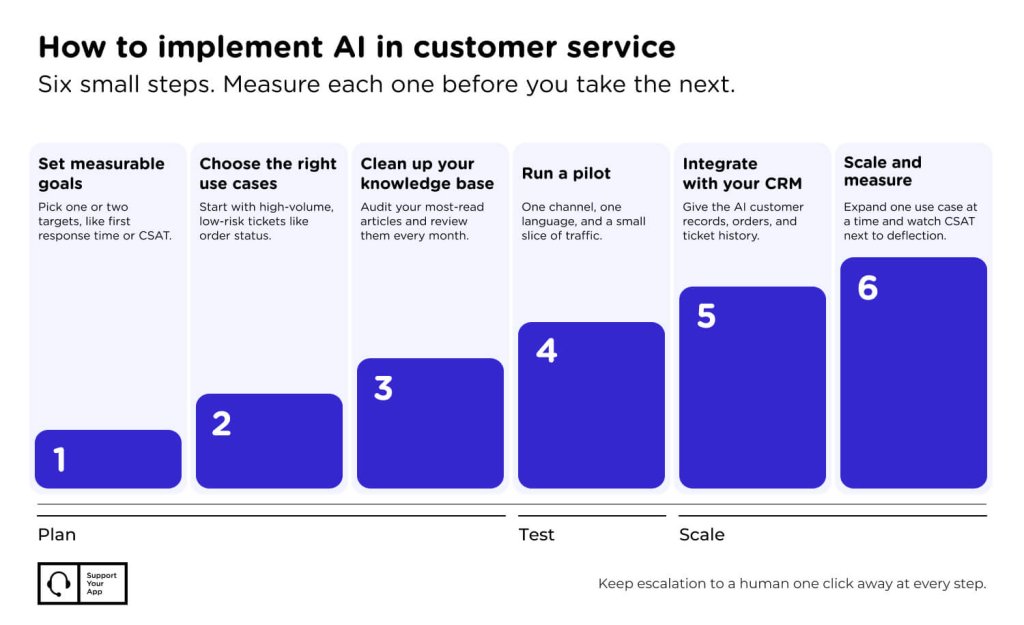
Successful rollouts move in small, measurable steps rather than one big launch. If you're figuring out how to use AI in customer service, follow this order.
Step 1: Set Measurable Goals
Pick one or two outcomes before you pick a tool. Good targets include first response time, cost per resolution, CSAT, or after-hours coverage. A goal like "cut first response time on chat by half" tells you which tool to buy and when the pilot worked. Vague goals stall projects.
Step 2: Choose the Right Use Cases
Start with repetitive tickets. Pull the last three months of tickets and group them by topic. High-volume, low-risk topics like order status or password resets make the best first candidates. Leave large refunds, legal complaints, and anything involving vulnerable customers with people until the AI proves itself.
Step 3: Clean Up Your Knowledge Base
AI answers are only as accurate as the articles behind them. Outdated pricing and conflicting policies turn into wrong answers repeated thousands of times. Assign an owner to audit the fifty articles your customers read most, then set a monthly review, so changes reach the AI quickly.
Step 4: Run a Pilot
Launch on one channel, one language, and a small slice of traffic. Watch resolution rates, escalations, and CSAT every day for the first two weeks. Read a sample of AI conversations every day too, because metrics miss the confused customer who gave up without complaining.
Step 5: Integrate With Your CRM
Context lives in the CRM. Connect the AI to customer records, order data, and ticket history before you scale. CRM platforms like Microsoft Dynamics 365 combine Copilot and IoT telemetry to detect equipment and account anomalies before issues escalate, while BigCommerce utilizes predictive analytics to anticipate merchant inventory and customer trends. Without that connection, the bot asks customers for details you already have.
Step 6: Scale and Measure
Expand one use case or channel at a time once the pilot hits its targets. Track first contact resolution, escalation rate, CSAT, and cost per resolution every month. If CSAT drops while deflection climbs, customers are giving up rather than getting help, so pull that flow back and fix it.
Challenges and Mistakes to Avoid
The biggest AI customer service challenges come from data, escalation design, and team buy-in. Agents worry about their jobs, and that worry slows adoption if nobody addresses it. Gartner found that 95% of customer service leaders plan to retain human agents, with analysts projecting that half of organizations planning AI-driven headcount cuts will abandon them once ticket complexity increases.
Bad answers carry legal risk. In 2024, a Canadian tribunal held Air Canada liable after its chatbot gave a customer wrong information about bereavement fare refunds. The airline argued the chatbot was responsible for its own words, and the tribunal rejected that. Your company owns every answer the AI gives, so test policy questions thoroughly.
The most frequent AI automation mistakes look obvious in hindsight. Teams hide the "talk to a person" option, launch on every channel at once, or let the bot loop customers through three questions. Others never update the AI after launch, so answers drift as products change. Keep escalation one click away.
Pros and Cons of AI for Customer Service
AI brings speed and scale, and it also adds risks around data privacy and bias. Weigh both sides before you decide how far to automate. The table sums up the trade-offs that come up most often when companies evaluate AI for customer service against a human-only team.
| Pros | Cons |
| Instant answers around the clock | Wrong answers delivered with full confidence |
| Lower cost per resolution on routine tickets | Setup, integration, and tuning costs |
| Consistent policy answers across channels | Weak with sarcasm, edge cases, and strong emotion |
| Agents spend more time on complex cases | Data privacy and compliance exposure |
| Instant scaling during peaks | Bias in training data can skew outcomes |
Disclose AI use upfront. Customers accept bots more readily when they know what they're dealing with. The EU AI Act also requires chatbots to identify themselves as AI to users. Keep personal data in certified environments, limit what the AI can store, and audit vendors against GDPR, CCPA, and PCI DSS requirements.
Bias needs a human check. Models trained on past tickets can repeat old patterns, like slower help for certain languages. Regular audits of outcomes by language, region, and customer segment catch that drift. The bigger design choice is how much oversight to keep, and our guide on human-in-the-loop versus autonomous AI compares both models in detail.
The Future of AI in Customer Service
Support is moving from AI that answers questions to AI that completes tasks. Agentic systems will process refunds, rebook flights, and fix account settings without a handoff. People won't disappear from the picture, and our take on whether AI will replace call center agents explains where human roles are heading.
Customers will also send their own AI assistants to contact your support team. Service teams will need rules for handling bot-to-bot conversations. Our full breakdown of the future of AI in customer service covers agentic AI, autonomous resolution, and how to prepare your team.
Summary
AI in customer service pays off when it takes repetitive work off your team. Start with one measurable goal and a clean knowledge base. Pilot on a small slice of traffic, connect your CRM, and keep a human one click away for every customer who needs one. Then scale what works.