



If you run a support team, you've probably been asked to "add AI" without anyone saying where. This guide gives support leads and founders a practical answer. It covers eight examples of AI in customer service, from chatbots to voice agents. For each one, you'll see where it pays off. You'll also see where people should stay in charge.
Key takeaways
- Chatbots and self-service tools take repetitive questions off your team's plate, but only when the knowledge behind them is current.
- Agent-assist and generative AI make human agents faster without handing customers over to a machine.
- Voice AI and autonomous agents cover the hours and queues your team can't, as long as someone decides what they must never touch.
- The teams that win with AI fix their documentation and processes first, then automate one use case at a time.
Customer patience keeps shrinking. According to Zendesk's CX Trends 2026 report, 74% of consumers now expect customer service to be available 24/7. Few in-house teams can staff every hour of every day. So businesses reach for AI to cover the gaps. That's where the hard questions start.
Plenty of tools promise instant answers. Some deliver. Others create more work than they save. By the end of this guide, you'll know which AI use cases in customer service hold up and what each one needs. You'll also know when to keep people in charge. Let's start with the basics.
What Is AI in Customer Service?
AI in support combines machine learning, natural language processing, and automation to handle or assist with customer conversations. It spots patterns and reads intent. Then it replies across chat, email, voice, and messaging channels. Some tools talk to customers directly. Others work behind the scenes. They help agents move faster.
The shift is picking up speed. Gartner predicts that by 2029, agentic AI will resolve 80% of common customer service issues without human intervention. That's a bold forecast. It also explains why so many teams are testing AI now. Few want to wait.
Chatbots and generative AI tend to be where teams start. Smart routing, data analysis, and priority scoring follow close behind. The table shows the spread. Most AI in customer service examples in this guide mix two or more of them. Few work alone.
AI Adoption Rate by Tool Type
| Popular AI Tools | Usage |
| Chatbots for responding to service requests | 41% |
| Generative AI tools for drafting responses | 41% |
| AI for routing service requests to appropriate agents | 38% |
| Tools for collecting and analysing customer feedback | 37% |
| AI to prioritise requests by urgency | 37% |
The business impact is easy to measure. Response times drop. So does the cost per contact. Support stays open around the clock, and answers stay consistent across channels. Scaling up gets easier, and agents burn out less often. Those gains usually show up within the first few months of a well-planned rollout.
AI doesn't replace human agents, though. It takes the repetitive, high-volume work, so agents can focus on cases that need empathy and judgement. Think of it as a very fast junior colleague. It never sleeps. It still needs someone experienced checking its work and stepping in when things get tricky.
How Is AI Used in Customer Service Today?
Modern support teams use AI across nearly every part of the customer journey. It's not just chatbots anymore. The technology now covers automation, live help for agents, workflow management, prediction, and omnichannel coordination. Most tools fit one of five categories. Each solves a different problem:
- Direct support automation: Chatbots and self-service systems that answer customer requests without a person, 24/7.
- Agent-assist tools: Reply suggestions, knowledge surfacing, sentiment detection, and conversation summaries that sit alongside agents during live chats.
- Workflow automation: Smart routing, priority scoring, auto-tagging, and ticket classification that send work to the right people without manual triage.
- Proactive and predictive support: Churn prediction, personalised recommendations, and outreach based on behaviour patterns, so problems get caught before customers complain.
- Voice AI and omnichannel tools: Natural language phone systems, cross-channel routing, and unified customer history that connect every touchpoint into one conversation.
How Each AI Category Works in Practice
| Category | Examples |
| Direct support | Chatbots, self-service assistants |
| Agent-assist | Live answers, summaries, sentiment detection |
| Workflow automation | Smart ticket routing, priority scoring, auto-tagging |
| Proactive and predictive support | Predictive detection, churn prediction, personalised recommendations |
| Voice AI and omnichannel tools | Automated voice bots, omnichannel orchestration |
Each category tackles a different problem. Chatbots cut ticket volume. Agent-assist speeds up resolution. Smart routing prevents bottlenecks, and predictive systems catch trouble early. The trick is matching the technology to your specific business challenge. Don't buy the tool with the longest feature list and hope it fits.
8 Examples of AI in Customer Service With Results
Let's get practical. Each use case below covers what the tool does, where it works, and where it falls short. It also covers what you need before launch. Where SupportYourApp has built it for a client, you'll see the outcome too. The list runs from simple chatbots to fully autonomous agents.
1. Conversational AI Chatbots
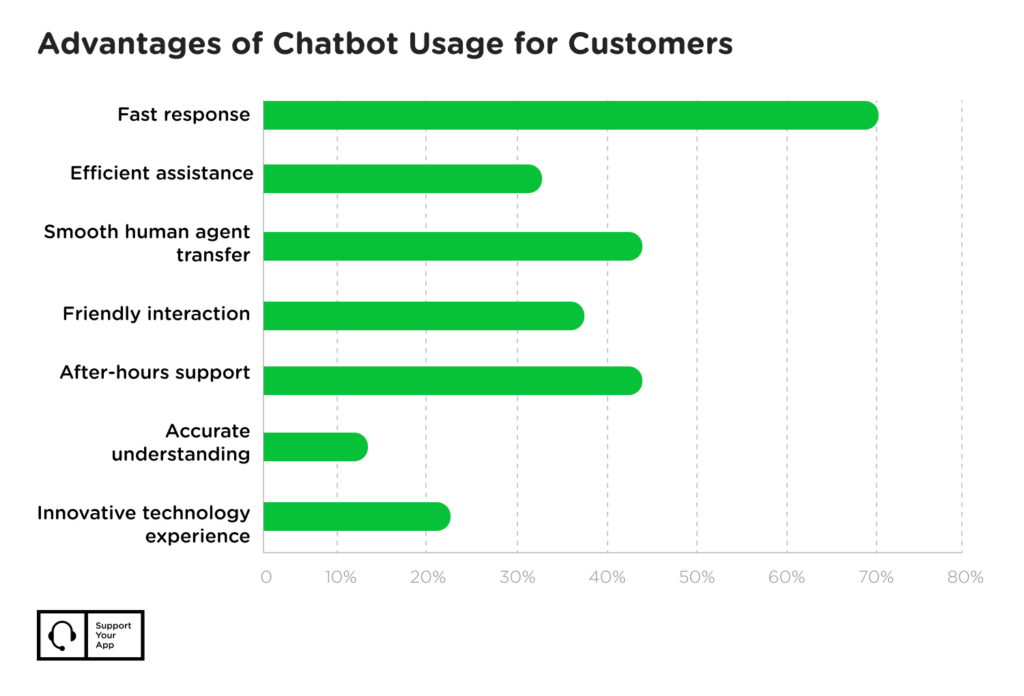
Most companies deploy AI chatbots as the first point of contact on websites, apps, and messaging channels. They handle tier-one work like FAQs, password resets, order tracking, and bookings. Natural language processing lets them understand free-text questions. There's no rigid menu tree. Customers just type.
When a question goes beyond the bot, a person takes over with the full context attached. That handoff matters as much as the answers. Nobody likes repeating themselves. The strongest chatbot use cases in customer service share one trait, too. The answer already lives in a structured knowledge base the bot can search.
- Works best: High-volume, low-complexity questions where answers come from a well-kept knowledge base.
- Falls short: Nuanced problems, emotional situations, or issues that need a judgement call.
Implementation note: A custom chatbot that meets security standards and connects to several tools takes months to get right. Plan for it. You need clean documentation and regular updates to its training content. People also need to review conversations to catch failures. Every extra integration raises the budget.
The payoff can be big. In this AI chatbot case study, SupportYourApp and CoSupport AI trained a chatbot on Cocoatech's Zendesk help centre and internal FAQ. Within two months, average resolution time fell from 8 hours 54 minutes to 5 minutes 12 seconds. Specialists kept the complex technical issues.

2. Live Agent Assistance
AI agent assistance is spreading fast. These tools work during live conversations. They suggest replies, surface relevant information, detect customer sentiment, and flag urgent issues. While an agent chats, the AI reads the conversation as it unfolds. It highlights similar past tickets. It flags a souring mood.
The technology shines for new agents still learning the product or facing unfamiliar edge cases. Beyond suggestions, AI assistants can help teams manage recurring work such as inbox management, follow-ups, summaries, and coordination. Senior agents lean on it less. They still save time on summaries.
SupportYourApp's SupportBrain works this way. It drafts, translates, and summarises replies inside the team's helpdesk. Agents review and send every message. Customers never talk to it directly.
The catch: Agent-assist only works if your knowledge base is current and well organised. Messy documentation produces messy suggestions. Agents quickly learn to ignore them. Fix your content before you roll these tools out. Otherwise you're paying for a second opinion that's often wrong.
3. Smart Routing and Priority Scoring
Smart routing uses AI to classify incoming tickets and send them to the right team or agent. Intent detection reads the request. Priority scoring then weighs urgency based on impact, customer value, and SLA terms. Forget first come, first served. AI routes each ticket by need, like this:
- Billing questions go to the finance team.
- Technical bugs go to the engineering queue.
- Urgent complaints go straight to escalation.
Smart routing is one of the least visible examples of AI in customer service. Customers still feel it. High-priority issues get attention right away instead of sitting behind routine questions. It works best with clear team divisions and defined escalation paths. Small teams gain less. So do subjective priority calls.
Cost consideration: Most modern helpdesk platforms include basic smart routing. Advanced AI routing often sits on higher-tier plans or paid add-ons. Custom builds cost more. The price rises with every system you connect and every business rule you add. Check what your current plan already covers first.
4. Generative AI for Response Drafting
Generative AI has moved customer support beyond fixed scripts. These models write original, context-aware answers on the spot. They don't pick from templates. Generative AI use cases in customer service include drafting personalised replies and summarising long threads. They also cover rewriting messages for tone and translating for international customers.
Here's how it works: An agent receives a complex question. The AI reads the conversation history, pulls relevant product information, and drafts a full reply. The agent checks it for accuracy. They adjust anything that's off. Then they hit send. Their time goes into judgement instead of typing.
- Works best: Routine explanations where the facts are clear but the phrasing changes from customer to customer.
- Falls short: Policy exceptions, sensitive situations, or questions that need company-specific judgement.
Important limitation: Generative AI will confidently produce wrong answers when its sources are incomplete or outdated. That's why the strongest generative AI customer service examples keep a person between the draft and the customer. Some teams add a trusted AI detector to their QA workflow. Budget for review.
5. AI-Powered Self-Service Systems
AI-powered help centres let customers find answers by typing a question instead of browsing categories. The system searches the knowledge base and presents the relevant content conversationally. Phrasing doesn't matter much. "Where's my order?" and "Track my shipment" both return the same article about order status. That's intent detection working.
Self-service gets stronger when the AI and the help centre improve together. SupportYourApp configured Intercom's Fin AI agent for FitXR's email support, as this AI support case study shows. The team then reviewed and expanded the snippets and articles Fin relied on. Accuracy followed.
The result was 76% of email conversations automated and 40% faster first responses. CSAT held steady. During peak season, a seasonal agent covered evenings and weekends. Customers who needed a person still got one. FitXR handled twice its usual ticket volume without the quality dropping.
- Works best: Comprehensive documentation and customers asking predictable questions.
- Falls short: Thin documentation, highly specific questions, or customers who need empathy more than information.
Setup requirement: AI search needs a solid library of well-written knowledge base articles before it delivers value. A thin help centre gives it nothing to surface. Audit what you have first. Fill the gaps, and retire anything outdated before you switch AI search on for customers.
6. Voice AI and Phone Automation
Voice AI brings chatbot-style automation to the phone. Instead of "press 1 for billing" menus, customers describe the problem in plain language. The AI understands and replies naturally. It completes common requests, too. It covers the phone line around the clock and in several languages. Transactional requests suit it best.
Here's a voice AI use case from our own work. SupportYourApp built a voice AI agent that gives Softorino 24/7 phone support and takes routine calls off its human team. First replies got 95% faster. Resolution time fell by 70%, and CSAT climbed from 3.5 to 5.0.
After-hours calls are another strong fit. For a multi-practice law firm, SupportYourApp built a multilingual AI voice agent to catch requests that arrived after closing. Average call pickup time fell to 1 second. No request goes unlogged. The three-person team stayed the same.
Deployment check: An AI voice agent needs call flow design, voice training on your product terms, and backend integrations. It also needs plenty of testing before live calls. SupportYourApp's SupportVoice handles inbound and outbound calls 24/7 in 30+ languages. Complex cases still go to a person.

7. Personalization and Churn Prediction
Predictive AI studies customer behaviour to spot churn risks, recommend personalised actions, and trigger proactive outreach. Machine learning models pick up the patterns that tend to come before a cancellation or a support request. The goal is simple. Reach customers first, before frustration sets in and they start looking elsewhere.
AI use cases in contact centers here include flagging customers likely to churn and forecasting ticket volume for staffing. Others tailor product recommendations to purchase history or send alerts about shipping delays. Support turns proactive. Teams step in early with a fix or a helpful nudge instead of waiting for a complaint.
Data requirement: Predictive models need a long history of customer data before their insights hold up. Newer companies, or those with patchy records, should start elsewhere. They can come back to prediction once enough history builds up. Until then, the model mostly guesses. That's not worth paying for.
8. Autonomous AI Agents for eCommerce Orders
An autonomous AI agent goes further than a chatbot. It connects to order data and the product catalogue, follows custom flows, and resolves requests end to end. This matters most in eCommerce. The same order questions repeat all day. The key design choice is deciding what the agent must never touch.
Take the AI agent case study we ran for Wall Art Brand, which sells made-to-order metal car art. SupportYourApp built a custom AI agent in Gorgias that walks shoppers through requirements, manufacturing details, delivery timelines, and costs. It also reads the Shopify catalogue. Describe a car model, and it finds the match.
Returns and replacements stay human. The brand's warehouse system isn't connected to Gorgias or Shopify, so those requests go straight to an agent. One month after going live, the AI agent resolved 30% of customer questions on its own. Resolution time on those tickets was 429% faster.
Welcome to Bob, a refillable body wash brand, took a similar route. Its three co-founders were answering every email themselves. SupportYourApp set up a Gorgias AI agent with a custom tone of voice. The team sorted their content into macros, help articles, and internal guidance first.
First replies got 99.7% faster. Now 81% of email tickets skip the founders. Both are useful AI customer experience examples for online stores, since shoppers get instant, on-brand answers while people keep the risky requests. SupportYourApp's own SupportResponse agent follows the same model in our eCommerce customer support work.
- Works best: High volumes of repeat order questions, backed by a clean catalogue and clear rules.
- Falls short: Requests that depend on systems the agent can't reach, like an unconnected warehouse.
What Most Companies Get Wrong About AI in Customer Service
Most companies treat AI as a technology project. They pick tools, set up integrations, and wait for results. That's backwards. The teams succeeding with AI in customer support know it's only as good as the systems around it. Your knowledge base and quality standards decide the outcome. So do your processes.
Here's what high performers do differently:
- They clean their documentation first. Before launch, they audit every help article, update anything outdated, and fill the gaps. AI trained on messy content gives messy answers.
- They start small and measure everything. They pick one use case, launch it, and learn from the data before expanding. Mailcheck took this route ahead of a promo campaign, when SupportYourApp launched one human agent plus one AI solution in 7 days. The AI now resolves 81% of routine requests without a person and replies in 3 seconds.
- They keep humans in the loop. Every AI conversation has an easy path to a person, and every AI decision can be overridden.
- They train agents to work with AI. The best agents know when to trust a suggestion and when to override it. They also feed corrections back into the system.
- They measure customer outcomes, too. Resolution time and cost per ticket matter. So do CSAT, first-contact resolution, and sentiment. AI that makes support faster but more frustrating has failed.
The pattern is clear. AI amplifies whatever support operation you already have. Strong documentation and processes get stronger. Weak ones get exposed, and faster than before. That's why the best examples of AI in customer service start with the unglamorous fixes. Automation comes after, one careful step at a time, measured against what your customers feel.










