




If your queue keeps growing and your agents spend every shift putting out fires, you're probably weighing proactive vs reactive customer support. This guide is for founders and support leads at growing tech companies. It explains how each approach works and how to mix them. The goal is simple. Customers get help before things break and fast answers after.
Key takeaways
- Reactive support answers customers when they reach out, and it's still where most tricky, one-off problems get solved.
- Proactive support spots trouble early and speaks up first, which means fewer repeat tickets and calmer customers.
- Neither model wins on its own. The teams that do best treat them as two halves of the same support plan.
- The right mix depends on your data and on how predictable your customers' problems are, so it shifts as you grow.
Proactive vs Reactive Customer Support: What's the Difference?
One unresolved ticket can cost you a customer. Zendesk's CX Trends 2026 research found that 85% of CX leaders say customers will drop a brand that can't resolve an issue on first contact. Reactive support carries that weight. The proactive side works on a different problem entirely: the contacts that never needed to happen.
Put simply, one model waits for the customer to speak first. The other speaks first. Most companies run both without naming them, and the mix shapes how much customer service impacts the customer experience. So the useful question is balance, not choice. The table below sums up the main differences at a glance.
What Is Reactive Customer Service?
It's the help customers get after they contact you. Someone can't log in or a payment fails, and they reach out through chat, email, phone, or social media. Your team works out the cause and fixes it. Think of it as the fire brigade of your support setup. Speed is its strength. It only arrives after smoke.
Where reactive support shines:
- It handles urgent, one-off requests the moment they land.
- It stays flexible when something unpredictable happens.
- It keeps your team in direct contact with customers, so you hear about new problems first.
- It gives customers a person to talk to when they need one.
Where it falls short:
- It rarely fixes the root cause, so the same questions keep coming back.
- Resolution times stretch out when ticket volume spikes.
What Is Proactive Customer Service?
This approach tries to solve problems before customers run into them. Your team studies ticket data and customer feedback, then acts on the patterns it finds. That might mean an outage alert or a help article for the question everyone asks. Customers get answers without waiting in a queue. Nobody has to chase you.
What proactive support does well:
- It cuts the number of repetitive tickets reaching your agents.
- It helps with customer retention, since fewer customers hit a wall and leave.
- It shows customers you're paying attention to their experience.
- It builds trust, because bad news arrives from you rather than from a failed login.
Where it gets harder:
- It needs good data and regular updates to stay useful.
- It takes upfront work and budget, for example when you build a chatbot or a knowledge base.
Proactive Customer Service Examples (and Reactive Ones Too)
Definitions only go so far. Here's how each approach looks on an ordinary working day, across the channels and tools most teams already use. The reactive examples come first, since that's where almost every support team starts. Proactive habits usually get added later, once the team knows which questions keep repeating.
Reactive Support in Action
- Live chat. A customer can't log in and can't finish a purchase. They open live chat support, an agent resets the password, and the team checks for a wider system fault.
- Phone support. A buyer receives a faulty product and calls in. The agent arranges a replacement and starts the return during the same call.
- Chatbots. A customer types "cancel my subscription," and a bot walks them through the steps. It reacts to keywords, so it only helps once someone asks.
- Email support. A user spots a bug in the app and emails it in. They get a detailed reply with troubleshooting steps they can follow on their own.
Proactive Support in Action
- Knowledge base and FAQ. A customer wonders how a feature works and finds the answer in your help centre instead of opening a chat.
- Outage and bug alerts. Monitoring shows some servers misbehaving, so the company emails affected users before complaints arrive, with an estimate for the fix.
- Guided onboarding. New users get an interactive, step-by-step setup tour, so fewer of them get stuck in their first week.
- Personal recommendations. Customers see product or feature suggestions based on their past behaviour and search history.
- Feedback requests. After a support chat, customers get a short survey, and the team uses the answers to find weak spots.
Look closely and you'll see the two feed each other. Reactive tickets show you where customers get stuck. That tells you which proactive fixes to build next, and every fix frees agents for the harder cases. It's a loop. Each side makes the other cheaper and easier to run, month after month.

Proactive vs Reactive Support: When to Use Each
You'll get the most from both approaches once you know where each one fits. Predicting every issue isn't possible, even for teams with great data. So the mix depends on your product and your customers. Your industry and past ticket history are the best guides you've got. Start there.
Reactive and Proactive Support Side by Side
| Factor | Reactive support | Proactive support |
| Who starts the contact | The customer | Your team |
| Main goal | Fix the issue in front of you | Stop the issue from happening |
| Typical tools | Live chat, phone, email, ticketing | Alerts, knowledge base, onboarding, AI agents |
| Best for | Urgent, one-off, or complex cases | Recurring, predictable problems |
| Cost profile | Grows with ticket volume | Upfront work on data and content |
| Main risk | The same questions keep coming back | Fixes go stale without regular updates |
| Metrics to watch | First response time, resolution time, CSAT | Repeat contact rate, self-service usage, churn |
When Reactive Support Makes Sense
Reactive support works best when customers need a person and a fix right now. However much you invest in prevention, some problems will still slip through. Your agents will handle those, and that's completely fine. It's part of the job. Here's where the reactive model earns its place in your setup.
- One-off problems. Some issues can't be predicted, like a sudden bug or a delayed order. Customers want these fixed quickly, and they want a human doing it.
- Complex, personal cases. Some questions need empathy and product knowledge, not a help article. This applies across every channel, from technical support to the phone line.
- Smaller budgets. A fully proactive setup needs automation tools and people to run them. On-demand customer service lets smaller companies add capacity for a promotion or seasonal peak without full-time hires.
- Sales opportunities. While fixing an issue, an agent might notice the customer's plan lacks a feature that would solve the problem. That's a natural moment to suggest an upgrade.
When Proactive Support Pays Off
Proactive customer support earns its keep when the same problems keep landing in your queue. Once you can see a pattern, you can design it out. Patterns are the trigger. It also helps when your team is stretched thin and needs room for harder work. These are the clearest signs it's worth the investment.
- Recurring issues. If customers keep hitting login trouble or payment failures, track the pattern and fix it at the source. That could be a help article or an AI agent.
- Overloaded agents. Knowledge bases and automated replies take repetitive questions off your team's plate, so agents can spend time on problems that need a person.
- Long-term loyalty. When you warn customers about a delay before it hits them, they notice. Over time, that habit turns first-time buyers into repeat customers.
Finding the Right Balance
A one-size-fits-all model rarely works here. Most companies blend reactive vs proactive support and adjust the mix as the product changes. Humans stay central either way. In a 2025 Gartner poll, 95% of customer service leaders said they plan to keep human agents while they define AI's role.
Start with your current satisfaction scores and ticket data. If one issue keeps showing up, build a proactive fix for it. If things run smoothly, keep what works. Let the data decide. Some teams can't cover both sides alone. That's where outsourcing helps. A partner can build a mixed setup, whether that's outsourced technical support or call center coverage.
How to Build a Proactive Service Strategy
Gartner expects successful service teams to move from handling requests to planning experiences ahead of time by 2028. It won't happen by accident. You need sharper habits on the reactive side and a clear plan for prevention, so your customer service level holds up as you grow.
Tips for Better Reactive Support
- Train your agents regularly. Mix product training with soft skills, and base coaching on the gaps you see in tickets and QA reviews.
- Meet customers on their channels. Offer email, phone, live chat, and social media, so people can reach you where they're comfortable.
- Keep context attached to every ticket. The same Zendesk research found that 74% of customers get frustrated when they have to repeat information. A unified inbox like SupportCRM keeps email, voice, and chat history in one agent workspace.
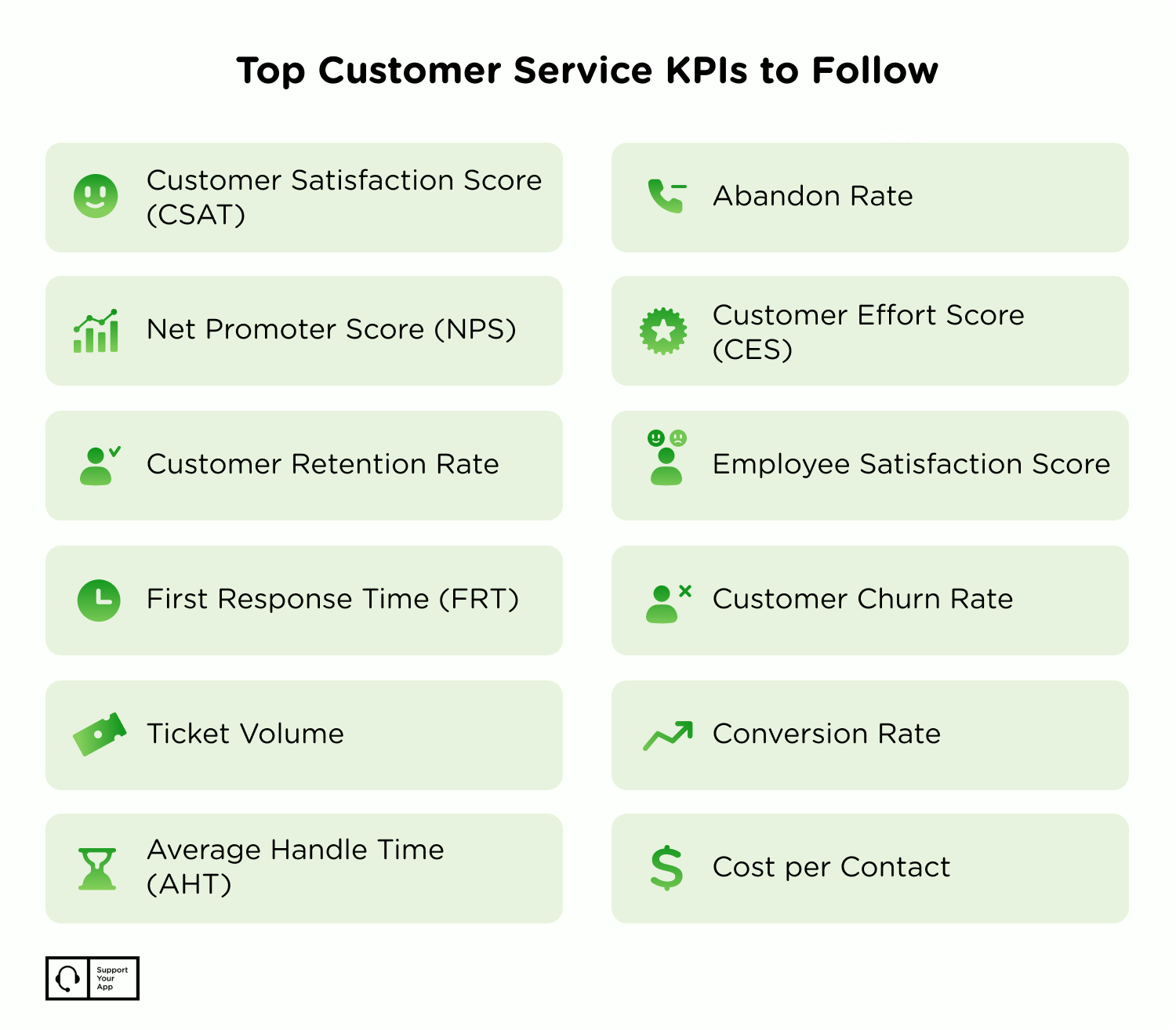
- Set clear KPIs. Track first response time, first contact resolution, resolution time, and CSAT, then review them often. The chart below lists more KPIs worth watching.
- Build a feedback culture. Encourage agents to share what's slowing them down. Teams that speak up fix problems faster, and customers feel the difference.
Proactive Customer Service Strategies That Work
- Make prevention part of the culture. Plenty of teams still work on the principle that if nobody complains, it's fine. Put prevention into your team values and celebrate people who catch problems early.
- Let data set priorities. Pull patterns from support conversations and customer feedback, then change things gradually and measure the effect.
- Build self-service. A knowledge base and guided onboarding cut the questions customers need to ask later.
- Automate the routine. An AI agent like SupportResponse resolves repetitive tickets on its own, around the clock, and hands complex cases to a person.
- Keep improving. Customer expectations shift every year, so review what's working each quarter and adjust.
Mailcheck shows what proactive vs reactive customer support looks like when the balance is right. The email verification platform had a promo campaign days away and expected a sharp spike in sign-ups. Hiring wasn't an option. So SupportYourApp paired one human agent with SupportResponse and launched the whole setup in seven days, before the traffic arrived.
The AI agent learned from Mailcheck's knowledge base, FAQs, and past resolved tickets, while sensitive cases went straight to the human agent. The setup paid off quickly. According to the Mailcheck case study, 81% of routine requests were resolved without human intervention, and resolutions got 51% faster across the board.
Before you commit to either model, check your budget and staffing honestly. Some teams have the people and tools to run both in-house. Many don't, and that's normal. If managing everything internally feels like too much, outsourcing customer service to an experienced partner can fill the gaps without a long hiring cycle.

Summary
Neither approach is better on its own. Both models matter. The best version of proactive vs reactive customer support predicts what it can and responds fast to everything else. Start small. Find the questions that keep coming back and fix those at the source. Then give your agents the training and context they need to handle the rest well.