


Your queue grows every Monday, and leadership keeps asking what AI can take off the team's plate. This guide is for support leaders at SaaS and eCommerce companies deciding where generative AI for customer service fits. It covers what the technology does, where it pays off, and where it still needs a human.
TL;DR
- Generative AI writes answers from your own content instead of picking from scripts, so it copes with questions nobody planned for.
- The biggest wins come from routine tickets and agent assist, not from replacing the whole team.
- Companies that pulled humans out completely learned the hard way that quality drops.
- Proving ROI starts with a baseline you measure before launch.
AI already handles about 30% of service cases, according to Salesforce's State of Service research. Service teams expect that share to reach 50% by 2027. That leaves every support leader with a practical decision about which tickets go to AI and which stay with people. The split decides your CSAT.
What Is Generative AI in Customer Service?
Generative AI in customer service is software that writes new replies from your own content instead of picking prewritten scripts. It runs on large language models trained on huge amounts of text. You connect it to your help center and ticket history. The replies it produces read like something a person wrote, with natural phrasing and a conversational flow that doesn’t feel stitched together from templates.
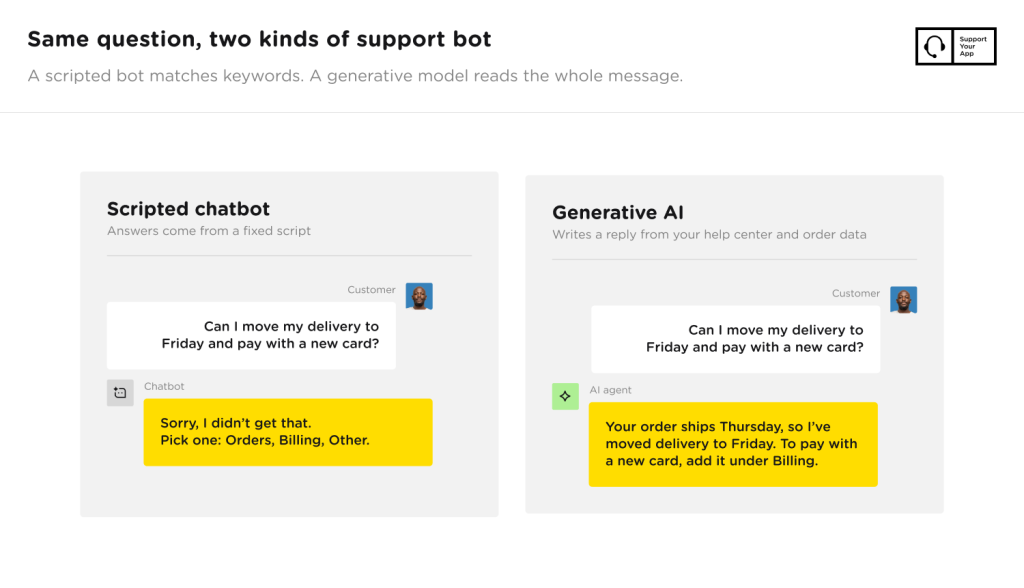
Older chatbots work by following fixed scripts, so they tend to fall apart once a conversation moves beyond those paths. Someone writes every answer in advance and links it to a keyword or button. Any off-script question gets a "Sorry, I didn't get that" reply. A generative model reads the whole message and writes a fresh reply, though it can hallucinate: produce an answer that sounds confident, but it’s wrong or made up.
Predictive AI is a different tool that sorts and routes tickets but never writes a word. Gen AI customer service tools produce the reply text itself. That's why generative models now sit inside most AI customer service chatbots and agent tools, and why they need human review.
Benefits of Generative AI in Customer Service
Generative AI makes support faster and cheaper and lets a small team cover more hours. Agents also get time back for the work that needs a person. Teams usually notice the speed first and the savings a few months later.
Customers no longer wait in a queue for a first response, because replies start within a few seconds of a ticket coming in. A generative model reads the ticket and drafts an answer before an agent opens it. Customers asking about delivery dates or password resets get help right away. Complex tickets still go to people, but they arrive with a draft reply and the relevant help articles already attached.
The model can pull order history and past conversations into each reply. A customer on a free trial hears about onboarding, while a long-time subscriber gets a fix that matches their setup. Writing replies at that level of detail by hand was too slow at volume. Because of that, each answer now fits the person asking, reflecting their account and situation instead of reading like a generic response sent to everyone.
Agents end up with several hours back in their week, which they can spend on the conversations that need more attention. Salesforce found that reps using AI spend 20% less time on routine cases. That frees up about four hours a week for escalations and unhappy customers. Thread summaries add to the savings, because agents no longer read ten messages before they can write a single reply.
Cost per ticket is the benefit finance teams ask about first. When AI resolves order tracking alone, you need fewer agent hours for the same volume. A queue full of billing disputes saves less than one full of "where's my order" messages. Check your ticket mix before counting on the benefits of generative AI in customer service.
An AI agent answers chats and emails overnight and on weekends without night-shift pay. Customers in other time zones get answers in minutes instead of waiting for Monday. Anything the AI can't resolve waits with a summary, so the morning shift starts with context instead of a backlog. Coverage runs around the clock.
Languages stop needing separate teams. Generative models translate incoming messages and write replies in the customer's language. Quality varies by language, so check it before you rely on it. Have native speakers spot-check a sample of replies in your top markets before you switch off human review there completely.
Generative AI Use Cases in Customer Service
The most common use cases are:
- Reply drafting
- Ticket summaries
- Translation
- Sentiment analysis
- Knowledge base writing
- Quality checks
- Agent assist
- Self-service
Most teams start with one or two and add more once they trust the output. Internal uses carry less risk.
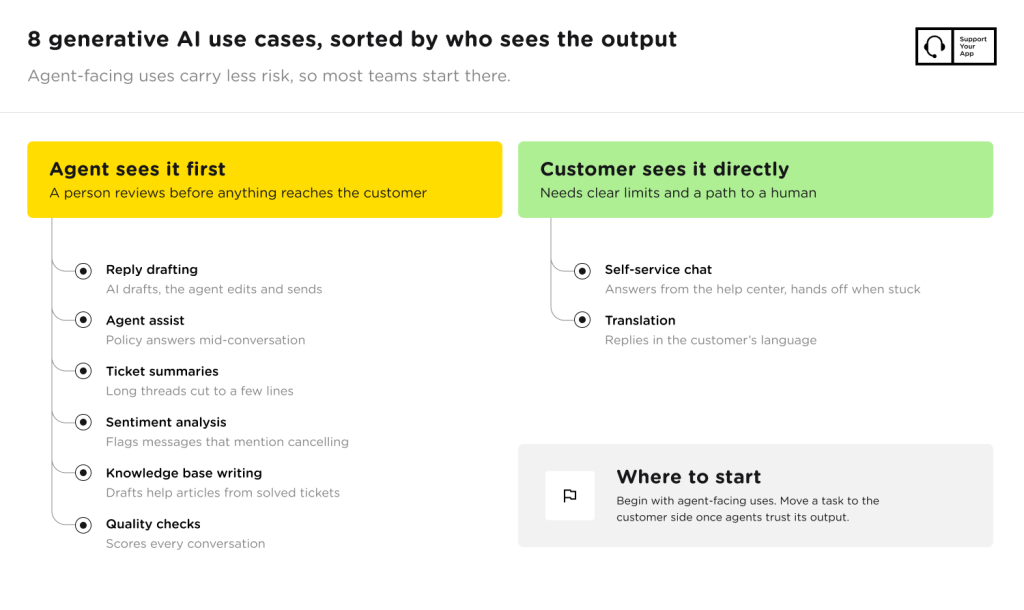
Reply drafting and agent assist come first for most teams. The AI writes a draft from the knowledge base, and the agent edits and sends it. Agents can also ask the assistant a policy question mid-conversation and get the answer back in seconds, without leaving the ticket. New hires ramp up faster.
Summaries save reading time. A customer who writes five times about the same refund leaves a long trail. The AI turns that trail into a few lines covering what happened, what the team promised, and what's still open. Whoever picks up the ticket next starts from the summary.
Translation lets one team answer customers in many different languages. The AI translates the customer's message for the agent, then translates the reply back. Tone and idioms still trip it up, especially in legal or medical topics. In high-stakes markets, keep native-speaking agents in the conversation from the start.
Sentiment analysis spots churn risk. The model reads tone across chats and emails and flags messages that mention cancelling. Supervisors can move those tickets to experienced agents before the customer walks away. Across thousands of tickets, sentiment trends also show which recent product changes or policy updates upset customers the most, and why.
Solved tickets become help articles. The AI spots questions that keep coming back and drafts an article from the best answers. A support lead checks the facts before anything goes live. Over a few months, the help center fills the gaps customers kept hitting, and fewer of those questions reach the queue.
QA moves to full coverage. Instead of a lead reviewing a handful of tickets a week, AI scores every conversation against your own QA checklist. Leads then spend review time on the conversations that scored lowest. Coaching gets more specific because it draws on every ticket.
Self-service chat answers customers before they ever reach the queue. A generative chatbot reads the help center and hands off to a human when stuck. For more generative AI use cases in customer service with results attached, see these examples of AI in customer service.
Generative AI Customer Service Examples
The strongest results come from companies that gave AI the repetitive work and kept humans on the complex and sensitive cases. Three of these four come from SupportYourApp client projects, and one is a warning. The tools differ each time.
Cocoatech, maker of the Path Finder file manager for macOS, had a two-person team when a partnership sent tickets up fast. SupportYourApp and CoSupport AI trained an AI chatbot on its Zendesk help articles. The bot answers simple chats, and complex ones still go to Cocoatech's team. Read the Cocoatech case study.
81% of Cocoatech's chat volume goes to the AI agent, and average resolution time fell from 8+ hours to 5 minutes.
FitXR, a VR fitness platform, had one agent on weekday hours, so customers waited overnight and Monday mornings started with a backlog. SupportYourApp set up Intercom's Fin AI agent and built automated flows for cancellations and password resets. Fin now answers chat and email in 46 languages around the clock. See the FitXR case study.
76% of FitXR's support tasks now run on automation, while human agents keep the cases AI can't solve.
Welcome to Bob, a UK body wash startup, had its three co-founders answering every support email. SupportYourApp set up a Gorgias AI agent that writes emails in their tone, and the co-founders kept the escalations for themselves. This generative AI customer service case study walks through the first week.
99.7% faster response time for Welcome to Bob, with no extra support hires.
Klarna shows the other side. The fintech moved most of its chat support to an AI assistant to cut costs. In May 2025, its CEO told Bloomberg the cost-first push had lowered quality and that Klarna was hiring human agents again. In all of these generative AI customer service examples, a person stays within reach.
Generative AI Customer Service Automation
Generative AI automates support workflows by reading each request, deciding what it is, and then resolving it or routing it with context. Most setups start with triage and resolution, then add voice. Each stage of customer service generative AI needs clear limits.
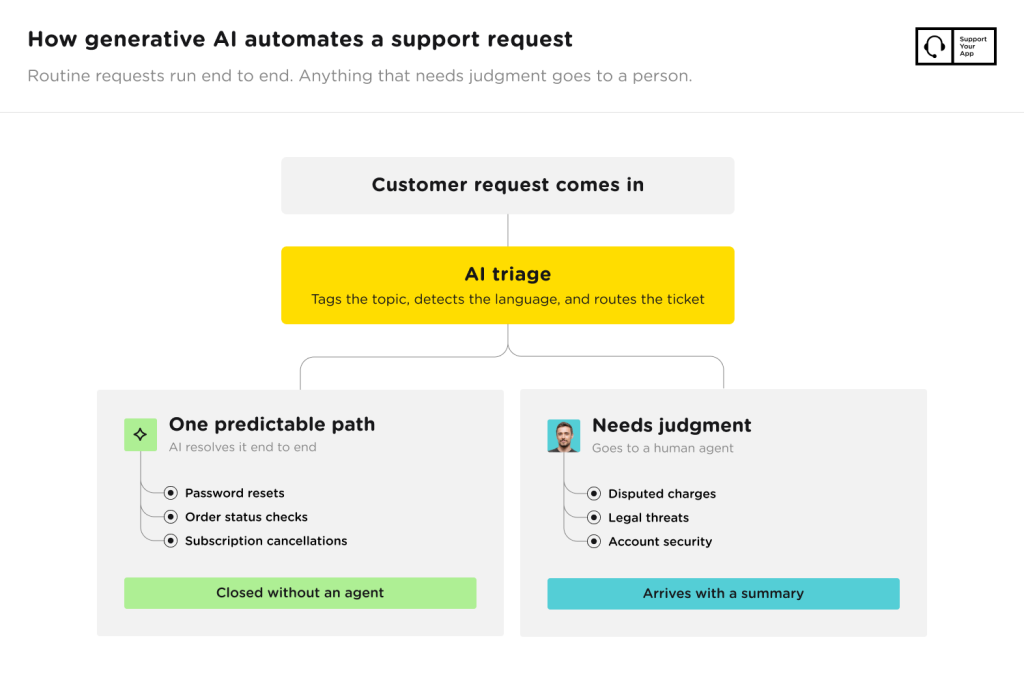
Triage runs before anyone looks. The AI tags the topic, detects the language, and routes each ticket to the right queue. A bug report reaches tier 2 with the device details already pulled out of the message. Agents stop spending the first minute of every ticket working out what it's about and who on the team should own it.
Password resets, order status checks, and subscription cancellations follow one predictable path. Generative AI customer service automation can run these end to end once it connects to your help desk and account data. Anything that needs judgment, like a disputed charge, still goes to a person. Refund exceptions stay human.
An AI voice agent like SupportVoice answers inbound calls, routes them by intent, and looks up account data while the caller waits. Complex or emotional calls still go to a human agent. Teams that want to call customers first, rather than wait for them, can add an outbound AI voice agent too.
Set limits before launch. Decide which topics the AI may answer alone and which always need a human, such as legal threats or account security. Review a sample of automated conversations every week for the first few months. That review catches wrong answers before they turn into a pattern.
Measuring ROI of Generative AI in Customer Service
Measure ROI by comparing cost per resolved ticket, handle time, resolution rate, and customer satisfaction before and after the AI goes live. Without a baseline, every number after launch is a guess. Vendor dashboards show resolutions, but they leave out your setup and review costs.
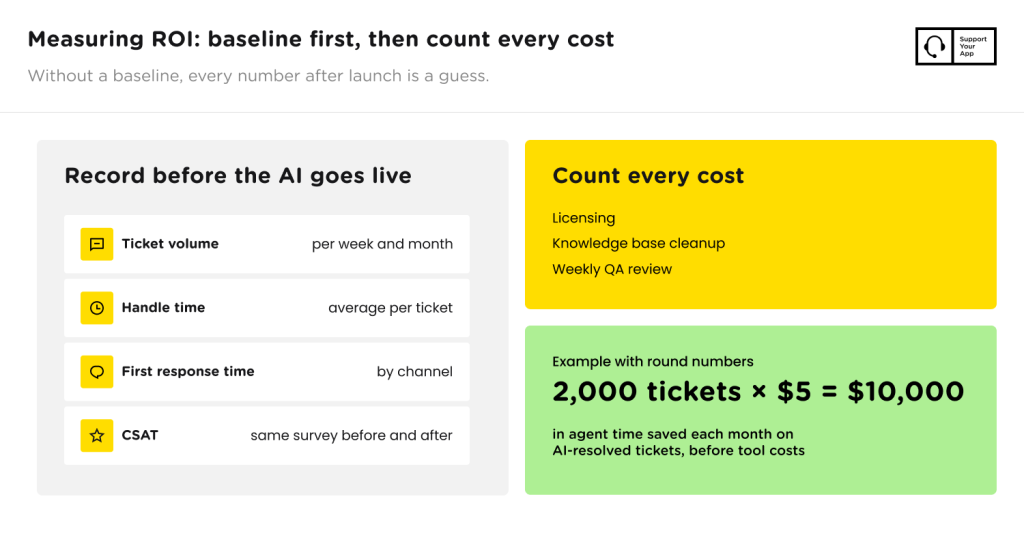
The simplest method for measuring ROI generative AI customer service teams can defend in a budget meeting starts with that baseline. Record ticket volume, handle time, first response time, and CSAT before the AI goes live. Then track the same numbers every month and compare like for like. Seasonal spikes skew results.
Count every cost. Licensing is the obvious one, but knowledge base cleanup and weekly QA review add up too. Some tools charge per resolution, others per seat or per minute. With round numbers, 2,000 AI-resolved tickets at $5 of saved agent time each come to $10,000 a month before tool costs.
Gartner predicts agentic AI will resolve 80% of common customer service issues on its own by 2029, cutting operational costs by 30%. That forecast covers common issues across many companies, not your specific queue. Prove the result on one queue before you expand to others. Give the pilot a quarter.
How SupportYourApp Uses Generative AI in Customer Service
SupportYourApp uses generative AI through its Support Intelligence Hub, which pairs AI products with human support teams working in 120+ languages. Each AI product either escalates complex cases or needs human approval. The AI customer service solutions in the Hub split each task by how much review it needs.
SupportResponse handles routine volume. This AI customer service agent answers customers on live chat, email, and messengers like WhatsApp, 24/7 and in 120+ languages. It works from your knowledge base, triggers custom flows, and escalates complex cases to a human. SupportResponse delivers 80% autonomous resolution, with the rest going to people.
SupportBrain works for the agent. It drafts, edits, and translates replies, pulls answers from the knowledge base, and summarizes long threads in three to five lines. An agent reviews and sends every reply, so nothing reaches customers unchecked. Support teams using SupportBrain see 60% lower average handling time.
SupportCRM isn't an AI agent but the workspace your team works in. It brings email, voice, and chat into one inbox, so agents see the full history whichever channel the customer used. With SupportCRM, nobody switches tabs to find the last message. SupportVoice also requires it.
Where to Start With Generative AI for Customer Service
Start with the tickets your team answers the same way every day, and keep people on anything that needs judgment. Pick one queue, measure a baseline, and review AI answers weekly. Expand to new queues once customers and agents both trust the output.
Running generative AI for customer service in-house takes setup time most teams don't have. SupportYourApp combines AI products with trained support teams, so you can test the hybrid model first. If you want a second opinion on where AI fits your queue, talk to an expert.