

Support teams outgrow Zendesk for different reasons. Sometimes it comes down to cost. Sometimes it's the gap between the support desk and the CRM the rest of the company already runs on. This guide walks through a Zendesk to HubSpot migration from planning to going live. It's built for teams ready to move, not teams still weighing whether to bother.
TL;DR
- Zendesk and HubSpot Service Hub structure data differently, so nothing moves over untouched.
- Triggers, macros, and SLA history need manual rebuilding once tickets land in HubSpot.
- A staged approach, test first, then full cutover, protects live conversations during the switch.
- SupportYourApp can migrate Zendesk to HubSpot end to end, for teams that want it handled by someone else.
Tool fragmentation is eating support team productivity. The average service agent toggles between four separate applications during a normal shift. According to Salesforce's 2026 Connectivity Benchmark Report, enterprises manage an average of 957 applications, but only 27% are integrated with one another, which means approximately 73% remain disconnected. A Zendesk to HubSpot migration is one direct way to close that gap. It pulls support data into the same system sales and marketing already run on, instead of leaving it stranded in a separate tool.
Why Companies Migrate from Zendesk to HubSpot Service Hub
The decision rarely starts with the support team alone. Sales and marketing are often on HubSpot already, and the support desk sits apart from it. Every ticket needs a separate login. Every rep gets a separate view of the same customer.
After deciding on a Zendesk to HubSpot migration, most companies want one customer record as the end result. Reps stop hunting across two tabs for one conversation history. Reports pull from one data set instead of two exports stitched together by hand. Even simple questions, like how many tickets a specific account opened last quarter, stop requiring a manual cross-reference.
Consumers feel this gap too. According to Zendesk’s CX Trends 2026 research, 81% of consumers want customer-service representatives to pick up where they left off, while 74% are frustrated when they have to repeat information. Split systems make that harder to deliver. It doesn't matter how good either tool is on its own if the data lives in two separate places.
| Factor | Zendesk | HubSpot Service Hub |
| Core strength | Purpose-built support desk, mature ticketing | Support tied directly to sales and marketing data |
| Customer view | Ticket history, separate from CRM | Full contact timeline: deals, emails, tickets |
| Automation | Triggers and macros, support-specific | Workflows shared across the whole HubSpot account |
| Pricing model | Per-agent, scales with support headcount | Often bundled with existing HubSpot hubs |
| Best fit | Large support-only teams needing deep ticketing depth | Teams that want support, sales, and marketing on one platform |
Neither tool is strictly better. A support-only operation with heavy ticket volume may still be better served staying on Zendesk. Teams that want one customer record across departments tend to be the ones who move.
Cost plays a role too, but rarely the deciding one. Companies already paying for HubSpot's marketing or sales hubs often find Service Hub cheaper to add than running Zendesk as a second, unconnected subscription. That math changes for large support-only teams, where Zendesk's per-agent pricing can still come out ahead once headcount climbs.
What Data Moves from Zendesk to HubSpot?
Most core objects transfer with the right mapping. Tickets, contacts, companies, and knowledge base articles all have a home on the other side. Custom fields need a one-to-one match built before any data moves. Reports and dashboards are the exception. HubSpot rebuilds these natively rather than importing them. A Zendesk Explore dashboard needs to be recreated by hand, once the underlying data has a home in HubSpot.
Here's roughly how the main objects line up during a Zendesk to HubSpot data migration:
| Zendesk Object | Maps to HubSpot | Notes |
| Tickets | Tickets (Service Hub) | Status, priority, and tags carry over with mapping |
| Users / Organizations | Contacts / Companies | Deduplication against existing HubSpot records needed |
| Custom fields | Ticket / contact properties | Each field needs a matching property built first |
| Help Center articles | Knowledge Base | Formatting and images usually need a manual pass |
| Macros | Snippets or workflow actions | Text carries over, the logic behind them does not |
Warning: imported tickets don't render in HubSpot's threaded conversation view the way native tickets do. Older messages often show as a flat log instead of a back-and-forth thread. Flag this to agents before going live, so nobody assumes something broke.
Known Limitations to Expect
A few things never move cleanly, no matter which tool or method handles the job. Knowing them ahead of time saves a support team from a surprise mid-project.
Triggers and automations top the list. Zendesk's trigger engine and HubSpot's workflow engine work on different logic, so a one-to-one copy isn't possible. Plan on rebuilding these rules from scratch, and use the move as a chance to retire any automations that nobody remembers building.
SLA policies fall in the same bucket. Historical SLA compliance data doesn't carry over in any useful form. New SLA rules get configured fresh inside Service Hub, and past performance stays in Zendesk as a static record if it's needed later.
CSAT survey history is similar. Old ratings can often be preserved as a static property for reporting, but the live survey mechanism itself becomes HubSpot's going forward. Side conversations and light-agent permissions also need a manual rebuild, since neither concept maps directly between the two platforms.
Agent roles and permissions are worth a second look too. Zendesk's role structure doesn't line up one-to-one with HubSpot's permission sets, so admins usually end up rebuilding access levels rather than copying them. It's a good excuse to tighten permissions that grew a little loose over the years, rather than a step to rush through.
Step-by-Step Migration Process
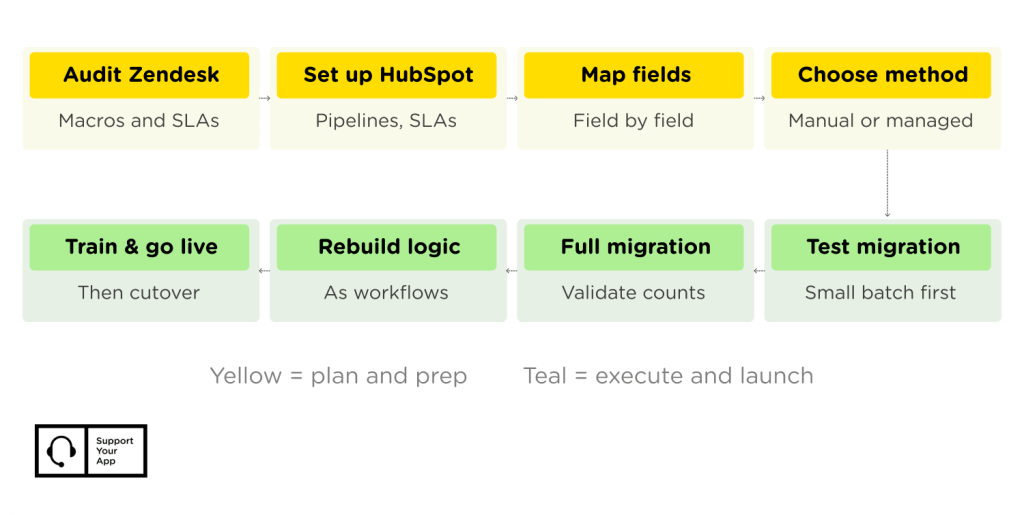
Trying to migrate Zendesk to HubSpot in one big jump rarely goes well. It tends to go smoother in stages, tested before they're final. Here's the order that holds up on real projects.
Step 1: Audit Zendesk
Start by inventorying every channel, SLA policy, automation, and macro (reusable ticket replies that agents apply manually) currently in use. Mature Zendesk accounts often carry years of overlapping triggers nobody has cleaned up. This audit decides what needs rebuilding, versus what can simply get retired instead.
Step 2: Configure HubSpot
Set up pipelines, ticket properties, and SLA rules in HubSpot before any data lands. Getting this scaffolding right first means imported data has somewhere sensible to go, instead of getting dumped into default fields. This is also the point to decide which HubSpot tier the team actually needs. Professional and higher unlock the SLA and pipeline features most support teams end up wanting.
Step 3: Map Data Fields
Build the field-by-field map between Zendesk and HubSpot. Every custom field needs a matching property, and every tag needs a decision: keep it, rename it, or drop it.
| Zendesk Field | HubSpot Property | Decision Needed |
| Ticket tags | Ticket properties or list | Consolidate duplicate or unused tags first |
| Priority | Priority property | Usually a direct match |
| Custom ticket fields | Custom ticket properties | Build the property before mapping the field |
| Organization fields | Company properties | Watch for duplicate company records |
Step 4: Choose a Migration Method
Smaller ticket volumes can move through a CSV export and import. Larger or more complex accounts usually need something sturdier. That means a dedicated migration tool, a direct API-based transfer, or a managed migration run by an outsourcing partner. Each method trades setup time against control over the final mapping.
Step 5: Test Migration
Run a small batch first, maybe a few hundred tickets, before committing to the full data set. Check formatting, attachments, and property mapping on this sample before moving forward.
Step 6: Full Migration and Validation
Once the test batch checks out, migrate the remaining tickets, contacts, and companies. Validate record counts against Zendesk to confirm nothing got dropped along the way. Spot-check a handful of older, more complex tickets specifically, since edge cases tend to surface there first.
Step 7: Rebuild Automations
Recreate triggers as HubSpot workflows, one at a time. This is also the moment to simplify: most Zendesk accounts have more automation than anyone really uses.
Step 8: Train and Go Live
Walk the team through the new ticket view, the new automation logic, and any known quirks, like the threaded-view issue mentioned earlier. Give agents a short overlap period where old Zendesk tickets stay visible in read-only mode, so nothing gets lost mid-transition. Go live once the team can navigate HubSpot without needing Zendesk open in a second tab.
How Long Does Zendesk to HubSpot Migration Take?
Timeline depends on ticket volume and how much custom logic exists in Zendesk. It also depends on whether the company keeps HubSpot CRM alongside Service Hub, or replaces more of the stack at once.
| Scenario | Typical Timeline |
| Small team, low customization, CSV migration | 2-3 weeks |
| Mid-size team, moderate automation, migration tool | 4-6 weeks |
| Large or complex account, full rebuild | 6-10 weeks |
Teams already using Freshdesk to Zendesk migration processes tend to move faster the second time. The audit and mapping habits carry over, even with a different destination platform.
How SupportYourApp Handles This Migration
SupportYourApp runs help desk migration services for teams that want the project handled without pulling internal staff off support duty. That includes the audit, field mapping, staged migration, and automation rebuild described above.
Teams still weighing HubSpot against other CRM destinations can compare notes with our HubSpot pros and cons breakdown. If Salesforce is still on the table, our Zendesk to Salesforce migration guide covers that path instead. For companies that want support delivery handled alongside the migration itself, our tech partners page covers how that combined setup works.
Ready to move off Zendesk? Talk to SupportYourApp about a managed HubSpot Service Hub migration built around your ticket volume and timeline.