

Mobile app customer support is the help users get inside and around your app when something breaks or doesn't make sense. This guide is for product and support leads at app companies who want fewer uninstalls and better ratings. It covers mobile channels, help desk tools worth comparing, best practices, and the metrics that show whether your support works.
Key Takeaways
- In-app chat and a solid knowledge base handle most user problems without forcing anyone to leave the app.
- The right help desk depends on your channels and how much of the routine work you want AI to take off your agents.
- Reply templates and proactive push notifications cut response times and stop small bugs from turning into angry reviews.
- Outsourcing gives you trained agents and round-the-clock coverage without the cost of hiring and training an in-house team.
Your users don't keep office hours. According to Zendesk's CX Trends 2026 research, 74% of consumers now expect service around the clock. A payment error at 2 a.m. needs an answer then, not after the morning standup. Users judge the customer service mobile apps provide by how fast they get unstuck, and a slow answer is an easy reason to uninstall.
What Is Mobile App Customer Service and Support?
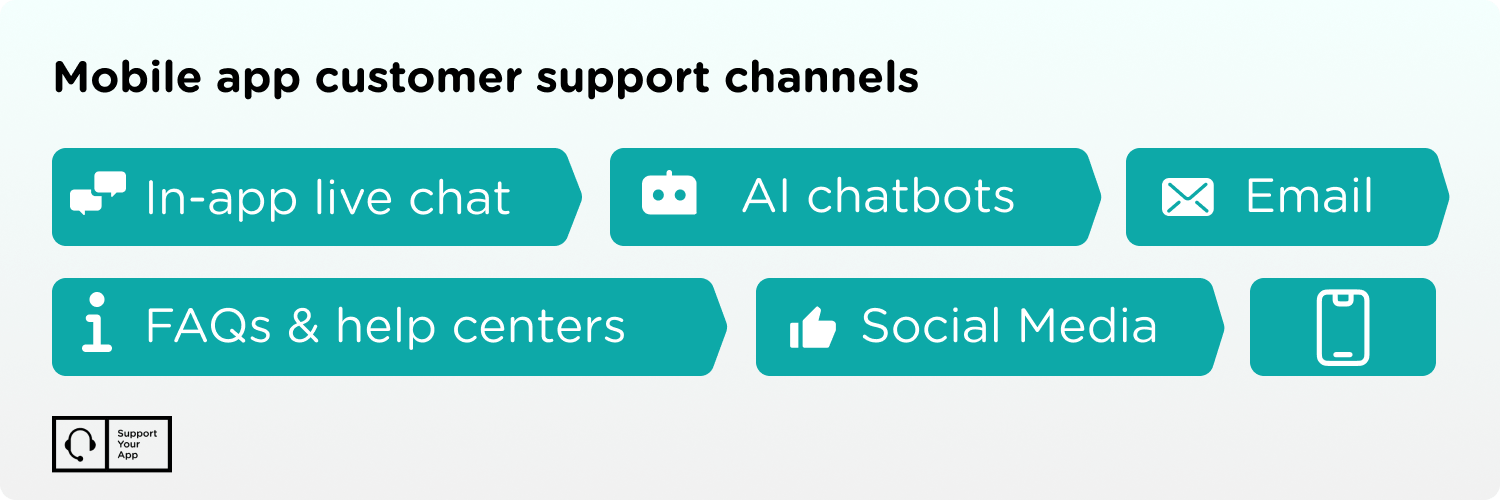
It's the assistance people get when they hit a problem or need guidance while using your app. That help can live inside the app as live chat, or outside it as an FAQ page, a help center, or email. Your channel mix depends on your resources, automation options, user preferences, and how personal you want each conversation to feel.
Mobile application support also covers the technical side: crashes after an update, sync errors, login loops, and billing issues tied to app store subscriptions. Many teams split this work into tiers. Frontline agents handle account questions, while specialists take the bugs that need logs or a developer's eye.
Benefits of Effective Mobile App Customer Service
Investing in support pays off in four places: happier users, lower costs, better retention, and a stronger brand reputation. Each one feeds the others, so a gain in one area tends to show up in the rest.
- Higher user satisfaction. When users find an answer fast or get timely, personal help, they're more likely to stay and open your app more often. Some will buy in-app content or subscribe. Good mobile customer service turns satisfied users into people who recommend your app to friends.
- Lower support costs. A balanced setup that pairs agents with self-service saves money. FAQs and knowledge bases often give the same answers your agents would, which cuts ticket volume and the number of agents you need.
- Better user retention. Fast, personal help is the baseline that stops users from leaving. A tailored follow-up with a few helpful tips makes them feel valued. That extra step turns a casual user into a loyal customer.
- Stronger brand reputation. Even an app that launches well can take a hit to its image if support falls short. Timely, personal help shows users that someone on the other end cares, and they mention it in reviews and ratings.
Mobile App Customer Support Tools and Software
The right platform helps you build stronger relationships and turn one-time users into long-term customers. We think it's best to meet users where they're already comfortable. In-app customer service works for most apps, but any channel pays off if it fits how your users behave. These platforms are worth a look for mobile support teams.
Zendesk
Zendesk is a well-known help desk with a simple, mobile-friendly interface. Its main plans cost $19 to $115 per agent per month on annual billing, and Enterprise pricing is quote-based. AI agents and automation take routine work off your team. The weak spot is Zendesk's own mobile app, which feels limited next to the desktop version. Our Zendesk review covers the details.
SupportCRM
SupportYourApp built their own CRM to improve omnichannel support.
SupportCRM pulls email, voice, and chat into one inbox. Agents stop switching between tools, and team leads assign tickets from a single workspace. For apps that support users over chat and phone, every conversation with a user stays in one history.
Fin (Formerly Intercom)
Intercom, which now operates under the Fin name, earned its reputation with an AI agent for conversational support that handles many chats at once. Seats cost $29 to $132 per month on annual billing, and the Fin AI agent adds $0.99 per resolution. Every plan covers the basics you need for mobile app assistance.
Our team can set up Fin and its AI-powered support around each client's needs, so every mobile user gets timely help. Fin also works alongside other help desks, so you don't have to migrate to use it. Read our Intercom review if you're thinking about trying it.
HelpCrunch
HelpCrunch is a popular choice for mobile customer support. Pricing starts at $12 per team member per month on the Basic plan, and the Unlimited plan costs $495 per month, both billed annually. Customizable chat widgets and proactive messages help you reach users at the right moment.
SupportYourApp has hands-on experience configuring HelpCrunch so clients get more out of their mobile support. Our HelpCrunch review explains how to use the platform well. Every plan also includes a knowledge base, which helps with self-service.
Helpshift
Helpshift is a mobile-first platform built around in-app messaging and AI automation. It pairs bots with human agents, so users get fast answers without losing the personal touch. Most plans are quote-based, so expect a sales call before you see a price. Our team has integrated Helpshift into client support systems to raise agent productivity.
Best Practices for Mobile App Customer Support
Strong mobile support comes from looking at the problem from several angles: the channel, the content, the speed, and what happens after a conversation ends. The practices below cover each of those, and most of them work for apps of any size.
Offer In-App Chat for Live Support
In-app chat is one of the most effective channels for mobile because users get help without leaving the app. Agents can see user history and app activity, so their answers fit the user's situation. AI chatbots and automated replies take care of common questions, which shortens wait times and keeps customers happier.
Create a Comprehensive FAQ Page and Knowledge Base
Self-service isn't the lazy option. Plenty of people would rather find the answer in an FAQ than wait for an agent. Problems start when the knowledge base is thin and the answer a user needs isn't there. Done well, step-by-step guides and video tutorials save your customers and your support team a lot of time.
Develop and Use Predefined Customer Response Templates
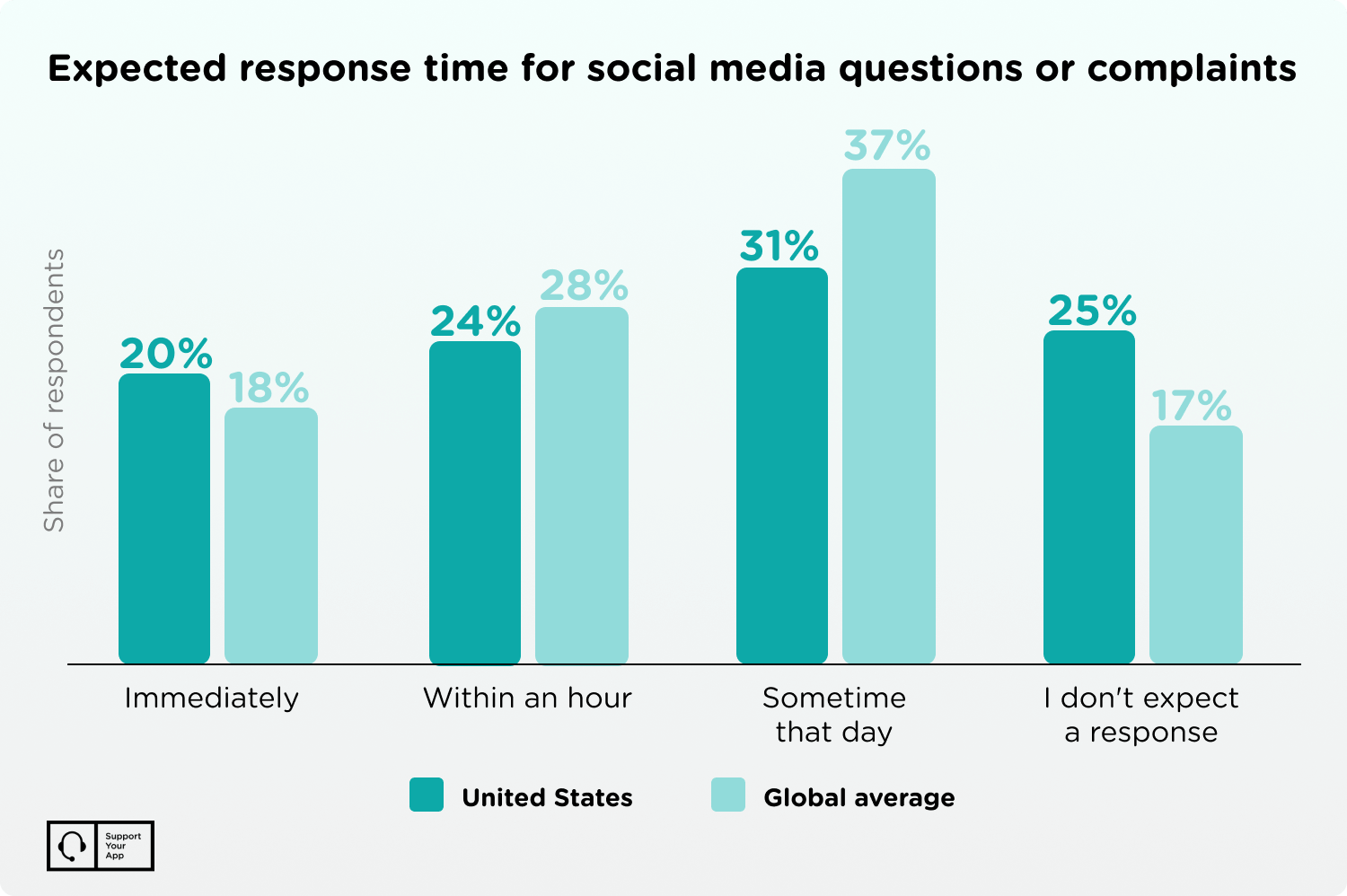
Speed is one of the first things users notice, and expectations run highest on social media, where many people want a reply the same day. Writing every answer from scratch slows your team down. Templates for repetitive questions cut response time and keep answers consistent across agents.
Pre-written templates for frequent issues, like password recovery or product status updates, save time and raise satisfaction. Agent-assist tools take this a step further by drafting replies from your knowledge base, which an agent then reviews and sends.
Follow Up on Customer Interactions via Mobile
Users notice when a business follows up after a review, positive or negative, because it shows you're open to a conversation. Follow-ups build trust and prove that agents care about the experience, not only the sale or the session count. At SupportYourApp, our team uses follow-ups to strengthen a good impression or turn a bad one around.
Gather and Act on User Feedback
Customer feedback is the most direct view you'll get of how your app and support perform. Reviews, comments, and app store ratings point to gaps that are easy to miss from the inside. Use that data to improve your support and fix the problems users keep running into.
Feedback keeps pointing to the same lesson, which is that people want a human within reach. In a 2025 Kinsta survey of U.S. consumers, 88.8% said companies should always offer a human option. Automation works best when users can reach an agent the moment a bot gets stuck.
Proactively Address Common Issues
Don't wait for users to report problems. Look for weak spots before they show up in reviews, and fix the root cause instead of patching symptoms. Once an update ships, send push notifications about new features, common fixes, or changes users should know about, so your audience stays informed.
Measuring Success
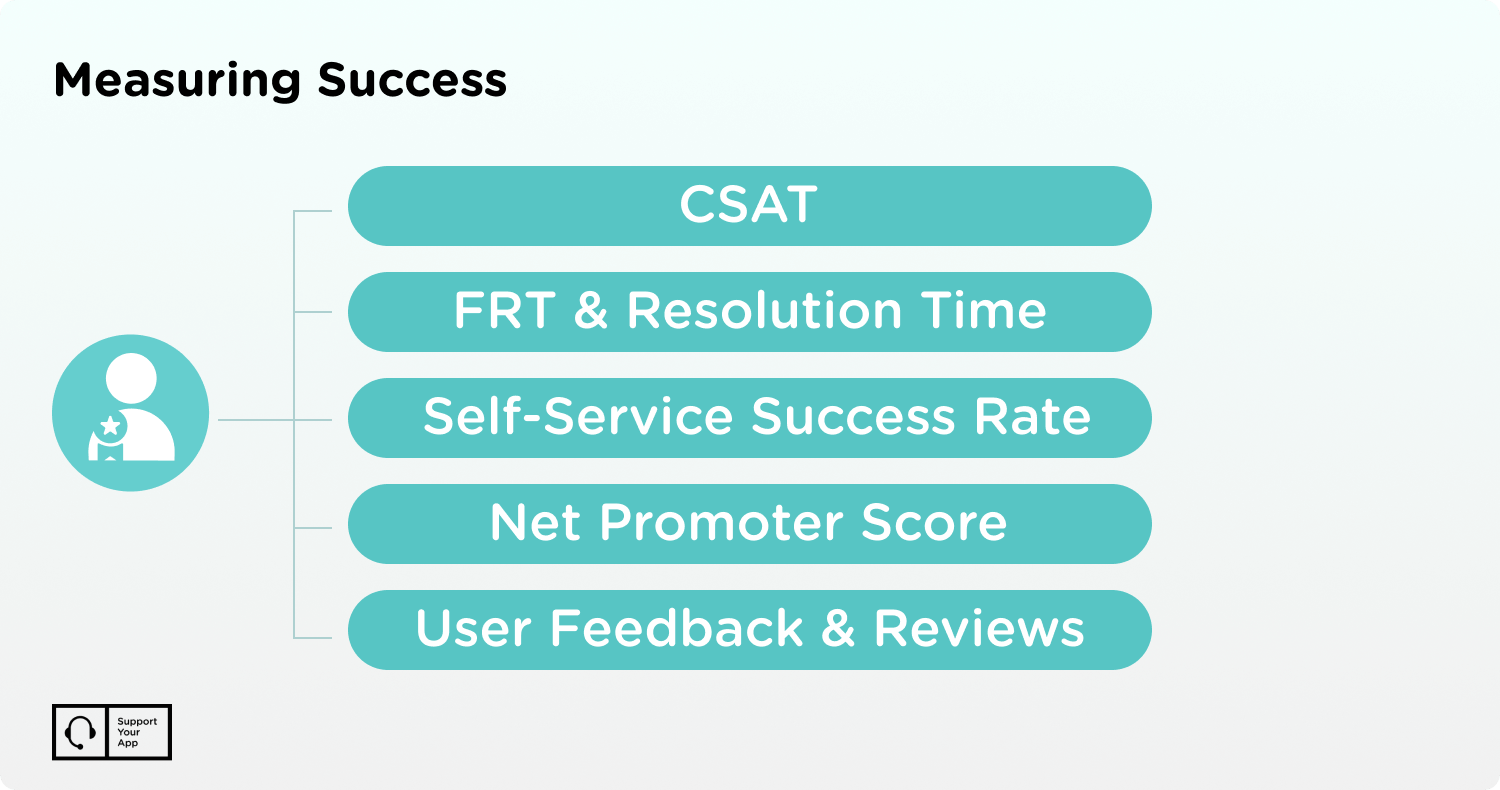
To keep satisfaction high and spot ways to cut costs, check your support performance on a regular schedule. Review the numbers at least monthly and after every major app release. These are the metrics worth tracking:
- CSAT. Customer Satisfaction Score (CSAT) is the standard satisfaction metric. Users rate their most recent interaction with an agent in a short survey, and a high score means they're happy with the help they got.
- First Response Time and Resolution Time. First Response Time (FRT) shows how quickly your team replies. Resolution Time (RT) shows how long it takes to close a user's issue.
- Self-Service Success Rate. This tracks how often users find answers in your FAQ or knowledge base without contacting support. It shows whether self-service works and which articles need fixing.
- Net Promoter Score. NPS asks users how likely they are to recommend your app to others. It reflects overall satisfaction with the app and the value users get from it.
- User Feedback and Reviews. Reviews show how users think and what bothers them most. Look for recurring themes, find the gaps in your service, and plan fixes quickly.
Outsourcing Mobile App Customer Support
Many companies still run support in-house, but outsourcing part or all of the team saves time and resources. Cost is the main reason companies look for outside help. Hiring support specialists is expensive, and they need ongoing training. Outsourced teams arrive trained, so you skip long hiring and onboarding cycles.
Outsourcing also gives you experienced agents from day one. SupportYourApp has supported tech companies since 2010, with 1,500+ supporters working 24/7 in 60+ languages. Our agents know industry standards and handle complex cases without the trial and error new in-house hires go through. We also offer flexible pricing built around your goals.
If mobile app customer support keeps pulling your developers away from the roadmap, an outside team can take that load off them. You keep control of the product decisions, and trained agents handle the tickets.
Summary
Users who get stuck in your app decide fast whether to stay. Solid mobile app customer support keeps them around and protects your ratings.
Help desk vendors like Zendesk and Fin keep adding features for mobile teams. Still, tools only pay off when you measure results and act on feedback. Technical support outsourcing is a good fit if you'd rather focus on the product without letting support quality slip.