
If your support partner keeps missing SLAs, struggles with seasonal peaks, or slips on data security, this guide is for you. Here's how to switch customer support providers without risk. Audit your current setup, set clear goals, and score every vendor on one scorecard. Then move volume over in phases. A pilot, a parallel run, and steady KPI checks keep your customers from feeling the change.
Key Takeaways
- Falling CSAT, missed SLAs, and slow scaling are signs to act, but the order of your next moves decides whether customers notice the change.
- Pick the new partner before you offboard the old one, and score every candidate against the same goals, KPIs, and security checks.
- A pilot and a parallel run expose problems while your old provider still covers the queue, so a bad week never reaches every customer.
- The switch isn't over at go-live. Weekly reviews and a later post-switch audit show whether the new partner delivers what it promised.
Customers notice a handover faster than most teams expect. In Zendesk's CX Trends 2026 research, 81% of consumers want agents to continue the conversation without backtracking. A rushed switch breaks that thread. Ticket history goes missing, and new agents ask customers to explain everything again.
Signs It's Time to Switch BPO Providers
Walking away from a support partner is a big call, so base it on patterns, not on one bad week. Watch for the red flags below, especially when two or three of them show up in the same quarter.
Falling Service Quality
Check your KPI reports and recent customer feedback first. Slower response times, inconsistent answers, and poor escalation handling are early warnings. Raise them with your provider and give the team a fair chance to fix them before you start looking elsewhere.
Typical KPI red flags include:
- Lower Customer Satisfaction (CSAT) and Net Promoter Score (NPS) results
- Lower First Contact Resolution (FCR)
- Higher call abandonment rates
- Average Handling Time (AHT) that keeps climbing without a clear reason
Missed SLA targets are another warning sign. Your customer service SLA defines the quality and response levels you pay for. When targets slip month after month, agents lack current product training, or CSAT stays below your goal, your investment stops paying back.
Scalability Problems
Your provider should grow with your business. If the team can't match your volume, your markets, or your hours, you'll feel it first in queue times and then in churn. Watch for these red flags:
- Queues that collapse during seasonal peaks
- Long onboarding times for new agents
- Missing language coverage when you enter a new region
Language gaps are often the hardest to close quickly, which is why multilingual customer support belongs on your requirements list from day one. Hours matter too. The same Zendesk research found that 74% of consumers now expect 24/7 service, so a provider that only covers business hours puts you behind.
If a seasonal peak is coming, start the switch three to six months ahead. That gives the new team time to learn your product and settle into a routine. They can fix early gaps before volume spikes.
Data Security Gaps
One breach can undo years of customer trust, and the damage lands on your brand, not your vendor's. Treat these as immediate switch triggers:
- Gaps in compliance with ISO 27001, PCI DSS, GDPR, or CCPA
- Poor or overdue audit results
- Weak data encryption or loose access controls
The same triggers apply when switching IT provider contracts for help desk or infrastructure work. Any partner that touches customer data should prove its compliance with current certificates, not a slide in a sales deck.
Communication Breakdowns
Strong collaboration matters as much as hitting KPIs. When communication breaks down, it usually points to deeper operational or relationship problems that will hurt results over time. Watch for these signs:
- Irregular updates: Reports arrive late or skip the numbers you need, so you can't see what's happening in your queue.
- Defensive replies: The vendor blames your tools or policies instead of proposing fixes.
- Ignored feedback: Issues raised in QBRs stay open after several rounds of discussion.
- Lost trust: You feel left out of decisions that affect your customers.
Slow Technology Adoption
A good BPO partner keeps improving its toolset with automation, AI, and CRM integrations. A vendor that resists these changes leaves you running yesterday's support model while competitors move faster. Ask every candidate which AI tools their agents use today and how they measure the results.
For example, SupportYourApp's AI agent, SupportResponse, resolves routine tickets on chat, email, and messengers around the clock. It escalates complex cases to human agents, so automation covers the repetitive volume and people handle the conversations that need judgment.
How to Switch Customer Support Providers in 7 Steps
Changing partners isn't a decision to rush, but it's the right move when your current vendor keeps falling short. Follow these seven steps in order. Each one lowers the chance that customers feel the change.
1. Define Why You Want to Switch
Start with the goals you want the new vendor to hit. They might cover quality, cost, technology, scalability, or the overall customer experience. Whether you're moving call center outsourcing or a chat team, write each goal down with a target number.
Bring your QA manager in early. They know where quality slips today, which ticket types cause the most escalations, and how to turn those gaps into measurable requirements for every candidate.
2. Audit Your Current Setup
Map your current support operation before you talk to vendors. A clear baseline shows what the new partner needs to cover now and as you grow. Your audit should include:
- Channels: phone, chat, email, and social media
- Volumes: peak hours, agent capacity, and seasonal spikes
- Integrations: CRM, ticketing, knowledge base, and analytics tools
- Compliance: GDPR, PCI DSS, and ISO requirements
If your helpdesk or CRM is changing too, treat the help desk integration and migration as its own workstream with a separate owner and timeline. Migrate a test batch of tickets first and check every field before the pilot.
3. Set Your Selection Criteria
Ask every candidate for a service proposal built around your goals and baseline. Our guide to criteria for selecting a customer support outsourcing partner covers this in depth, but these five areas matter most:
- Performance: CSAT, FCR, AHT, and your quality standards
- Scalability: seasonal capacity, 24/7 coverage, and language support
- Technology: CRM integrations, AI readiness, and self-service options
- Compliance: data protection practices and ISO certifications
- Cultural fit: empathy and a tone that match your brand voice
Turn these areas into a weighted scorecard, giving the most weight to the goals from step one. Use the same scorecard for every vendor, so the final decision rests on numbers instead of the best sales pitch.
4. Evaluate and Shortlist
Score each vendor, then ask the top candidates for sample SLAs and case studies from clients similar to you. Don't pick a provider on price alone. A cheap vendor that can't handle your volume or quality bar costs more in churn and brand damage than it saves.
Anyone working out how to change customer service provider should also ask for references and a sample transition plan. A vendor that can't explain its own onboarding process in detail will struggle to run yours.
5. Plan a Phased Transition
A slow, staged move protects your customers better than a hard cutover. Here's what a typical plan looks like:
- Pilot: Move up to 20% of your volume to the new provider as a test.
- Parallel run: Run both providers side by side for four to six weeks.
- Scale-up: Shift the remaining volume step by step as KPIs stabilize.
- Decommission: Close the old provider's operations once the new team proves itself.

6. Train the New Team and Share Context
The new team needs thorough training on your product, dashboards, workflows, tools, and escalation paths. Share macros, past ticket history, and known issues before the pilot starts. That context keeps customers from repeating themselves, which is exactly the thread a rushed handover tends to break.
7. Review Results After the Switch
About three to six months after go-live, run a full review of the new partner. Answer these questions honestly:
- Is the provider meeting SLAs and quality goals?
- Do customers report a better experience?
- Are costs in line with your projections?
If the answers are mixed, use the data to fix specific gaps with the vendor before you consider another change. A second switch in one year costs more than a hard conversation now.
Switching Support Providers Checklist
Use the table below as a quick reference while you plan. It covers each stage of the move, what to check, and the sign that you're ready for the next step.
Provider Transition Checklist
| Stage | What to check | Ready to move on when |
| Audit | Channels, volumes, integrations, compliance | You have a written baseline for each area |
| Goals | Targets for CSAT, FCR, AHT, and cost | Every goal has a number and an owner |
| Scorecard | Weighted criteria for all vendors | Each finalist has a score on the same sheet |
| Contract | SLAs, exit terms, data ownership | Legal has signed off on the handover clauses |
| Data transfer | Encryption, access rights, ticket history | A test migration ran without errors |
| Training | Product, tools, escalation paths | Agents pass your internal QA review |
| Pilot | Quality on a small share of volume | KPIs hold steady for several weeks |
| Parallel run | Both teams on live traffic | The new team matches or beats the old one |
| Decommission | Access removal, final data export | The old vendor has no system access left |
| Review | SLAs, CSAT, costs | Results match the goals you set at the start |
Tips to Lower Risk During the Transition
A good plan prevents most problems, but a few habits catch the rest. These tips apply whether you're replacing a contact center or working out how to switch IT providers for technical support.
- Write a detailed plan: List every step of the migration, from data transfer to training and go-live dates, with an owner for each.
- Train before go-live: Walk the new team through your systems, processes, and escalation paths. Well-trained teams make fewer mistakes in their first weeks.
- Protect data in transit: Encrypt all customer data during the move and limit access to the people who need it.
- Hold weekly check-ins: Review performance and SLA results with the new provider every week during the first months.
- Ask your customers: Run short surveys after the switch to spot dips in quality or satisfaction early, then adjust.
Moving From In-House Support to an Outsourced Partner
Some companies aren't changing vendors at all. They're moving support out of the building for the first time, usually to cut costs, scale faster, or reach specialists they can't hire locally.
SupportYourApp has supported growing tech companies for over 16 years with call center, email, chat, and social media support. Our team handles Tier 1 to Tier 3 requests around the clock in 60+ languages. We're a PCI DSS Level 1 certified service provider, ISO/IEC 27001 certified, and GDPR-, CCPA-, and HIPAA-compliant.
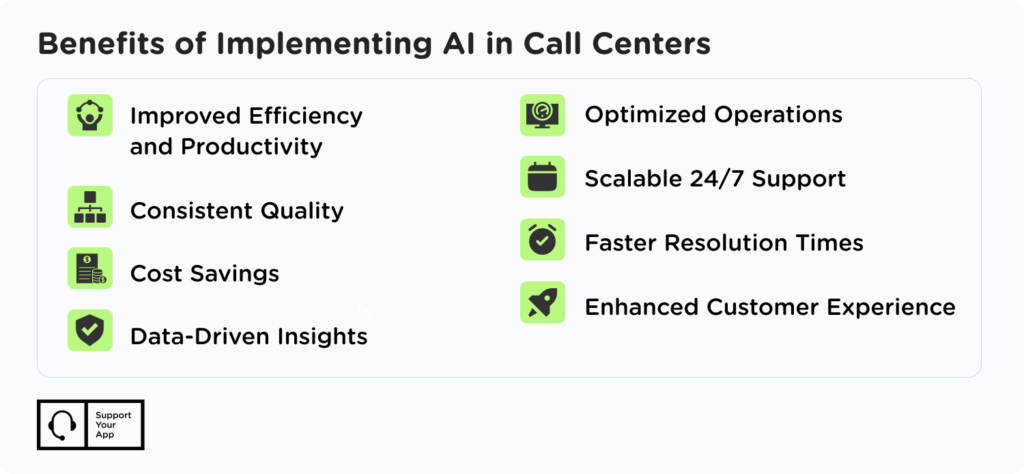
If you're unsure where to begin, our team can walk you through how to switch customer support providers or set up outsourcing from scratch. Here's what an outsourced team brings compared with an in-house setup, as the graphic below shows.
Specialist knowledge: An external team brings experience from many products and industries. Your customers get answers from agents who have solved similar problems before. You also skip the months a new in-house hire needs to reach that level.
Flexible capacity: Support volume grows with your business, and it rarely grows in a straight line. An outsourced partner adds or removes agents as demand changes, so you don't carry idle headcount after a peak or scramble for staff before one.
Lower costs: The vendor handles hiring, training, equipment, and infrastructure. You pay for the support you use. Recruitment cycles, software licenses, and office space for a seasonal team stop being your problem, and costs follow your volume.
Stronger data protection: Established providers invest in security certifications, audits, and access controls that cost a lot to build in-house. Your customers' information gets the kind of protection that payment and fintech companies expect from their partners.
Summary
Changing partners can lift service quality, capacity, and customer experience, but only with careful planning. Knowing how to switch customer support providers starts with spotting the signs early. Missed SLAs, falling CSAT, weak scaling, and security gaps all point the same way.
From there, audit your setup, set clear goals, and score vendors on one scorecard. Move volume in stages with a pilot and a parallel run, then review results after a few months. If you're moving from in-house support, the same steps apply, and you gain specialists, flexible capacity, and stronger data protection.