

Every support ticket carries something personal: a home address, the last digits of a card, a passport scan sent for verification. This guide is for support, CX, and operations leads who see those details every day and want fewer weak spots. It explains how to handle sensitive customer data from the first sign-up field to the day a record gets deleted. Each step is one your team can start this quarter.
Key Takeaways
- Trust breaks faster than it builds, and most customers now walk away from brands they suspect of mishandling their personal details.
- The safest record is the one you never collected, so every form field and ticket macro deserves a quick "do we need this?" check.
- Encryption and access limits work as layers, and either one alone leaves gaps that attackers and careless mistakes will find.
- Outsourcing partners touch your data too, which makes their certifications and daily habits part of your own security setup.
Why Customer Data Security Matters for Support Teams
Thales found that 82% of consumers dropped a brand in the past year over worries about how it used their personal data. Not one industry earned top trust from even half of the people surveyed. Customers notice how you treat their details, and they act on what they see.
Support teams are close to this problem. Agents read account histories, verify identities, process refunds, and paste screenshots into tickets all shift long. Each of those moments is a chance to protect sensitive customer information, or to leak it through a shared login or a forwarded email.
A breach also costs far more than a few angry tickets. IBM's 2026 Cost of a Data Breach Report puts the global average at $4.99 million per incident, the highest figure in the study's history. Detection work and lost business make up most of that bill, which is why prevention costs much less than cleanup.
What Is Sensitive Customer Data?
Sensitive data is any information that could hurt a customer if it reached the wrong person. That includes personally identifiable information (PII), such as names paired with home addresses, tax IDs, and email addresses. It also covers payment card details, bank information, health records, government ID scans, and login credentials.
Sensitive data management starts with need-to-know access, meaning each person sees only what the task in front of them requires. Your privacy and information security policies should spell out who can open each data type and how that access gets logged. Someone should also own the job of reviewing those logs.
How to Handle Sensitive Customer Data: 7 Best Practices
The practices below build on each other. Start with the policy and collection rules, since they shape everything your team stores later, then add the technical controls that protect whatever's left.
1. Write a Privacy Policy People Can Read
Customers shouldn't have to track breach headlines to find out whether their details leaked. Many do anyway, and some pay for identity theft protection that watches for signs their information has been exposed. A clear privacy policy closes part of that gap, because it tells people what you collect and why.
Your policy should answer four questions in plain language:
- How you collect data: directly from customers, through tracking, or from third parties.
- Where you use it, whether for support, marketing, research, or upsells.
- Who can access it and which security measures protect it.
- How long you keep each type and how you dispose of it.
Publish the policy where customers can find it fast, and link it from sign-up forms and your help center. When your data use changes, update the policy and tell customers what changed instead of hoping nobody notices.
2. Collect Only What You Need
Plenty of sign-up forms still ask for a birth date, a phone number, and a job title before someone can download a single checklist. A form like this one is still common:
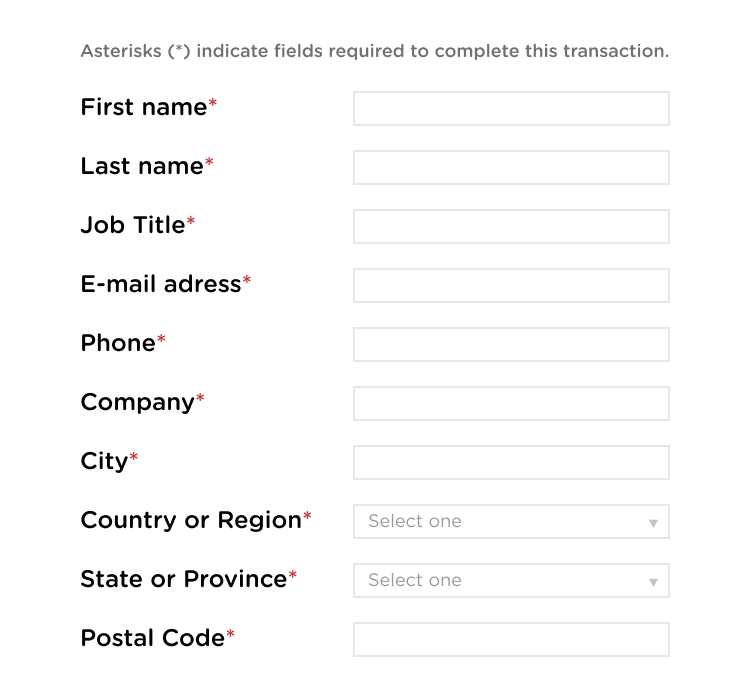
Every extra field is one more thing to protect, store, and eventually delete. It also makes customers suspicious when the reason for asking isn't obvious. Before adding a field, ask your team what would break if you left it out. If the answer is "nothing," cut the field.
The same logic applies inside your support workflow. Agents don't need a full card number to confirm a purchase, so mask everything except the last four digits. Ask customers not to send ID photos over open chat, and give them a secure upload link instead.
3. Give Agents Access Only to What They Need
A Tier 1 agent answering shipping questions doesn't need payment history, and a KYC specialist doesn't need your marketing lists. Give every agent an individual login with multi-factor authentication. Keep access logs too, so you can see who opened which record and when they did it.
If you're working out how to protect customer data on a growing team, role-based access is the cheapest place to start. A dedicated customer service team helps here, because the same trained people handle your account instead of a rotating shared pool. Train them to spot callers who pretend to be the account owner.
SwissBorg's setup shows how this works in fintech. SupportYourApp built SwissBorg's support and KYC operation from scratch, with a Support team, a Payments team, and two KYC teams sorted by complexity. Every team used the same security tool, so user data stayed under one set of controls. The partnership now runs at 80%+ CSAT.
AI tools need the same limits as people. If AI drafts replies on sensitive tickets, keep a person in charge of what gets sent. With SupportBrain, an agent reviews and approves every reply before it goes out. Our guide to AI governance in customer service covers the policies behind that choice.
4. Encrypt Data at Rest and in Transit
Encryption turns readable data into code that's useless without the right key. Encrypt sensitive data where it's stored, including databases, laptops, and backups, and while it moves between systems such as email and chat integrations. Most security frameworks, from PCI DSS to ISO/IEC 27001, treat this as a baseline requirement.
These four methods come up most often when teams compare options:
| Method | Type | Common use | Status |
| AES | Symmetric | Stored data and data in transit, from disks to TLS | Current standard |
| RSA | Asymmetric | Key exchange and digital signatures | Widely used with long keys |
| Triple DES | Symmetric | Older payment systems and ATM PINs | Legacy, being phased out |
| Twofish | Symmetric | Open-source disk and file encryption tools | Secure, less common than AES |
Encryption only works as well as your key management. Store keys separately from the data they protect, and rotate them on a schedule. Test decryption on a regular basis too, because a backup you can't decrypt during an incident won't help you.
5. Test for Breach Risks Regularly
Penetration testing simulates an attack on your systems to find weak points before someone else does. Run it on a fixed schedule and after major changes, such as a new helpdesk integration or a move to a different CRM. Then treat the findings as a to-do list with owners and deadlines.
Part of learning how to handle sensitive customer data is accepting that your defenses will have gaps. Testing shows where your controls fail, but it doesn't replace prevention. It works best alongside phishing simulations for agents and fast patching. For contact center specifics, see our call center security best practices.
6. Dispose of Data You No Longer Use
Customers churn, and retention periods run out. Both are reasons to delete data, and keeping records "in case we need them" only grows the pile an attacker could reach. Set a retention period for each data type, then automate deletion wherever your tools allow it.
Match the disposal method to the format the data lives in:
| Data format | Disposal method | Proof to keep |
| Files on active drives and servers | Secure erase with overwrite | Deletion log with date and scope |
| Retired hard drives and devices | Physical destruction by a certified vendor | Certificate of destruction |
| Paper documents | Cross-cut shredding | Shredding log |
When customers ask you to delete their data, confirm once it's done and keep a record of the deletion. GDPR and CCPA both give people the right to request erasure, and a clear confirmation shows you took the request seriously.
7. Vet Your Partners and Plan for Incidents
Your security is only as strong as the vendors who touch your data. Verizon's 2026 Data Breach Investigations Report found a third party involved in 48% of breaches, a sharp rise from the year before. That makes vendor checks part of your own defense.
Before you share data with a helpdesk vendor or an outsourced support team, ask for proof. Look for current certifications and a signed data processing agreement. Then ask how they apply best practices for securing customer data day to day, such as device rules and access reviews.
Regulated industries add their own rules on top. Fintech customer support teams work under PCI DSS and KYC requirements, while healthcare support teams handle protected health information under HIPAA. A partner who knows how to handle sensitive customer data in your industry will have those rules covered before the first ticket arrives.
Next, write the plan for the day something goes wrong. Name who leads the response and who talks to customers. GDPR gives companies 72 hours to report a qualifying breach to the supervisory authority, so a plan written during the crisis is already late.
Customer Data Protection at SupportYourApp
Security is part of daily work for every SupportYourApp supporter, starting from onboarding. SupportYourApp is a PCI DSS certified Level 1 and Level 2 Service Provider, ISO/IEC 27001 certified, and compliant with GDPR, CCPA, and HIPAA. Supporters go through regular security training, and access to client data follows each client's own rules.
If you're planning how to handle customer data securely with an outsourced team, reach out to us. We'll walk you through how our security setup would work for your product and your customers.