


Your support inbox keeps growing while replies slip from hours to days, and hiring another agent feels like a slow fix for a fast problem. This guide is for SaaS and ecommerce leaders weighing email support outsourcing as the way out. It explains the models and the costs, then shows how to pick a partner that replies fast.
TL;DR
- Handing the inbox to an outside team works best when ticket growth outpaces your hiring.
- The model you pick, fully outsourced or hybrid, shapes both your costs and your control over tone.
- Pricing depends more on ticket complexity and coverage hours than on any provider’s headline rate.
- AI drafts speed up replies, but people still decide what complex answers say.
In Freshworks’ 2025 CX benchmark, 53% of customer service professionals named growing ticket volume without new headcount as their biggest challenge. Email feels that squeeze first, because customers tolerate a wait there longer than on chat. Then they stop tolerating it, and every slow reply turns into a follow-up email or a refund request.
What Is Email Support Outsourcing?
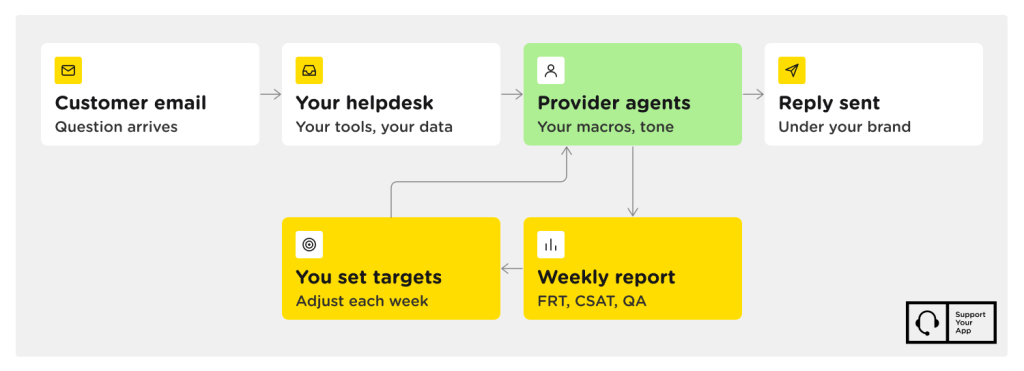
Handing your customer inbox to an external team that answers under your brand is the core of this model. The provider’s agents log into your helpdesk and work from your macros and tone guide. You set targets like first response time, and the vendor reports against them weekly. That reporting loop separates outsourced email support from simple mail forwarding.
Scope depends on how much of the queue you hand over. Some companies give the partner only Tier 1 questions, such as order status and password resets. Others hand over the whole queue, including technical troubleshooting that needs log access. If you only need messages captured and routed after hours, an email answering service covers that narrower job.
Why Companies Outsource Email Support
Companies usually make the switch when the inbox starts costing them customers faster than in-house hiring can fix it. For most teams, the trigger is a mix of slow replies and rising cost per ticket.
Faster First Response Times
An external team built for email staffs the queue in shifts, so messages don’t wait overnight for your morning crew. Response time drops because someone always owns the inbox, not because agents type faster. Mature email support services also arrive with tested triage rules, so urgent billing or access issues jump the line from day one.
Lower Cost per Ticket
Cost per ticket falls when you stop paying for idle capacity. An in-house agent costs salary, benefits, software seats, and management time whether the inbox is busy or quiet. A provider spreads those overheads across several client teams and bills for the hours or tickets you use. The savings grow when your queue has predictable peaks and long quiet stretches.
Coverage Across Time Zones and Languages
Customers in Sydney and Berlin shouldn’t wait for a team in Chicago to wake up. Providers with hubs on several continents run follow-the-sun shifts, so each region gets daytime replies. Native speakers also catch tone slips that machine translation misses. Teams that outsource email customer service for this reason often start with one extra language and expand once quality holds.
Flexibility During Volume Spikes
A product launch or a holiday sale can flood the inbox within hours. Hiring in-house agents for a two-week peak rarely pays off, since they’d be idle afterward. A provider moves trained agents between queues or adds a temporary pod, then scales back later. Put spike rules in the contract, including notice periods and how fast extra agents start.
Email Support Outsourcing Models
Companies choose between an in-house team, a fully outsourced team, or a hybrid that splits the queue. The right fit depends mostly on ticket complexity and how fast your volume changes. Here’s how the three setups compare on the points buyers ask about most.
| Model | Best for | How you keep control | Cost pattern |
| In-house | Complex products, small and steady volume | Direct management of every agent | Fixed salaries and tools |
| Fully outsourced | High volume of repeatable questions | SLAs and QA scorecards | Per hour or per ticket |
| Hybrid | Mixed queues and seasonal peaks | Core team keeps escalated and VIP cases | Fixed core plus variable overflow |
Hybrid often suits growing SaaS companies best at first. The in-house team keeps escalated bugs and key accounts, while the partner takes Tier 1 tickets and night shifts. That split lets you test email customer service outsourcing on a slice of the queue before handing over more. It also gives you a fallback if quality slips.
How Much Does Email Support Outsourcing Cost?
Price comes down to four inputs: agent location, ticket complexity, coverage hours, and the billing model. Offshore teams cost less per hour than onshore ones, and Tier 2 technical emails cost more than order-status questions. Round-the-clock coverage takes several agents per seat once you account for nights and weekends, so 24/7 quotes run far above business-hours quotes.
Billing models change what you pay for. Dedicated-agent or hourly pricing suits steady queues where agents need deep product knowledge. Per-ticket pricing fits spiky volume, since you pay for resolved messages instead of idle time. Shared agents cost less, but they split attention across several clients, which can slow replies during your busiest weeks.
When you compare quotes for email support outsourcing, convert each one to cost per resolved ticket rather than hourly rate alone. Ask what’s included, such as QA reviews and knowledge base upkeep. For rates by model and region, this breakdown of customer service outsourcing cost goes deeper.
How to Choose an Email Support Outsourcing Provider
Pick the partner that proves reply speed and quality on your own tickets, not the one with the slickest sales deck. Before you outsource email support services, ask every shortlisted vendor for the same evidence, and compare the answers side by side.
- Response time targets in writing. Get first response and resolution targets by priority level, plus what happens when the provider misses them.
- A visible QA process. Ask how many tickets per agent get reviewed each week and whether you see the scorecards.
- Security that matches your data. Look for ISO 27001 and GDPR compliance, plus PCI DSS or HIPAA if your emails carry card or health data.
- A paid pilot. Run 30 to 60 days on one slice of the queue before you sign a longer contract.
- Documented playbooks. Ask how the team records email support best practices, like tone rules and escalation paths, and confirm you keep them if you leave.
Watch how the vendor handles the pilot’s first bad week. A partner who flags problems before you spot them in CSAT will treat your customers the same way. Ask for references from companies in your industry, since a fintech queue and a fashion retailer’s queue need different skills.
Where AI Fits in Email Support
AI handles the repetitive parts of email work, such as drafting replies and finding knowledge base answers, while people decide what complex responses say. Deloitte Digital’s 2026 survey found that 35% of contact centers already use agentic AI in their operations.
For email customer support outsourcing, the most useful AI usually works next to the agent, not in place of them. SupportYourApp’s SupportBrain is an AI agent assist tool that drafts and translates replies and summarizes long threads. A human agent reviews and approves every reply before it’s sent, and teams using it report 40% faster first replies.
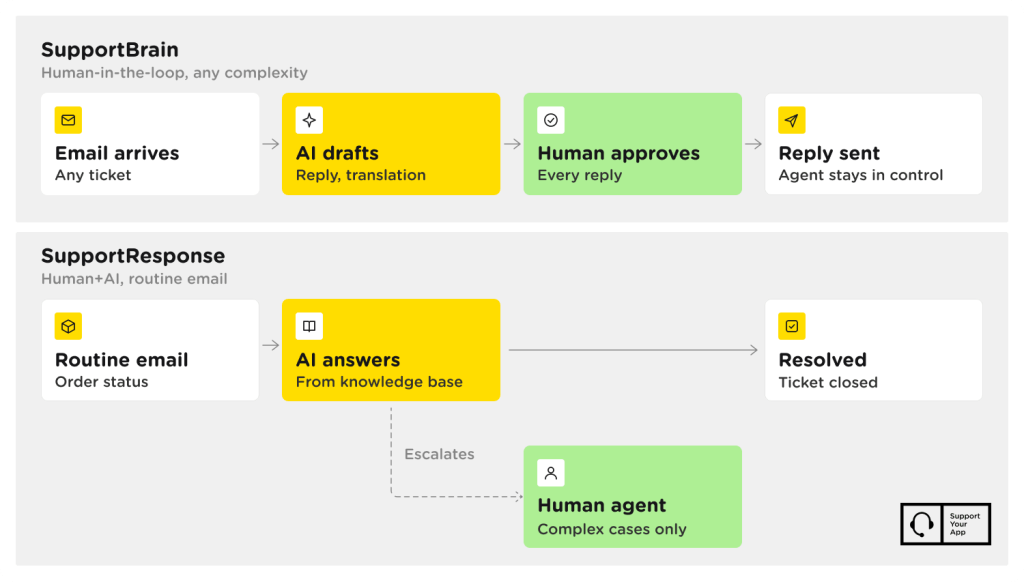
Repetitive tickets are a different case. SupportResponse answers routine emails like order status from the knowledge base on its own and escalates complex cases to a human agent. Ask any provider which tickets its AI answers alone and which ones a person approves before sending.
Choosing Your Next Step
The right partner makes your inbox calmer within a month, with reply times you can check. SupportYourApp is one option to compare for email support outsourcing, with 24/7 coverage from a 2,000+ person team across 8 international hubs. It’s ISO/IEC 27001 certified and pairs human agents with AI tools. Talk to an Expert to scope a pilot.