


Support teams usually feel the need for a new system when agents hunt through three tools for one customer’s history. This guide helps heads of support and CX managers run a CRM implementation without stalling the queue. It covers planning, data migration, help desk integration, and getting agents to use the new system.
TL;DR
- Start with support goals and baseline metrics, then map workflows before anyone touches configuration.
- Clean and deduplicate records before the move, or the new system inherits the old mess.
- Connect the help desk early and test with your own tickets instead of demo data.
- Adoption depends on training built around agents’ daily tasks and on usage tracking after launch.
Moving support onto a new CRM looks like a software project, but most of the risk lives in the data. Validity’s 2025 survey of CRM users found that 76% say less than half of their organization’s CRM data is accurate and complete. Agents who inherit records like that go straight back to spreadsheets and side notes.
What Is CRM Implementation for Customer Support Teams?
For a support team, rolling out a CRM means choosing, configuring, and launching one system where agents see each customer’s full history. That history covers tickets, chats, calls, orders, and account details. Unlike a sales rollout, it has to work with the help desk agents use all day, so ticket context and SLAs matter more than pipelines.
Platform choice comes first, and it shapes every later decision. If the shortlist is still open, compare the best CRM for customer service by channel coverage, help desk integrations, and reporting. Once your team has picked a platform, the work moves to planning, data, integration, and training.
CRM Implementation Steps for Support Teams
A support rollout works best in five stages, each with a clear owner and a sign-off before the next one starts. Teams working out how to implement CRM in a live support operation can use these stages as a checklist. The table shows what each stage produces and who usually owns it.
| Stage | Main output | Usual owner |
| Define goals and KPIs | Target metrics and a baseline | Head of support |
| Map workflows and channels | Process maps per channel and tier | Support operations lead |
| Configure the CRM | Fields, queues, views, permissions | CRM admin |
| Integrate with the help desk | Sync rules for tickets and contacts | IT or integration partner |
| Test and go live | Signed-off test cases and launch plan | Project lead and team leads |
Step 1: Define Goals and Support KPIs
Start by writing down what the new system should change, in metrics your team already tracks. First response time, average handling time, first contact resolution, CSAT, and backlog size are the usual set. Record the current baseline for each one, because without it nobody can tell after launch whether anything improved.
Turn those goals into a written CRM implementation plan with scope, budget, owners, and a launch date. Keep the first phase narrow: one region, one product line, or one channel is enough to prove the setup. The rest of the team moves over once that first group works without falling back to the old tools.
Step 2: Map Workflows and Channels
Map how a ticket moves today, from the first message to the final close, across every channel and tier. Mark each point where an agent leaves the help desk to check another tool. Ask two or three agents per tier to walk through their day, since they’ll name workarounds like shared spreadsheets for chargebacks.
Step 3: Configure the CRM
Configuration turns the workflow map into fields, queues, views, and permissions. Build only the fields agents need to resolve tickets and the fields managers need for reporting. Set up role-based access early. Then switch on routing rules and SLA timers one at a time, so you can trace any misrouted ticket to a single rule.
Step 4: Integrate With Your Help Desk
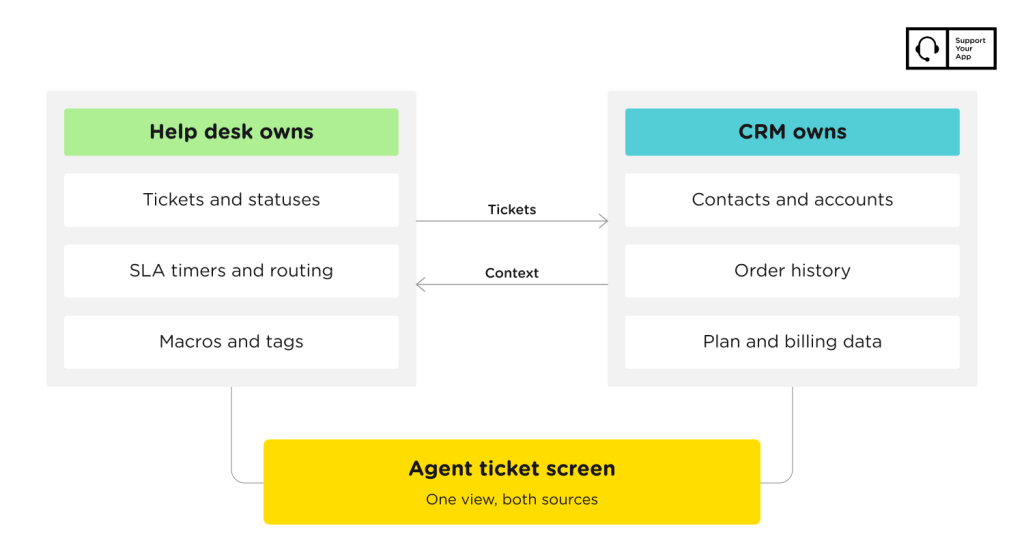
The help desk integration decides whether agents get context inside the ticket or keep switching tabs. Decide which system owns each record: contacts often live in the CRM, while tickets stay in the help desk. Then set the sync direction and frequency for each object, and agree on what happens when the two systems disagree.
A clean sync also matters for AI tools. Deloitte Digital’s 2026 Global Contact Center Survey found that 35% of contact centers already use agentic AI in operations. Those tools read the same records your integration feeds. Teams without integration engineers often bring in a partner like SupportYourApp for help desk and CRM integration.
Step 5: Test and Go Live
Test with your own ticket history instead of vendor demo data. Replay a sample of recent tickets across channels in a staging environment, and let agents check routing, macros, and sync behavior. Launch on a low-volume day, keep the old system read-only for a few weeks, and track your baseline metrics daily during the first month.
How to Prepare Your CRM Data
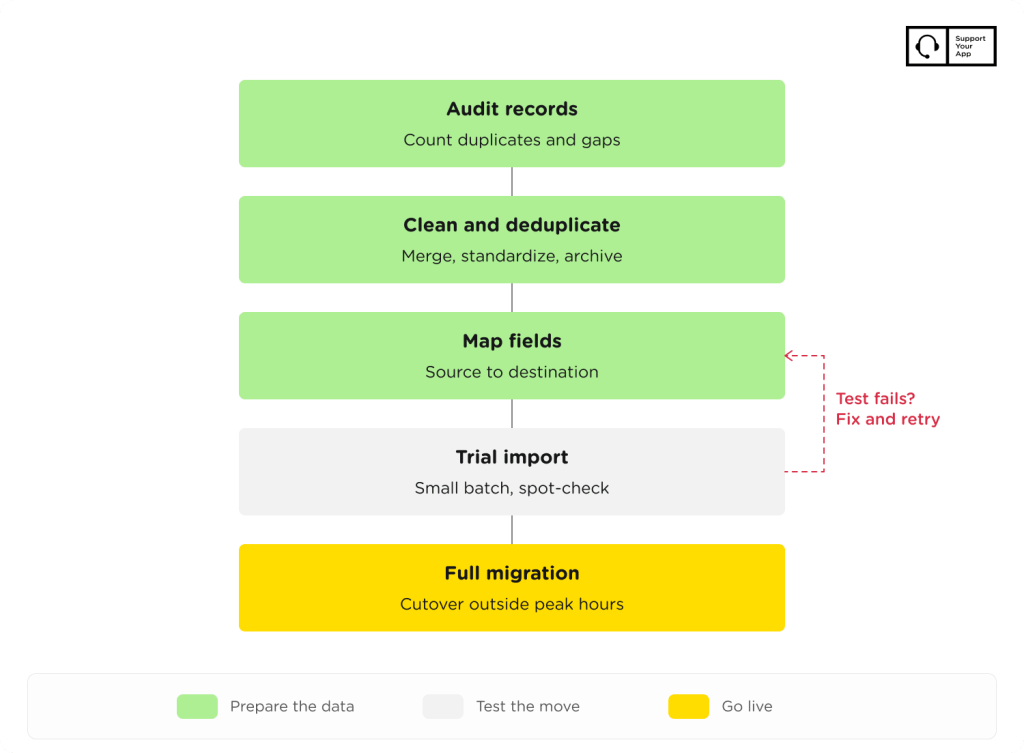
Good CRM data migration starts weeks before any record moves, with an audit of what exists and a decision about where each field goes. Data work usually takes longer than configuration, so run it in parallel with workflow mapping. Cleaning and field mapping make up most of that effort.
Clean and Deduplicate Records
Start with an audit that counts duplicates, empty required fields, outdated contacts, and records with no activity for two years or more. CRM data cleansing then follows a fixed order. Agree on merge rules first, merge duplicate contacts and companies, standardize phone, country, and date formats, and archive records nobody has touched.
Map Fields and Move the Data
Build a field map that lists every source field, its destination, its format, and any transformation in between. Ticket statuses, tags, and custom fields rarely match one to one between systems. Archive fields with no destination on purpose, instead of losing them by accident during the import, because someone will ask for that data later.
Most CRM data migration best practices come down to testing in small batches. Run a trial import, compare record counts, and spot-check twenty tickets by hand before moving the full dataset. If the project also replaces the help desk, this guide to help desk migration covers the ticket side.
Training Your Team and Driving CRM Adoption
Agents adopt a new CRM when it makes their next ticket faster, and training should prove that from the first session. Generic product tours rarely stick, so build CRM onboarding around the tasks agents repeat most. That means finding customer history, logging a call, escalating to tier two, and closing a ticket with the right tags.
Measure CRM user adoption with usage data instead of survey answers. Track logins, the share of tickets with complete required fields, and how often agents still open the old tool. A drop in any of these after the first month usually points to one broken workflow, which costs far less to fix than retraining everyone.
CRM Implementation Best Practices
Support rollouts stay on schedule when one person owns the decisions and the first phase stays small. Delays usually come from decisions that wait on too many people or a scope that keeps growing. These CRM implementation best practices apply whether the project runs in-house or with a partner:
- Name one project owner with authority over fields, workflows, and launch dates.
- Involve agents from every tier in workflow mapping and testing.
- Launch in phases by region, channel, or product line.
- Keep the old system read-only until the new one passes a full reporting cycle.
- Review the setup after the first month and remove fields nobody uses.
Common CRM Implementation Challenges
Most stalled rollouts trace back to planning or data. Scope creep tops the list, because every department asks for its own fields and the launch date slides. Freeze the phase one scope and log new requests for phase two. Dirty data comes next, since agents who find duplicates in week one stop trusting the system.
Integration gaps and low adoption are the other common CRM implementation challenges. A one-way or delayed sync shows agents outdated order details, so they go back to the source system. Low adoption is harder to spot because agents keep closing tickets while skipping new fields, which is why usage tracking should start on launch day.
When to Hand CRM Implementation to a Provider
Handing the project to a provider makes sense when your team lacks integration skills or needs the system live before peak season. Look for a provider that runs support operations as well as software setup. Ask for a written test plan, a rollback option, and named owners on both sides.
SupportYourApp can take on the tooling, the support work around it, or both. Its customer service CRM software, SupportCRM, gives agents one workspace for email, voice, and chat, with custom integrations on request. The team also handles system setup and integration for help desks and CRMs that clients already use.
Summary
The CRM implementation steps stay the same for a ten-agent team and a global operation. Settle goals, workflows, and data before configuration starts, then connect the help desk with clear ownership rules for every record. Test with your own tickets, train agents on their daily tasks, and track usage from launch day.