

This guide is for HVAC owners and office managers who lose calls while techs are on roofs, in crawl spaces, or driving between jobs. It covers how an AI receptionist for HVAC answers those calls, how it separates emergencies from tune-ups, and what it costs next to the alternatives.
TL;DR
- An AI receptionist picks up when your techs and office can’t, then captures the address and how urgent the problem is.
- It flags emergency calls and routes them by rules you set, while routine visits go straight into the schedule.
- It costs far less than a full-time hire, but some calls still need a person on the line.
- The right pick depends on your call mix, your field service software, and how you run after-hours dispatch.
What happens when a homeowner with a dead furnace calls at 7 a.m. and nobody answers? In a 2025 CallRail survey of 1,000 US consumers, 78% said they had taken their business elsewhere after failing to reach a company by phone. In January or July, that caller is usually a repair job, sometimes a full replacement.
What an AI Receptionist Does for an HVAC Company
An AI receptionist answers your business line, asks the questions your dispatcher would ask, and turns the call into a job record. It works around the clock and can take several calls at once, so a heat wave Monday doesn’t leave a queue of customers on hold. On a typical call, it collects:
- Name, callback number, and service address
- Equipment type (furnace, heat pump, central AC, mini-split) and rough age
- Symptoms in the caller’s words, like “blowing warm air” or “short cycling”
- Whether the caller owns or rents, plus any gate or lockbox code
- Maintenance plan status, if your system lets it look that up
An AI receptionist for HVAC companies earns its keep after the call ends. It books a tune-up into an open slot, sends a summary to the office, or texts the on-call tech. The morning starts with complete tickets, and the AI telephone receptionist leaves only a short callback list for your office.
How an AI Receptionist Handles Emergency Calls
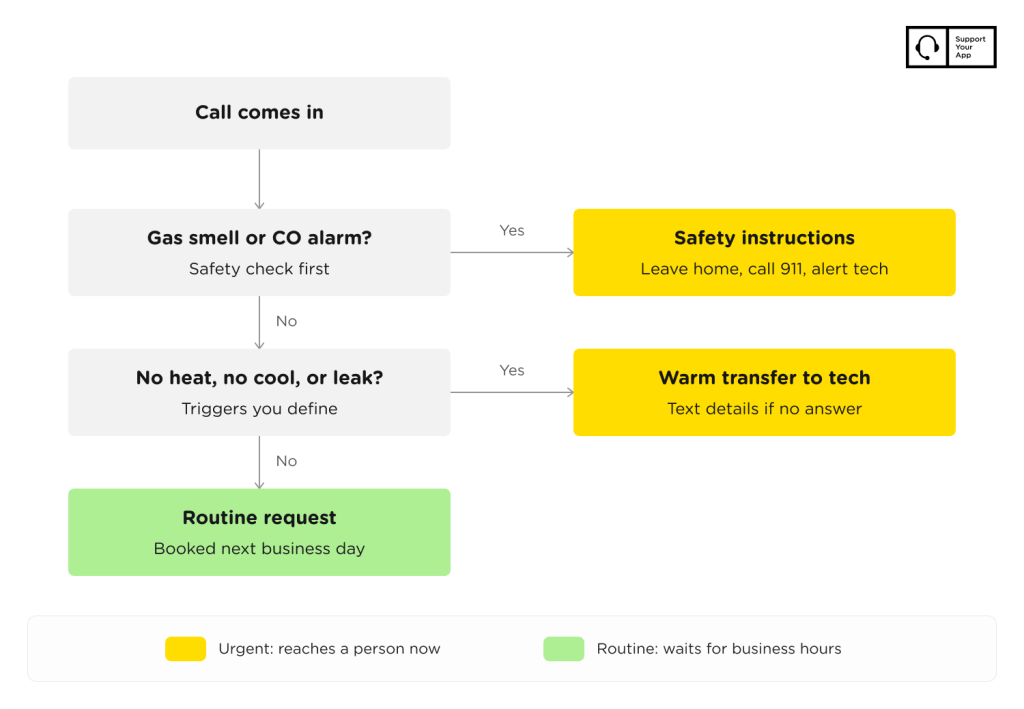
An AI receptionist handles emergency calls by matching the caller’s words against triggers you define, then sending the call to a person. Typical HVAC triggers include no heat during a freeze, water pooling near the air handler, and a tripped carbon monoxide alarm. Some owners add no cooling for elderly residents. You decide which ones wake up a technician.
Gas smells and CO alarms are safety calls first. A good script tells the caller to leave the house and contact the gas utility or 911, then alerts your on-call tech. The AI shouldn’t try to troubleshoot these, so test that path yourself before launch and listen to the recording.
For a true no-heat or no-cool call, the usual flow is a warm transfer to the on-call technician. If the tech misses it, the system texts over the address and symptoms. A thermostat question at 11 p.m. goes onto the next business day’s schedule. That split is why owners move from voicemail to an AI phone answering service for HVAC.
AI Receptionist vs Answering Service vs In-House Hire
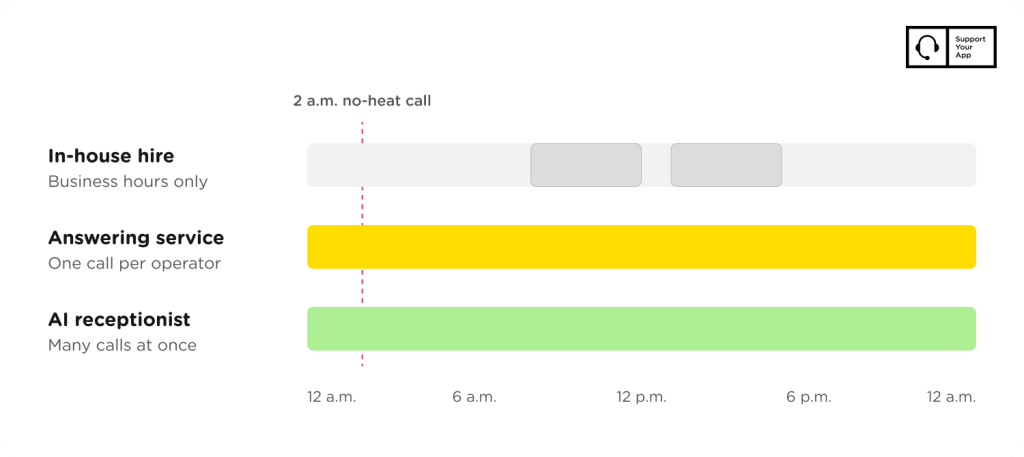
Of the three, an AI receptionist costs the least and can take many calls at once. A human answering service adds operator judgment, billed by the minute or by the call. An in-house receptionist gives you the most control, but the cost is fixed and coverage ends when that person’s shift does.
The table compares the three options on the points HVAC owners ask about most.
| Factor | AI receptionist | Human answering service | In-house receptionist |
| Coverage | 24/7, many calls at once | 24/7, one call per operator | Business hours, one call at a time |
| Typical cost | Flat monthly plan | Monthly plan plus overages | Salary, taxes, and benefits |
| Emergency calls | Rule-based triggers and routing | Operator follows your script | Personal judgment |
| Booking | Into open slots, if integrated | Often takes a message | Books directly |
| Weak spot | Unusual or emotional calls | Cost climbs with volume | Lunch breaks, sick days, nights |
Many shops land on a mix. The AI takes overnight calls and peak-season overflow, while a person handles upset customers and replacement quotes. For an AI receptionist for HVAC contractors with two or three trucks, that hybrid often replaces the after-hours answering service.
What an HVAC AI Receptionist Costs
Most AI-only tools for small service businesses charge a flat monthly fee. Entry plans often cap the number of calls or leave out booking. Mid-tier plans usually add calendar sync and emergency routing, and some include a second language.
Pricing comes as flat monthly plans, per-call fees, or per-minute billing. Per-minute rates look cheap in April and painful in July, when calls run longer and arrive in waves. Ask each vendor to price last August using your real call logs, and check what happens when you go over the plan’s limit.
A full-time hire costs far more. US receptionists earned a median of $38,010 a year in May 2025, per the Bureau of Labor Statistics, before payroll taxes and benefits. That salary still covers only one shift. Overnight coverage means a second person, an on-call rotation, or an outside service.
How to Choose an AI Receptionist for an HVAC Business
Choose an AI receptionist by testing it on your own call types. Call it as a panicked homeowner, a landlord with three units, and a member asking about a renewal. Then read the summaries it sends. Before you sign, confirm the tool offers:
- Emergency triggers you can edit, with a fallback to a live person
- Integration with your field service software, or at least your calendar
- Call recordings and transcripts your team can review
- Spanish or any other language your customers speak
- Pricing that stays predictable in peak season
The best AI receptionist for HVAC is the one your dispatcher trusts enough to stop double-checking. Run a two-week trial on after-hours calls only, then compare each ticket with what the tech found on site. Ask whether the AI answering service HVAC plan you’re quoted includes after-hours routing or charges extra for it.
If you’re unsure a trades-specific tool is worth it, our roundup of the best AI receptionist for small business compares general options. Those tools often need extra script work before they ask HVAC questions like equipment type or system age.
How We Set Up an AI Receptionist for HVAC Teams
At SupportYourApp, we build phone coverage on SupportVoice, an AI voice agent that handles inbound and outbound calls 24/7. It routes calls by intent, looks up account data, updates records, and escalates complex calls to a human. It speaks 120+ languages, which matters in service areas with many Spanish-speaking homeowners.
Setup starts with your call types. We map what counts as an emergency, who’s on call each night, and which details your techs need before they roll a truck. SupportVoice works with SupportCRM, the agent workspace where call records land, and connects to your own CRM through a custom integration on request.
When SupportVoice escalates a call, a person takes over. SupportYourApp’s reception desk services cover that human side, so a frustrated customer talks to a support agent instead of looping through a menu. The result for HVAC teams is after-hours coverage with no new headcount, with every call logged for the morning crew.
Summary
An AI receptionist for HVAC answers the calls your techs can’t, collects the job details, and sorts emergencies from routine visits by rules you control. It costs a fraction of a full-time hire, though upset customers and big quotes still belong with a person. Test it on your own calls before you commit.
If you want a second opinion on where AI fits in your phone coverage, SupportYourApp can review your call types and after-hours setup. Read more about our 24/7 AI receptionist or talk to an expert about a mix of AI and human coverage.