


Your phones ring through lunch, voicemail is full by 9 a.m., and the front desk doesn’t have the capacity to call everyone back. An AI receptionist answers those calls, resolves the routine ones, and passes the rest to your staff. This guide shows practice managers where the AI stops and what to ask an AI receptionist vendor before you sign a contract.
TL;DR
- The AI takes routine admin calls like booking and rescheduling, while anything clinical stays with your team.
- Patients can call in their own language, which changes who gets through to your practice.
- The note your staff receive after each call decides whether the tool saves time or creates additional work.
- Start with one call type, and get the vendor's patient data terms in writing before launch.
Phones are still the busiest door into most medical practices. In a February 2026 MGMA poll, calls ranked second (27%) among front-office areas where practices plan to add AI, right behind scheduling. That puts an AI receptionist for medical practice teams on a lot of 2026 shortlists.
What an AI Medical Receptionist Handles at the Front Desk
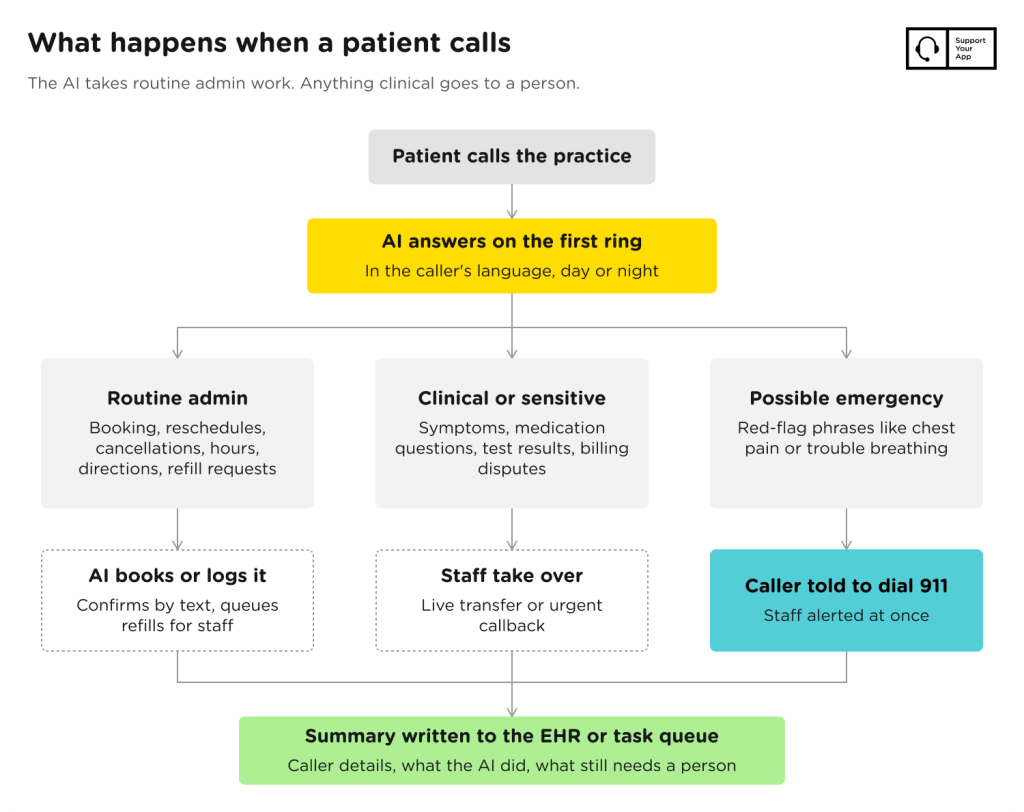
The AI resolves the high-volume admin calls that follow a predictable script. That covers new bookings, reschedules, cancellations, office hours, directions, parking, and refill requests that need to reach the right queue. It answers on the first ring, day or night, and handles several calls at once.
Booking works through your practice management system or EHR scheduler. The AI reads open slots, applies your visit-type rules, and texts the patient a confirmation. Your rules have to be clear first. If a new-patient visit takes longer at one site than another, write that down before launch.
For an AI receptionist for doctors in busy specialties, after-hours coverage tends to deliver the fastest relief. Patients who call at 7 p.m. to move an appointment get it done on the spot. Your team starts the morning with confirmed changes instead of a voicemail backlog.
SupportVoice, SupportYourApp's AI voice agent, covers this layer for medical practices. It answers inbound calls and places outbound ones 24/7, routes callers by intent, and updates records. With it, practices get after-hours coverage with no new headcount. A patient disputing a bill still reaches a person, because SupportVoice escalates complex cases to a human support agent.
Where the Line Is: Administrative vs Clinical
The AI handles administrative calls, and anything that needs clinical judgment goes to a person. Symptoms, medication questions, test results, and possible emergencies are outside its job. Your clinical team sets this boundary, and the vendor builds it into the call flow before launch.
An AI receptionist should never guess when a caller describes symptoms. It should recognize red-flag phrases like chest pain or trouble breathing, tell the caller to dial 911, and alert staff at once. For softer symptoms, it should transfer live during office hours or flag an urgent callback for the triage nurse.
This table shows a typical split across common call types. Your clinical lead should adjust each row before launch.
| Call type | What the AI does | Who takes over |
| New appointment or reschedule | Books from open slots, sends confirmation | Staff for unusual visit types |
| Hours, directions, parking | Answers from an approved script | Nobody |
| Prescription refill request | Logs drug and pharmacy details | Nurse or provider reviews |
| Billing or insurance question | Takes details, routes the request | Billing staff |
| New or worsening symptoms | Transfers live or flags urgent callback | Triage nurse |
| Possible emergency | Tells the caller to dial 911 | Staff alerted at once |
Patients Who Speak Another Language
Many AI receptionists can hold a full call in Spanish and other languages, so patients who struggle in English can book without an interpreter. In a 2025 survey of California safety-net clinics, 54% paid out of pocket for private interpreter vendors. When those clinics use the interpreter phone line a patient's health plan provides, they can wait up to 30 minutes to get an interpreter on the call.
An AI that answers in the caller's language removes that wait for routine calls like booking or rescheduling. Clinical conversations still need a qualified medical interpreter or a bilingual clinician. Before you pick a Spanish-speaking AI receptionist medical staff can trust, test it with real patient call scripts. Include names, birth dates, insurance IDs, and medication names.
Check that the system logs each call's language, so a bilingual team member can handle the callback. A multilingual AI receptionist should answer in the caller's language, not route them through an English menu first. SupportVoice handles calls in 120+ languages and understands local accents.
Some calls still need a person who speaks the patient's language and knows your billing rules. Practices with a wide language mix often pair the AI with multilingual customer support for billing disputes, insurance questions, and complex scheduling across several providers.
What the Staff Sees After the Call
After each call, staff should see a summary, the caller's details, what the AI did, and what still needs a person. The best setups write this into a task queue, with urgent items at the top. SupportVoice logs each call in SupportCRM, a unified inbox for email, voice, and chat. Custom integration with your own CRM is available on request.
This handoff decides whether an AI receptionist for medical offices saves time or adds work. A vague note like "patient called about meds" means someone has to phone the patient back and repeat the intake. A clear note names the drug, the pharmacy, and the best callback number.
Take a refill call as an example. The summary shows the patient's name and date of birth, the blood pressure medication she needs, and her usual pharmacy. It also notes she has three pills left, prefers French, and wants a callback after 4 p.m. The nurse can act on that without dialing the patient to ask for missing details.
Questions to Ask About Patient Data Use
Ask every vendor how it stores and shares patient data before any call goes live. Any AI receptionist for healthcare that hears names and appointment reasons handles protected health information under HIPAA. Your practice shares legal responsibility for that data.
In the AMA's 2026 survey, seven in ten physicians saw room for AI in administrative and clinical work. Patient privacy still topped their concerns, which makes vendor answers on data handling a deciding factor. Use this checklist in vendor calls, and ask for written answers:
- Will you sign a business associate agreement (BAA) before we go live?
- Where are call recordings and transcripts stored, and for how long?
- Do you use our patient data to train your models, and can we opt out?
- Who on your team can access recordings, and do you log that access?
- Which of our systems do you write into, and with what permissions?
- What happens to our data if we cancel the contract?
Attach those answers to the contract so they carry legal weight. A vendor that can't answer the BAA question on the first call isn't ready to partner with your practice. Choosing a medical AI receptionist on demo quality alone skips the part that protects your patients.
How to Start: One Call Type at a Time
Start with one call type, usually rescheduling, and expand only after the AI handles it cleanly for a few weeks. Rescheduling carries low clinical risk and comes in high volume. You can also measure it against last month's call logs.
Run the AI after hours first, then add daytime overflow once the transcripts look clean. Write escalation rules with your clinical lead, and keep a direct line to a person in every call flow. Add billing or refill calls next, one at a time.
Track four numbers from the first week: calls the AI resolved alone, transfers to staff, abandoned calls, and patients who called back within two days. Compare them with last month's call logs. If repeat calls climb, fix the script before you add another call type to the AI.
An AI receptionist for medical clinics with several locations works best when one site goes first. Each location has its own quirks, and a single pilot surfaces them early. Small practices comparing vendors can start with this list of the best AI receptionist for small business options.
What an AI Medical Receptionist Costs
Most vendors price by call minutes or calls handled, often within a monthly plan, plus setup and integration fees. AI medical receptionist software contracts vary most on integration. A tool that only takes messages costs less than one that books into your scheduler, but your staff still call each patient back.
Ongoing upkeep belongs in the budget too. Someone on your team updates the scripts whenever providers change schedules, new visit types appear, or a location moves. Plan a few hours a month for that work, plus time for your clinical lead to review escalation rules every quarter.
To compare an AI receptionist for medical practice budgets against hiring, price out the overtime, answering-service fees, and missed bookings it would replace. Ask for a quote based on your current monthly call volume, and compare AI receptionist pricing against that number before you commit.
Summary
An AI receptionist works best as a first filter. It books, reschedules, and answers routine questions around the clock, and it passes anything clinical to your team with the details attached. Practices that get value from it start small and hold vendors to strict data terms, with clinical boundaries set before launch.
If you're weighing an AI receptionist alongside human support, SupportYourApp can walk you through how both would handle your current call mix. Book a call with us, bring last month's call logs, and we'll show which calls the AI could take and which should stay with your team.