

As of 2026, over 100 million users worldwide rely on Zoho’s platform, yet Zoho CRM holds approximately 10% of the global CRM market. This raises a key question: is Zoho the cost-effective alternative that deserves a spot on lists of the best software for customer support, or are businesses missing features offered by the largest CRM providers?
What is Zoho CRM, exactly? It's a cloud-based customer relationship management platform designed for businesses of all sizes — from startups to small and medium-sized businesses to enterprises. The platform helps streamline support operations through omnichannel communication, ticket management, and customizable dashboards.
Here's the reality: every CRM has trade-offs. Understanding the Zoho CRM pros and cons matters because the right platform amplifies your team's strengths, while the wrong one creates unnecessary friction. Your choice depends on your specific needs, team size, budget, and support workflows.
In this article, we're breaking down Zoho CRM advantages and disadvantages — no marketing spin, just honest analysis. So, you can make an informed decision about whether it fits your customer support operation. Let's dive in.
Key Points:
- All-in-One Platform: Zoho CRM unifies sales, marketing, and customer support with lead management, automation, reporting, and omnichannel engagement in a single system.
- Customization and Scalability: Businesses can tailor workflows, modules, dashboards, and automation to match their processes while scaling from small teams to enterprise operations.
- Strong Integration Ecosystem: Zoho connects seamlessly with third-party apps and the broader Zoho suite, enabling cross-departmental collaboration and centralized business management.
- Zoho CRM Pros and Cons: Strengths include affordability, comprehensive features, and user-friendliness; limitations involve advanced feature complexity, data migration challenges, and potential overwhelm for new users.
- Ideal Target Users: Zoho CRM is best suited for small to medium-sized businesses, sales-driven teams, customer support operations, and organizations seeking a cost-effective, flexible, and scalable solution.
What Is Zoho CRM?
Let's cut straight to the chase. Zoho CRM is a customer relationship management solution that prioritizes automation and analytics to address the manual processes and data silos that plague most support teams. The platform supports automated lead scoring, workflow triggers, and real-time tracking of customer interactions, with advanced analytics and predictive features available in higher-tier plans.
Scalability is a core strength of Zoho CRM. From three-person teams to multi-department operations, it adapts without requiring costly enterprise-tier plans. CRM integrations extend this flexibility further, with native connections to Microsoft Office, Slack, QuickBooks, and hundreds of other tools your team already uses.
Pricing starts with a genuinely free plan — not a trial, but permanent access to core features. This makes Zoho accessible for testing and early-stage operations before committing budget.
Kate Leggett, VP and Principal Analyst at Forrester Research, highlights this approach:
"Zoho CRM's mature, product-led growth motion, combining freemium editions for smaller customers with a traditional sales motion for larger organizations, demonstrates its ability to serve a broad range of business needs."
Zoho CRM Features
Zoho's feature set covers the full spectrum of customer relationship management — sales, marketing, and support — all unified in a single platform. But more importantly, integrationcapabilities let you connect your existing tools instead of forcing you to abandon what already works.
Here are the capabilities you get when using Zoho CRM:
Lead & Contact Management
Zoho offers a centralized database for leads and accounts, complete with lead scoring and segmentation, eliminating scattered spreadsheets and missed follow-ups. All information is easily searchable and accessible.
Sales Pipeline & Deal Management
Visualize your entire pipeline at a glance. Track deals, probability, and revenue forecasting from a single dashboard. You'll know exactly where revenue is coming from and where bottlenecks are forming.
Marketing Automation
Monitor and nurture campaigns across email and social media through native integrations. Set up drip campaigns, A/B tests, and automated responses without switching between platforms.
Workflow Automation
Automate the repetitive stuff: lead assignments, alerts, time-based triggers. Your team focuses on conversations that matter, not administrative busywork.
Omnichannel Engagement
Access unified customer history across email, live chat, social media, and web forms. When a customer reaches out, you see the full story — not just the current interaction.
AI Capabilities
Zoho Zia AI assistant handles predictive lead and deal scoring, forecasting, and anomaly detection. It spots patterns humans miss and delivers real-time recommendations based on your data.
Reporting
Real-time dashboards, KPI tracking, and custom report builders mean you're never guessing about performance. Build the reports you need, not the ones the platform thinks you should have.
Customization
Customize fields, layouts, and role-based views with the layout editor. Make the CRM match your workflow, not the other way around.
Mobile CRM
iOS and Android apps with push notifications keep you connected on the go. Check deals, update records, and respond to leads without being chained to a desk.
Customer Support
Track SLAs, manage tickets, automate escalation rules, and monitor CSAT statistics from the same platform. Support and sales finally share context.
Orders & Invoicing
Manage orders, invoices, and quotes directly through Zoho Books or your preferred external integration. Close deals and process payments without leaving the system.
Security
Role-based access control, two-factor authentication, audit logs, and data governance support keep customer information locked down. Compliance teams can actually sleep at night.
Developer Tools
Access APIs, custom extensions, and functions to build custom applications when you need functionality Zoho doesn't provide out of the box.
The breadth is impressive. But, whether you'll use all of it depends entirely on your team's size, workflows, and support complexity.
When you partner with SupportYourApp for customer support outsourcing or help desk outsourcing, we use Zoho among other CRM integrations. But here's the key: we configure only what your team will actually use. No feature bloat. No wasted budget.
Zoho Pros and Cons
SciTech reports that 47% of CRM users see positive impacts on customer satisfaction, while unified omnichannel data can drive retention up by 27%. Those aren't small numbers — they represent real competitive advantage.
Let’s explore and evaluate the Zoho CRM strengths and weaknesses.
Strengths and Limitations of Zoho CRM
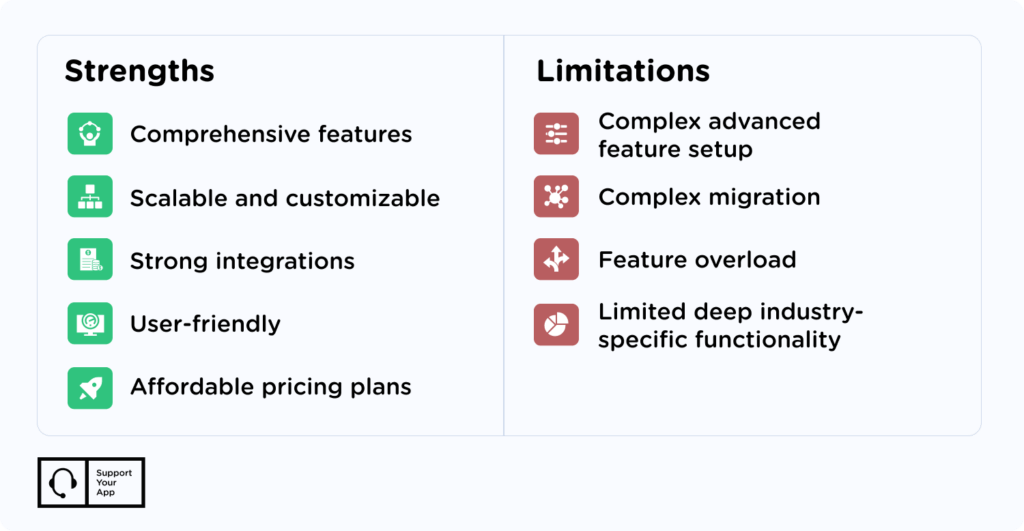
Zoho CRM’s Strengths:
Comprehensive Features
Zoho offers a highly diverse feature set ranging from marketing to support and sales, covering automation, reporting, and AI assistance, all from one platform.
Scalable and Customizable
Not only does Zoho support your capacity for growth and offer the opportunity to function across departments, but it is also customizable, allowing you to personalize modules, workflows, and dashboards to your exact preferences.
Strong Integrations
Zoho provides open-source APIs that enable straightforward connections to third-party applications and other Zoho products. This Zoho CRM integration approach eliminates the need for multiple disconnected platforms.
User-friendly
Zoho CRM is intuitive enough for non-technical teams to adopt quickly without extensive training or IT support.
Affordable Pricing Plans
Zoho offers competitive subscription tiers suitable for small to large enterprises, as well as a free plan ideal for individuals and small departments.
Zoho CRM’s Limitations:
Complex Advanced Feature Setup
While the basic features are straightforward, building complex automations requires expertise that most teams may not have on day one.
Complex Migration
Transferring historical client data from other CRMs can require careful planning and support to ensure it is done smoothly and without error.
Feature Overload
The Zoho ecosystem includes 50+ products, which sounds great until you're a new user trying to figure out where to start.
Limited Deep Industry-Specific Functionality
While Zoho provides strong general-purpose CRM capabilities, some industries like advanced healthcare, complex manufacturing, or large-scale financial services may require additional industry-specific modules that are not native to the platform. This sometimes limits use cases to some extent.
The Most Common Use Cases for Zoho
A Zoho CRM review would not be complete without answering the critical question: how are businesses actually using it? Let's look at the most common scenarios.
- Small Business Growth Enablement. If your company is a small business, get scalability without enterprise pricing. Zoho's modular structure lets you add capabilities as you grow, paying only for what you actually use.
- Cross-Departmental Collaboration. Enjoy seamless collaboration between the sales, marketing, and customer service teams with shared customer data, activities, and notes while ensuring improved internal communication.
- Operational Consistency and Workflow Automation. Easily automate repetitive tasks like lead assignment, task creation, and notifications to improve workflow efficiency while creating consistency across departments.
- Omnichannel Communication Management. With the capacity to combine email, phone, live chat, social media, and web form data, engagement is simplified and allows teams to communicate consistently, irrespective of where a customer reaches out.
- Customer Relationship Management. A centralized record system ensures all communication, transactions, and interactions are accessible by the entire team, encouraging personalized and consistent customer engagement.
The common thread? Zoho CRM gives businesses the tools to scale smart, work together seamlessly, and keep customers at the center.
Zoho CRM vs. HubSpot
HubSpot CRM ranks among the leading alternatives to Zoho, matching it in capability and scope. The platforms share key strengths: cross-departmental collaboration and free plans with core functionality.
However, Zoho proves to be much more affordable, offering better scalability over the long term and greater flexibility to businesses with smaller budgets. Zoho CRM pricing typically starts from $14-$52 per user/month, while HubSpot’s plans start at $45 per month, reaching up to hundreds of dollars for more advanced tiers.
Additionally, Zoho’s advanced features, such as workflow automation, lead scoring, and reporting, are available in earlier pricing tiers than with HobSpot CRM.
On the flip side, HubSpot CRM is recognized for its usability, with clean interfaces, guided workflows, and onboarding resources that allow teams to adopt it quickly. Zoho, by comparison, has a steeper learning curve due to its highly customizable interface, which may initially challenge inexperienced users but offers greater long-term flexibility.
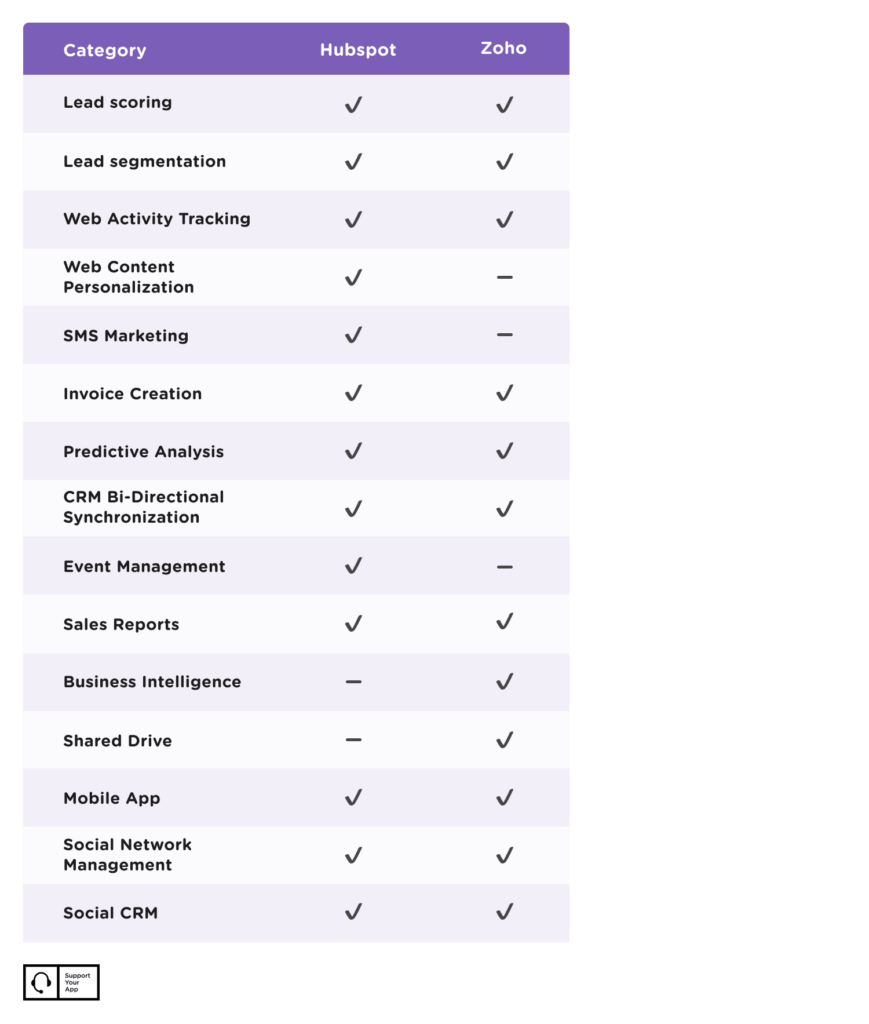
See the image below for a summary of an advanced feature comparison between Zoho and HubSpot.
Who Should Use Zoho CRM?
After examining the pros and cons of Zoho, we can establish more accurately that Zoho is suited for the following:
- Small to Medium-sized businesses
- Sales-driven organizations
- Businesses requiring highly tailored CRM systems
- Growing and scaling businesses
- Businesses looking for an affordable all-in-one solution
Summary
Zoho CRM delivers a complete, cloud-based platform that unifies sales, marketing, and customer support with intuitive dashboards, omnichannel engagement, and extensive integration capabilities.
Understanding the Zoho CRM pros and cons comes down to what you prioritize. Strengths include all-in-one functionality covering lead management, pipeline tracking, marketing automation, and support ticketing. Seamless third-party integrations enable cross-departmental collaboration, while flexible pricing makes it accessible to startups and small teams.
The limitations matter, too. Advanced automation requires technical expertise. Data migration can get complex. The extensive feature set can overwhelm new users, and specialized industries may need supplementary tools.
The bottom line? Zoho CRM is well-suited for small to medium-sized businesses, sales-driven teams, and organizations seeking scalable solutions without enterprise-level costs. With initial setup effort, it delivers strong long-term value and flexibility, while organizations seeking immediate plug-and-play simplicity may find the learning curve challenging.
Like it? - Share:


-
Is Zoho CRM good?
Yes. Zoho CRM is a robust, cost-effective platform offering strong customization, automation, and integration capabilities, making it well-suited for growing and sales-driven organizations.

-
What are the benefits of using Zoho CRM?
Zoho CRM offers centralized customer data, sales and marketing automation, strong customization options, seamless integrations, omnichannel engagement, scalability, and cost-effective pricing, making it ideal for growing businesses.
-
What are the disadvantages of Zoho CRM?
Zoho CRM can be complex to configure, advanced features may require technical expertise, data migration can be challenging, and some industries may need additional specialized functionality.
-
Which companies are using Zoho CRM?
Companies using Zoho CRM span startups to major brands, including Airbnb, eBay, Citibank, Ford, Nike, Cisco, Way.com, Agoda, Yelp, and Telus, among others.
-
Is Zoho CRM free?
Yes. Zoho CRM offers a free plan with basic CRM features for small teams, alongside paid tiers for more advanced capabilities.
-
How much does Zoho CRM cost?
Zoho CRM offers a free plan for up to 3 users. Paid plans range from $14 to $52 per user/month, depending on features and billing options.

Nader Gammoudi
Integration Manager
Nader is an Integration Specialist with over nine years of experience in the customer support industry. Having started as a support agent, he developed a deep understanding of diverse client needs and service environments. He now specializes in building and optimizing helpdesk systems, creating workflows, and implementing tailored integration solutions. Outside of work, he enjoys watching anime, spending time with his family and friends, and is passionate about brewing and tasting great coffee.
Posted on January 30, 2026

Support Insights




Customer Support Trends
2026: Are You Ready?
Benchmark your customer support against key 2026 trends.