
Your support queue keeps growing, and the tool you picked a few years ago is starting to creak. This guide is for support leads and founders comparing platforms right now. We've checked the best help desk software on the market against what decides your monthly bill. Each pick comes with current pricing and a clear team fit.
Key takeaways
- Seat prices are now the smallest part of most bills, because AI resolutions and add-ons often decide what you pay each month.
- Small teams can start on a free or cheap plan, but check agent caps and trial limits before building workflows on top of them.
- The right tool depends on your main channels and the systems it must connect to, much more than on any feature checklist.
- A strong platform still needs trained people behind it, and outsourcing can cover the hours and languages your own team can't.
Why Your Help Desk Choice Matters More in 2026
The push to automate support is coming from the top. According to Gartner, 91% of service leaders say executives are pressing them to implement AI this year. That changes the brief. A help desk isn't only a shared inbox with ticket numbers anymore. It has to run AI agents and pass tricky cases to a person without losing context.
Customers feel the difference fast. A good setup pulls up order history and routes each ticket to the right specialist before anyone asks. A weak one makes people repeat themselves. They notice. Your agents notice too, because they end up copying details between browser tabs instead of fixing the problem in front of them.
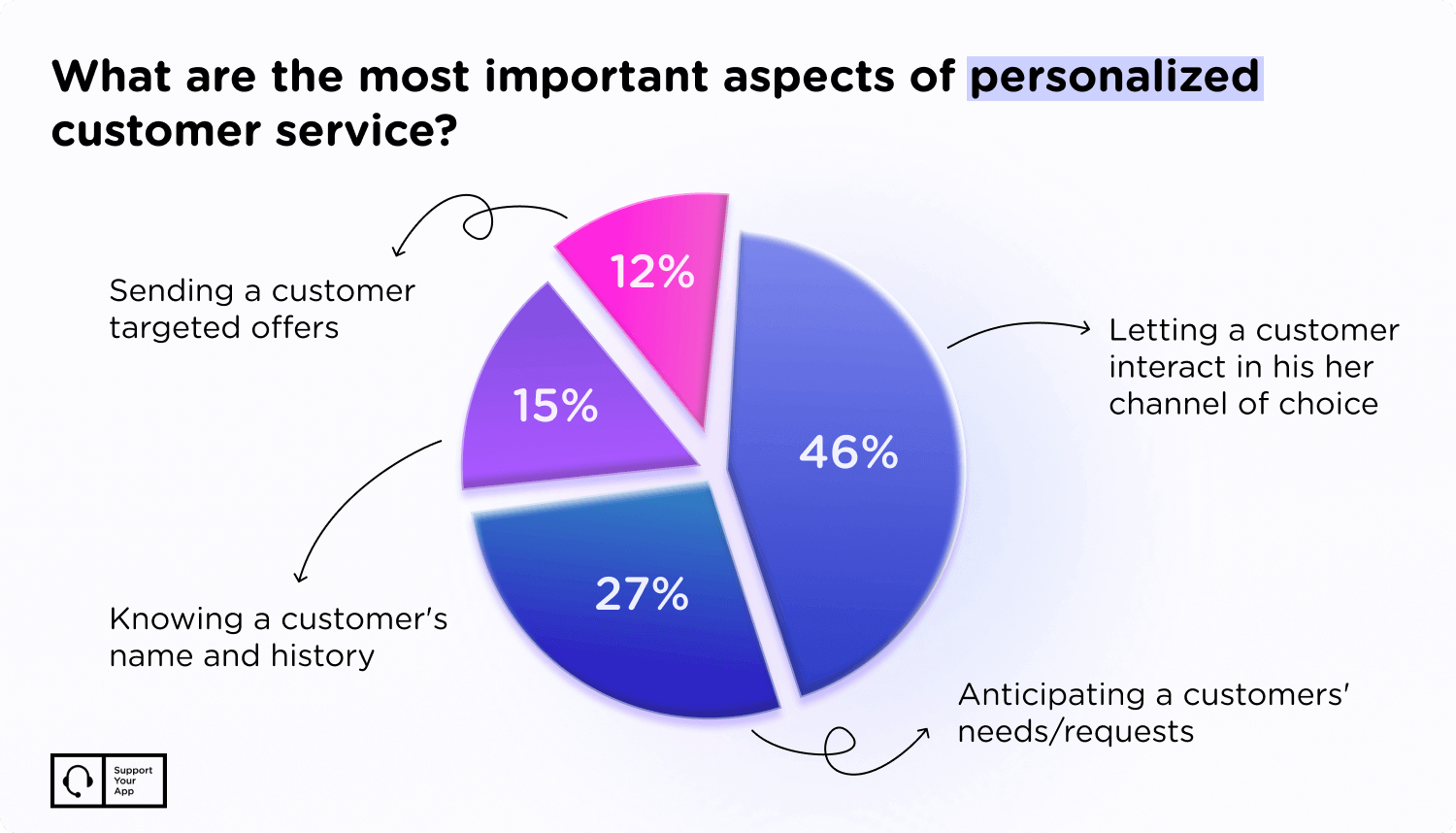
Personalization depends on that same plumbing. When your help desk stores a customer's history and preferred channel, agents can tailor a reply in seconds. Without it, replies sound generic. Good tools won't make a team great on their own. A clumsy one can make a great team look slow, though.
How We Evaluated the Best Help Desk Software
We looked at each platform the way a support lead would during a trial week. That meant less attention on feature counts and more on what happens when a busy Monday hits. Five things mattered most. Here's what we checked for each one, and why it made the list in the first place.
- Ticket management and routing. Every email and chat should land in one queue with a clear owner. Good routing sends billing questions to billing without anyone sorting them by hand.
- Omnichannel coverage. Agents should answer email, chat, messaging apps and voice from one screen. Some vendors charge extra for anything beyond email, so we checked which plan includes each channel.
- AI and automation. We looked at whether the AI drafts replies, resolves simple tickets on its own, or both. We also checked how each vendor bills for it, since per-resolution pricing can surprise finance teams.
- Human handoff. When a bot gets stuck, a person should take over with the full conversation in view. Gartner found 87% of customers say companies using GenAI must offer a route to a human agent.
- Price and scale. We compared what a ten-agent team pays on annual billing and what changes at fifty. Free plans and add-on costs went into the notes too.
Speed sits behind every point on that list. Customers judge a support team by how long they wait, and agents judge a tool by how many clicks each reply takes. Both views count. We gave them equal weight when we ranked the platforms below, even where one tool's marketing leaned hard on only one side.
5 Top Help Desk Tools for Customer Support Teams
The list below mixes all-in-one suites with lighter tools built for one job. Prices are list rates per agent per month on annual billing, checked in September 2026. Vendors change them often. Treat each figure as a starting point for your own quote, because add-ons and usage fees usually sit on top.
Zendesk: Best Enterprise Help Desk Software
Zendesk is still the default pick for large, multi-brand support operations. Its Suite plans bring messaging, live chat, voice and a help centre into one agent workspace. Routing gets serious higher up. Suite Professional adds skills-based assignment and SLA tracking. Our Zendesk pros and cons breakdown covers the platform in more depth.
Pricing starts at $19 per agent for Support Team, which covers email ticketing only. Most growing teams land on Suite Team at $55 or Suite Professional at $115. AI agents come included. The catch is a small monthly allowance of automated resolutions, with extra resolutions and the Copilot add-on billed separately on top.
Zendesk pros and cons
| Pros | Cons |
| Deep omnichannel coverage in one workspace | AI resolutions and add-ons push the bill well past list price |
| Advanced routing and SLAs on higher plans | Setup and ongoing admin need dedicated time |
| Large marketplace of integrations | Support Team is too basic for most growing teams |
Freshdesk: Best for Fast Onboarding
Freshdesk wins on speed. Teams can set up automations and go live in days rather than weeks, because the interface doesn't fight you. Base plans cover ticketing. Freshdesk Omni adds live chat and phone support for teams that want every channel in one inbox from the start.
Freshworks raised prices in 2026, the first entry-level rise in five years. Growth now costs $19 per agent, and Pro jumps to $55. A free plan covers one or two agents for six months. Freddy AI Copilot is a $29 add-on on Pro and above. AI agent sessions come in prepaid packs that expire. Budget for both carefully.
Freshdesk pros and cons
| Pros | Cons |
| Quick setup and a friendly interface | Chat and phone need the pricier Omni line |
| Solid automation from the Growth plan | Unused AI agent sessions expire |
| Free option for very small teams | The free plan is now time-limited |
SupportCRM: Best for Pairing Software With Trained Agents
SupportCRM is our own platform, a unified inbox that pulls every channel, from email to voice calls, into a single agent workspace. It also connects to your existing CRM and analytics tools without custom development. Setup is quick. Most teams work from one screen within days.
The difference from standalone help desk tracking software is the team you can plug in behind it. Run it with your own staff, or with SupportYourApp agents who already know it inside out. It also feeds our AI tools, like SupportResponse for routine tickets. Pricing depends on team size. Ask for a demo.
SupportCRM pros and cons
| Pros | Cons |
| Every channel in one agent workspace | No public price list |
| PCI DSS Level 1, ISO/IEC 27001, GDPR, CCPA and HIPAA compliance | Built around hybrid and outsourced teams |
| Connects to your existing tools | Less known than the big suites |
| Works directly with SupportYourApp AI tools and agents | Best value when you also use our agents |
Zoho Desk: Best Help Desk Software for Small Business
Zoho Desk has the lowest paid entry point on this list. Express costs $7 per agent but caps you at five users, while Standard at $14 removes that cap. A free edition covers up to three agents. Costs stay predictable. Zoho bundles AI features into the plans instead of billing you for each resolution.
Its standout feature is Blueprint, a visual builder that pushes tickets through set steps. That's handy for refunds or warranty claims where every case follows the same path. Teams already on Zoho CRM see customer context inside each ticket. Expect a learning curve. The interface is dense, and monthly billing costs noticeably more.
Zoho Desk pros and cons
| Pros | Cons |
| Lowest paid starting price among major tools | Dense interface takes time to learn |
| AI bundled into plans, with no per-resolution fee | Express plan stops at five users |
| Blueprint for strict, step-by-step workflows | Monthly billing costs far more than annual |
| Native link to Zoho CRM | Live chat arrives only on higher tiers |
LiveAgent: Best Help Desk Software for Startups
LiveAgent gives you ticketing and live chat from the cheapest plan up. Small costs $15 per agent and adds a knowledge base plus the AI Answer Assistant. There's no free plan. A trial lets you test it with live tickets first, which is worth doing, because the interface packs a lot into each screen.
Medium, at $29 per agent, adds the built-in call centre with IVR menus. Social channels cost extra on the smaller plans, which pushes many eCommerce teams up to Large at $49. The payoff is simple. You run one tool instead of three.
LiveAgent pros and cons
| Pros | Cons |
| Ticketing and live chat on every plan | No free plan, only a trial |
| Built-in call centre from the Medium plan | Social channels cost extra on smaller plans |
| Low entry price for a multichannel tool | Busy interface takes time to learn |
Help Desk Software Compared Side by Side
Here's how the five tools stack up on the numbers most buyers ask about first. Starting prices are annual list rates for the cheapest paid plan, unless the table says otherwise. AI costs move quickly. Check each vendor's pricing page before you sign anything, especially if you plan to lean on automation.
Help desk tools compared
| Tool | Best for | Free plan | Paid plans from | AI pricing |
| Zendesk | Large, multi-brand teams | No, trial only | $19 per agent | Small resolution allowance, then per resolution |
| Freshdesk | Fast onboarding | 1 to 2 agents for 6 months | $19 per agent | $29 Copilot add-on plus session packs |
| SupportCRM | Software plus trained agents | No | Custom quote | Works with SupportYourApp AI tools |
| Zoho Desk | Tight budgets | Up to 3 agents | $7 per agent | Bundled into plans |
| LiveAgent | Budget multichannel support | No, trial only | $15 per agent | AI Answer Assistant included |
Budget for AI Usage, Not Seats Alone
Seat prices tell you less than they used to. A Gartner survey found AI spending by service leaders rose 38% while overall support budgets grew by just 2%. Money is moving fast. Most of it now flows through usage meters rather than seat licences.
Run the maths on your own volume before you commit. Take last quarter's ticket count and estimate how many a bot could close without help. Multiply by the resolution fee. Then add your seats. The cheapest plan on paper can turn into the priciest one once your automation takes off.
This hits hardest for customer help desk software at consumer brands, where volume swings with sales and holidays. A per-seat tool with bundled AI keeps costs flat. A metered tool looks cheap in quiet months. Peak season flips that. Pick the pricing model that matches your yearly curve, not your average week.
When to Pair Your Help Desk With an Outsourced Team
Software fixes the workflow, but it can't staff the night shift. As volume climbs, the tool often stops being the bottleneck. People become it. Covering weekends and extra languages takes hiring and training time that a lean in-house team rarely has, especially during a product launch.
That's where help desk outsourcing earns its keep. You skip the hiring. Our team works inside whatever platform you already run. A cybersecurity client on HubSpot came to us with workflows that had stopped routing tickets. We rebuilt the triage rules and SLA alerts. The ticket backlog almost disappeared.
AI needs people too. FitXR, a VR fitness platform, sees sharp seasonal spikes. We paired its Fin AI agent with a seasonal human agent, which kept coverage running around the clock and cleared the ticket backlog.
SupportYourApp agents cover 60+ languages, 24/7. We also handle Tier 1 to Tier 3 technical support, with SupportResponse, our AI agent, and SupportVoice, our AI voice agent resolving our most common tasks, and routing complex ones to humans. Security comes built in. We're a PCI DSS Level 1 service provider with ISO/IEC 27001 certification and GDPR, CCPA and HIPAA compliance.
How to Choose the Right Helpdesk Software
Start with your channels, not the feature list. Write down where customers contact you today and where they'll contact you next year. Shortlist two tools, not five. A two-week trial with live tickets tells you far more than any polished sales demo ever will.
Size matters too. For a small team of three, the right pick is cheap to start and easy to leave. Enterprise buyers need audit logs and sandbox testing, plus someone who can own the day-to-day admin work. Budget that time early. It's the part most teams underestimate when they sign the contract.
Whatever you choose, the best help desk software for customer support is the one your agents open without sighing. Pick it for how your team works today. Keep an exit plan for how it'll work in two years. If you need people as well as software, we can help with both.