

If your support team relies on answer flows, intents, or article autoreplies in Zendesk, there's a change worth planning for. Zendesk bot builder and the rest of the legacy AI agent setup are nearing retirement. This guide covers the dates, the rebuild work, and the billing changes, so you can plan the move before Zendesk makes it for you.
TL;DR
- Zendesk is replacing its essential and legacy AI agents with one upgraded experience.
- Automatic upgrades are coming, and they won't carry over everything your current flows do.
- Legacy answer flows need a manual rebuild in the dialogue builder.
- Automated resolution counts can shift after the switch, so keep an eye on your bill.
On June 23, 2026, Zendesk announced it would remove Zendesk AI agents Essential along with its legacy AI agent functionality. On the upside, agentic features that once required a paid add-on now come with Suite and Support plans. But the move isn't fully automatic, and some flows won't survive it.
What Zendesk Is Removing (and What Happened to Zendesk Answer Bot)
Zendesk is removing three things: the AI agents Essential experience, legacy AI agent functionality, and autoreplies with articles. Legacy functionality covers bot builder, answers, and intents, the pieces admins used to build custom answer flows. Autoreplies with articles suggested up to three help center articles in reply to email and web form requests.
If you remember Answer Bot, you've already used most of what's going away. Zendesk renamed the product more than once. Its own documentation notes that Answer Bot became bots, the Zendesk flow builder became bot builder, and article recommendations became autoreplies. Those tools later moved under the AI agents name, and now Zendesk is retiring them.
The change doesn't apply to customers who bought the AI agents Advanced add-on. Everyone else running a Zendesk chatbot on Essential or legacy tools needs to migrate, across messaging, email, web form, and API channels. Web Widget (Classic) autoreplies with article recommendations are in scope as well.
Key dates
The removal timeline runs from June 2026 to June 2027, and several milestones have already passed. Every date below comes from Zendesk's official removal announcement and its migration guide, not from third-party summaries. Some dates apply only to essential agents, so check which ones affect you:
| Date | What happens |
| June 23, 2026 | Zendesk announces the removal, and migration opens |
| August 31, 2026 | Legacy features enter maintenance mode: critical bug fixes only |
| October 2026 | A self-service migration tool arrives for essential agents |
| January 2027 | Unmigrated autoreplies still send, but without article recommendations |
| Early February 2027 | Automatic upgrades start for unmigrated agents, with some exceptions |
| End of June 2027 | Legacy AI agent services shut off |
Essential AI agents stop working once the automatic upgrade runs on them. Autoreplies lose their article suggestions even earlier, in January 2027. Zendesk's guide says the retired features leave the product no later than June 2027. Treat that month as a hard stop for the rebuild.
Why You Should Not Wait for the Forced Migration
Waiting hands your bot's behavior to an automated process you can't fully control. Zendesk says the automatic upgrades come "with some exceptions," and its migration guide tells legacy customers to migrate their agents manually. The self-service tool also skips legacy answer flows, which hold the custom logic your team built by hand.
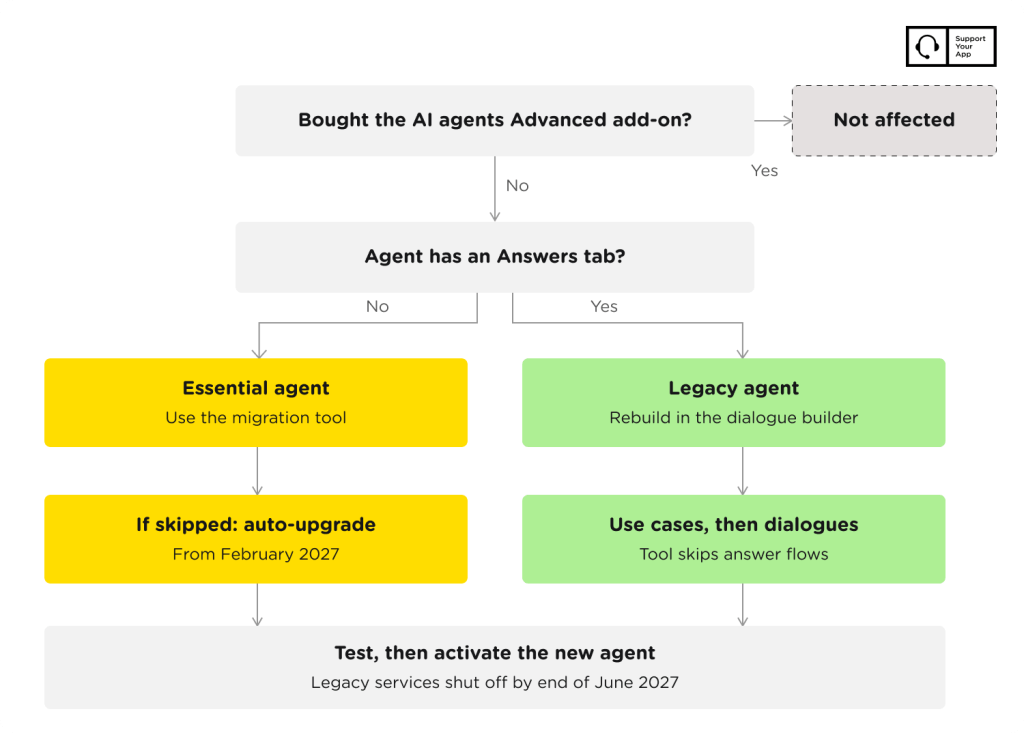
The migration tool doesn't carry over historical conversation logs, analytics, insights, or conversation memory. The switch interrupts ongoing messaging conversations, and Zendesk warns that the migration can't be undone. Export the reports you need first, and pick a low-traffic window to activate the new agent.
Moving early has an upside too. Agentic features that once required the Zendesk AI agents Advanced add-on now come with your plan. That covers Suite Team through Enterprise Plus, plus Support Team, Professional, and Enterprise. Teams that leave Zendesk bot builder now get months, not weeks, to test generative procedures and use cases.
How to Inventory Your Legacy Zendesk Bots
An inventory lists every flow, channel, and brand your current setup touches, so nothing breaks unnoticed during the move. Start in Admin Center under AI agents. Essential agents have no Intents or Answers tab, while legacy agents have an Answers tab and sometimes an Intents tab.
Zendesk suggests listing current answers and intents before you recreate them, and a written checklist keeps that list complete. Run through these items for each agent. If the bot change is part of a bigger help desk move, pair it with a full migration planning checklist:
- Agents: name, type (essential or legacy), and current status
- Answer flows: every answer, its steps, API calls, and variables
- Intents: each intent and the answer it triggers
- Channels: messaging (web, mobile, social), email, web form, and API
- Brands: which brand each agent serves, plus its default language and translations
- Autoreplies with articles: email, web form, and Web Widget (Classic) setups
- Hand-offs: escalation paths, business hours rules, and proactive messaging responses
Add two more columns: who owns each flow and roughly how much traffic it gets. An hourly password reset flow needs more testing than a returns flow that runs twice a month. That ranking tells you what to rebuild first.
Rebuilding Zendesk Bot Builder Flows in the New Experience
The rebuild happens in the new AI agents workspace, where three concepts replace the old ones. The dialogue builder replaces bot builder, dialogues replace answers, and use cases replace intents. Zendesk's guide recommends creating use cases first, then building generative procedures or dialogues to control how the agent responds.
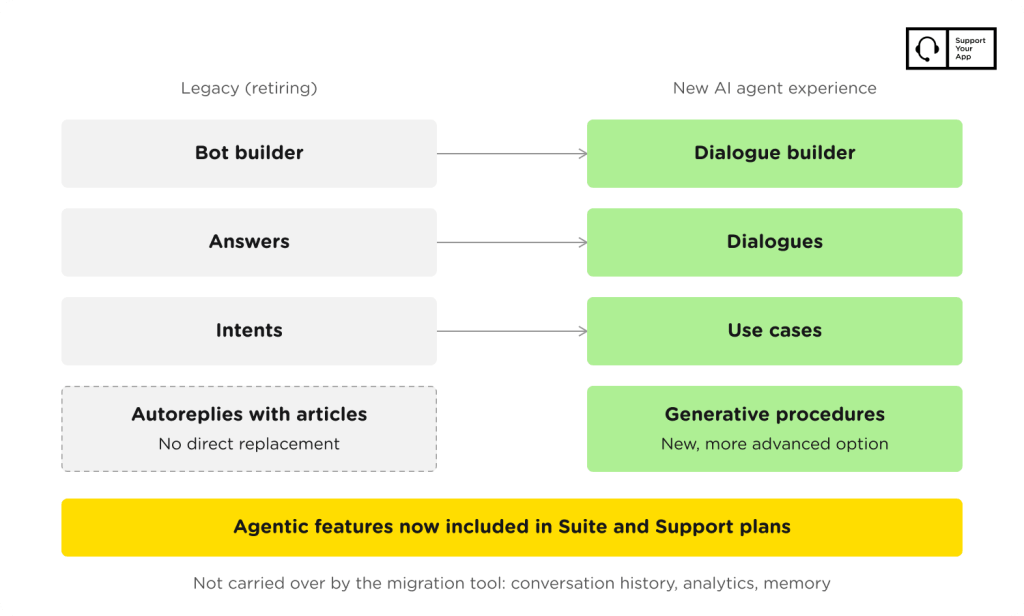
A dialogue gives you a scripted, step-by-step flow, which suits refunds, identity checks, or anything with strict rules. Generative procedures are the more advanced option, where you describe the process in plain language and the agent follows it with the customer.
Most scripted flows translate step by step, so you rarely need to redesign the underlying logic from scratch. Zendesk's migration guide maps each bot builder step type to a dialogue builder block. These are the pairs you'll use most often:
| Bot builder step | Dialogue builder block |
| Send message | AI agent message |
| Present options | Customer message |
| Show help center articles | Generative replies |
| Make API call | Integration or action flow |
| Transfer to agent | Escalation |
| Branch by condition | Conditional |
| Add business hours condition | Availability |
The Set variable step has no direct twin. Instead, you add an action that sets a conversation parameter to any block. System replies change as well: old standard responses map to welcome, BSAT, escalation, and default replies. The new experience also adds replies for unsupported languages, failed escalations, and technical errors.
Test every flow before you activate it. Run each flow in the Test AI agent widget against questions customers asked the old Zendesk bot builder setup. Activating a new agent on a channel replaces the essential agent there. Messaging and email setups migrate as two separate agents, so test both and repoint proactive messaging responses.
What Changes for Billing
Billing can change because Zendesk prices AI agents on automated resolutions, and the new experience may resolve more requests. Zendesk warns that your number of automated resolutions may change as you start using upgraded capabilities. Since pricing ties to outcomes, that shift can change your costs.
Your existing automated resolution (AR) overage configuration stays in place, according to the announcement. Before the switch, pull your current monthly automated resolution count as a baseline. Then compare it weekly for the first month after activation. That way, a jump in resolutions shows up on your dashboard before the invoice.
Rebuild In-House or Get Help
Rebuilding in-house works when you have a few flows, an admin who knows the dialogue builder, and time to test. It gets harder with many brands, custom API integrations, or several languages. Zendesk itself recommends its paid AI Expert offering for complex setups.
Some teams use the deadline to reassess the help desk itself. If you're weighing a Zendesk answer bot alternative, review these Zendesk pros and cons before you commit to a rebuild. Your inventory of flows, intents, and channels carries over to any platform you choose.
If your team would rather spend its time on customers than on block mappings, outside help makes sense. SupportYourApp handles help desk integration and migration, including system setup and configuration. Talking to an expert first can show whether your flows fit an in-house rebuild or need a partner.