



This update is for support leads and CX managers who run email, phone, and chat in separate tools and lose context between them. Here’s what changed in SupportCRM and how each change saves your agents time.
TL;DR
- SupportCRM keeps one customer record that human agents and AI agents both work from.
- Built-in AI tools draft replies, summarize threads, and transcribe, translate, and summarize calls, so agents get the point quickly, even in an unfamiliar language.
- A customer’s emails, calls, and messages sit in one thread, so agents see the full cross-channel history, and every ticket has a named owner.
- Pricing depends on your team size and the features you need.
What’s New in SupportCRM
How often does a customer repeat their order number because the last conversation happened on another channel? This update targets that gap. The new SupportCRM adds AI tools inside the ticket, a shared customer memory for AI agents, and one inbox for every channel.
The main change is memory for AI agents. SupportVoice and SupportBrain now get context from a customer’s previous requests, taken from the summaries of past conversations. The customer doesn’t start from zero on a new call or ticket, even when the last contact happened on another channel.
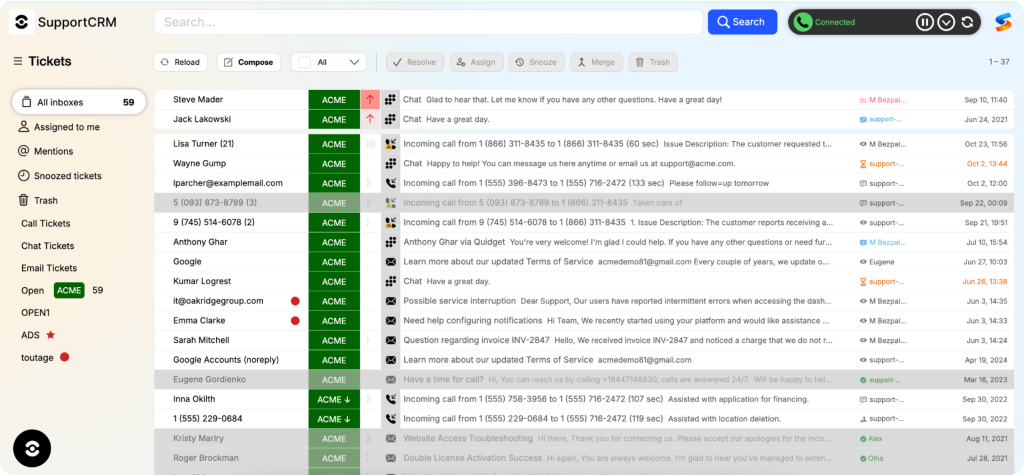
The product is a customer support CRM, the workspace your agents use every day. It brings email, voice, and chat into one place, records who owns each ticket, and keeps every past interaction in a single customer history.
AI Features Inside SupportCRM
The AI features inside the workspace run under one name: SupportBrain, an AI assistant for agents. It handles the small writing and call tasks that eat into an agent’s day, right inside the ticket. A human agent reviews and approves every reply before it goes out.
Rephrase and Fix Grammar. Rephrase rewords a draft reply while keeping its meaning, which helps agents soften a tense answer or simplify a technical one. Fix Grammar catches typos and grammar errors before the reply goes out. Together they cut the time agents spend rewriting the same sentence by hand.
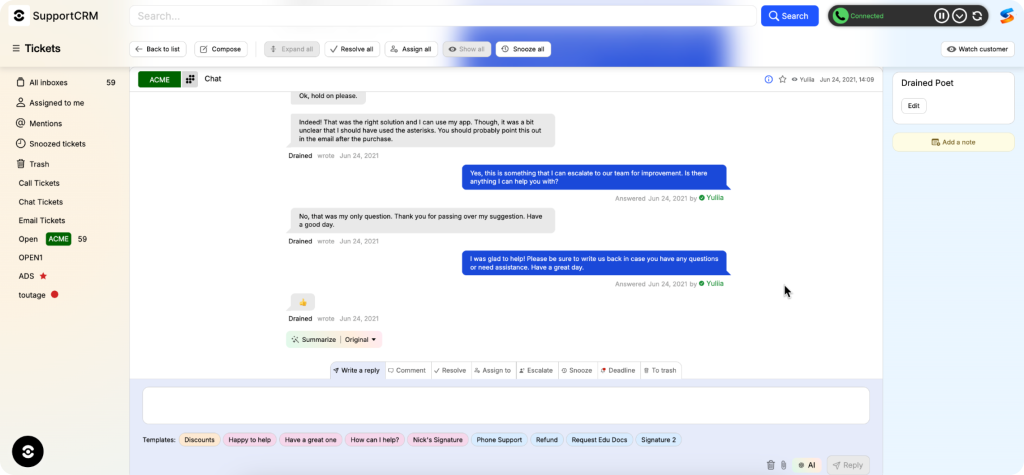
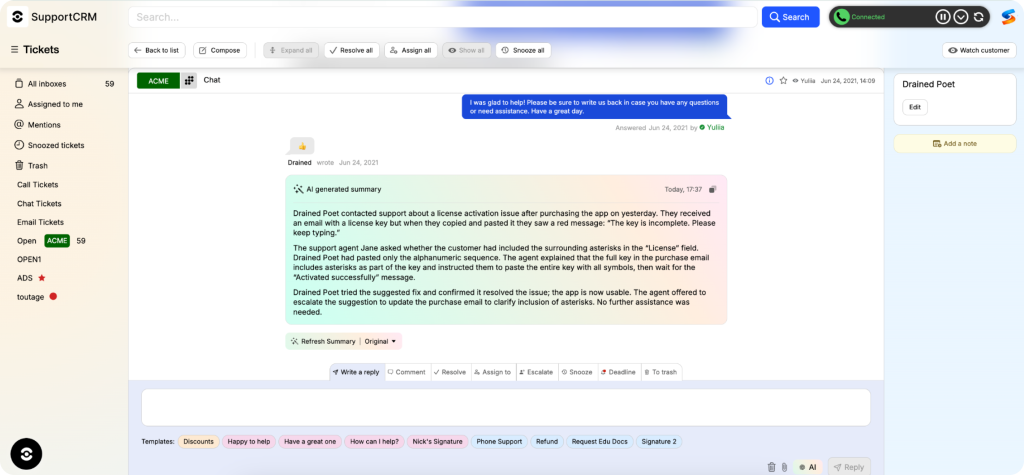
Summarize. Summarize condenses a long ticket thread into its key points. An agent picking up a 30-message conversation reads the summary instead of scrolling through every reply. The customer doesn’t have to explain the issue again.
Before using "Summarize" feature:
After using "Summarize" feature:
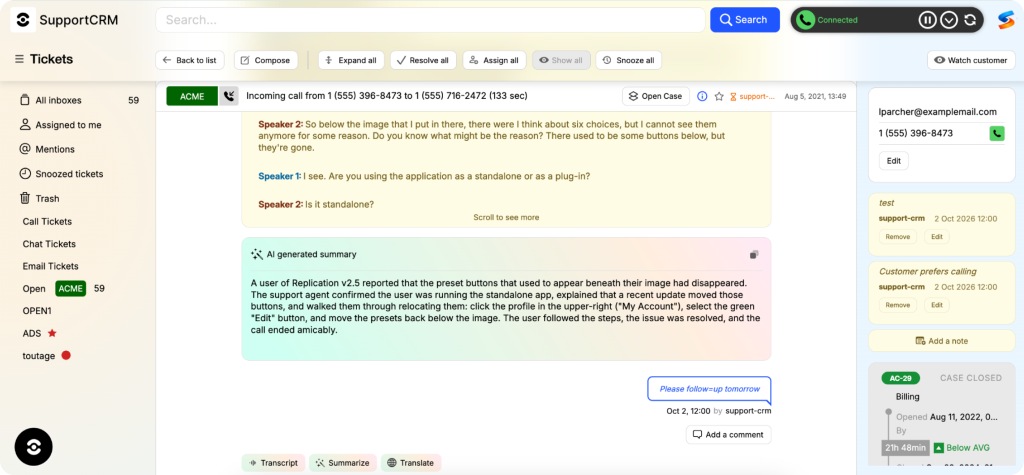
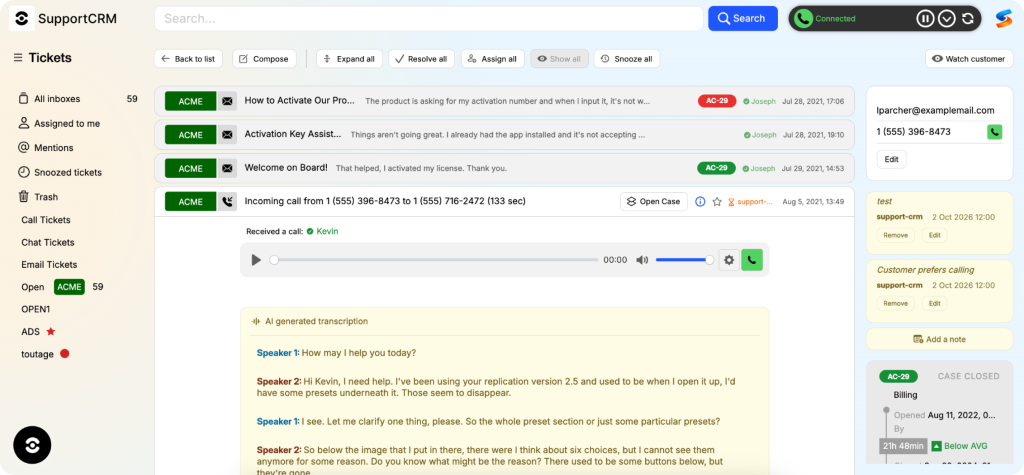
Audio Transcript, Audio Summarize, and Audio Translate. Audio Transcript turns a call recording into text, so agents read the conversation instead of replaying it. Audio Translate translates that transcript into other languages, and Audio Summarize pulls out the key points. Agents get the point of a 20-minute call, even one in a language they don’t speak, without listening to it start to finish.
Here’s how these tools change everyday agent tasks.
| Agent task | Before | With SupportCRM AI tools |
| Catching up on a long ticket | Reading the full thread | Reading a short summary |
| Polishing a reply | Rewriting by hand or in another app | Rephrasing or fixing grammar in the ticket |
| Reviewing a call | Replaying the recording | Reading the transcript or the call summary |
| Handling a call in another language | Waiting for a bilingual agent | Translating the conversation |
For complex tickets that need a full draft, SupportBrain drafts, edits, and translates replies, and a human agent approves every one before it’s sent. SupportBrain is available only in SupportCRM.
Memory for AI Agents: Context That Stays with the Customer
Memory in SupportCRM means the customer’s history stays with the customer. Most AI-powered support forgets the customer once a session closes. A customer explains a refund on chat, calls two days later, and starts from zero. SupportCRM keeps the facts from every conversation on one record, so the next agent, human or AI, picks up where the last one stopped.
Memory is built from context, not full transcripts. For each customer, SupportCRM gives the AI four kinds of data: internal comments, summaries of past chats and calls, customer notes, and contact details. The AI never receives the full conversation or email history, only the summaries. Anything a summary leaves out stays outside the AI’s view.
The context also has a size limit. For chat, the AI currently sees the 30 most recent messages. The team can raise that limit, but an overloaded context makes the AI start forgetting older information.
SupportVoice gains the most from memory, since it runs on SupportCRM. During a call, it reads the customer’s contact details, comments, notes, and conversation summaries. A caller who says “I gave you my tracking number yesterday” doesn’t have to repeat it, as long as the number made it into the summary.
Memory is read-only for SupportVoice. If a customer calls from a new number and introduces themselves, a human agent updates the record in SupportCRM. When a case is too complex, SupportVoice escalates it to a human agent, who sees the full call context in the same workspace.
The same record backs an outbound AI voice agent, which uses the customer’s ticket history when calling back about an open issue. The call can start from what the customer already reported, not from a blank slate.
Human agents get the same context through SupportBrain. Its suggested replies draw on the customer’s summaries and notes. The agent reviews and approves every reply before it goes out.
Memory doesn’t cover every AI channel yet. SupportResponse, the AI customer support agent for chat, doesn’t receive customer data. It works in SupportCRM as a chat channel, like Viber or WhatsApp. A ticket appears in SupportCRM only when the flow set up in SupportResponse creates one.
One Inbox for Every Channel
The shared inbox in SupportCRM keeps a customer’s emails, messages, and calls in one thread. Agents follow the full history of a request across channels without switching tools. Calls are made and received inside the platform and logged to the same thread automatically.
Every ticket has a named owner and a status: Open, Snoozed, or Resolved. Private notes let agents leave context for a teammate without the customer seeing it. VIP status moves high-value customers up the queue, and response templates keep answers to routine questions consistent across the team.
Besides email and calls, the inbox handles Telegram, Viber, WhatsApp, and chats with SupportResponse. Incoming SMS messages show up as tickets too. Other channels can be added on request.
How to Get Started
Start with a demo on your own channels and ticket types. If your team is comparing customer service crm software, bring two or three real cases, like a refund that moved from chat to phone.