

If you run support for a subscription software product, renewals can feel fragile. Every stuck user is a risk. This guide covers the SaaS support practices that work in 2026: multichannel access, personalization, trained teams, smart automation, and the metrics that prove progress. It's for founders and support leads deciding what to fix first.
Key takeaways
- Subscription revenue depends on support, since every unanswered question becomes a reason to cancel when the renewal date comes around.
- Customers happily use automation for quick fixes, but they want a person for messy problems, and the handoff between the two matters most.
- Personalization and proactive updates cost little, yet they shape how customers feel about your product long before anything breaks.
- The right support model depends on your audience and resources, and a handful of core metrics will tell you if it's paying off.
Why Excellent SaaS Customer Support Matters
Bad experiences cost more than most teams expect. Qualtrics XM Institute estimates that poor customer experiences put nearly $3 trillion in global sales at risk in 2026. For a SaaS company, that risk rarely looks like one lost purchase. It looks like a canceled plan. Or a renewal that never happens. Here's where strong support pays off.
Higher Customer Satisfaction
However good your product is, users will have questions. They'll get stuck during onboarding or hit a bug after an update. Traditional software often relies on a one-time sale. SaaS works differently. You earn the subscription again every month, so support has to stay with the customer for the whole journey.
Customers who get timely help tend to stay longer. Many start recommending you. That word of mouth drives organic growth, and it costs nothing in ad spend. When customers can't reach anyone, the opposite happens. Trust drops quickly. Before long, they're comparing you with alternatives and asking colleagues what they use instead.
Lower Churn and Stronger Retention
Winning a customer back is harder than winning them the first time. Once someone decides your product isn't worth the hassle, every email you send fights that memory. Churn hits subscription businesses hard. Revenue arrives month by month, so each lost account keeps costing you long after it leaves.
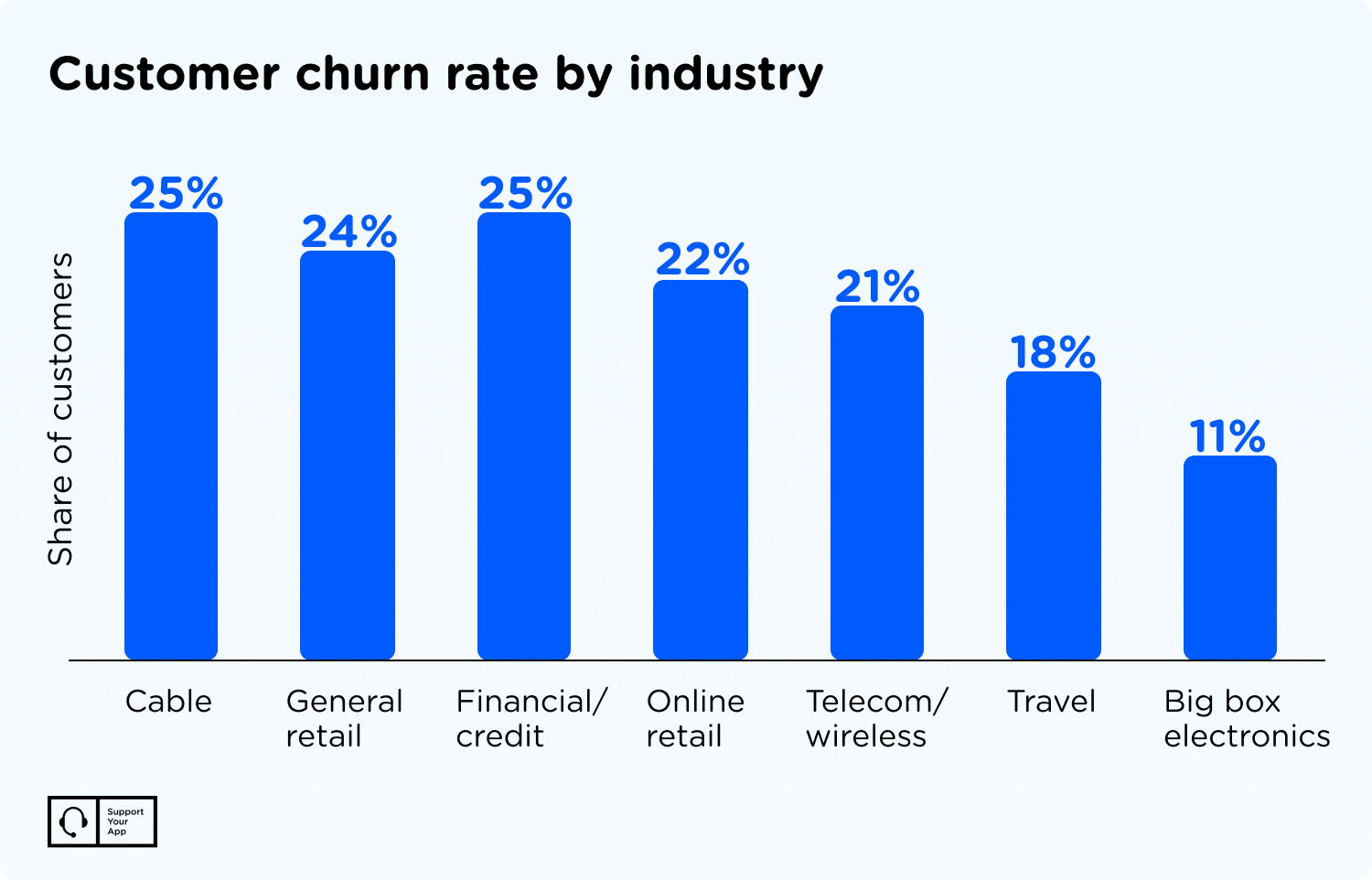
Responsive support gives a SaaS business a steadier base and a better reputation. It's also the cheapest retention tool most companies already own. Few teams use it fully. If you want to go deeper, our guide to SaaS customer retention strategies covers the tactics that keep subscribers renewing.
More Revenue Over Time
More retained customers means more revenue. Quality support costs money upfront, but renewals and upgrades pay it back. Plenty of companies also lose money in less obvious ways. Agents burn hours on repetitive tickets. Problems bounce between people without a fix. Customers notice every delay, and they remember it at renewal time.
Unhappy customers rarely complain loudly. They just spend less. Most of them never tell you why, so the drop shows up in your revenue report before it shows up in your inbox. Good support catches these problems early, while the customer is still willing to give you another chance.
Stronger Differentiation
The SaaS market is crowded. Many products offer similar features at similar prices, and that's where support starts to stand out. Companies that answer fast and make it easy to reach a person earn a reputation for reliability. Reputations like that last. Over time, that becomes the reason buyers pick you over a competitor with a nearly identical feature list.
Higher Customer Lifetime Value
A product's value isn't only in its features. Customers also judge the onboarding and the help they get when things go wrong. When they see support as part of what they pay for, they're more likely to upgrade or add seats. Less frustration means longer relationships. Longer relationships mean higher lifetime value.
Better Feedback and Product Insights
People open up once they know someone is listening. Support is your direct line to users. Agents hear the same pain points and feature requests every day, long before they show up in a survey. Passing those patterns to the product team helps you fix what matters. It keeps the roadmap honest.
Building a Successful SaaS Support Strategy
A good SaaS support strategy needs a clear direction and a few firm performance principles. Without those, teams react to whatever lands in the queue. Priorities shift daily, and agents burn out. Here's where we suggest you start instead, in roughly this order.
- Define your support model. This is the first decision to make, and we'll cover the main options later in the article. Pick a model based on the resources you have today and where your audience spends its time. Context changes everything here. A developer tool and a consumer app rarely need the same setup.
- Balance speed and quality. It's hard to get both, but a strong strategy doesn't give up either one. Many SaaS companies tie response times to plans through a tiered support structure, with service level agreements (SLAs) for each tier. Lower-paying clients still deserve good answers. So keep coaching every agent.
- Be proactive, not reactive. Proactive support means spotting problems before customers report them. Say your service goes down for an hour. Don't wait for the tickets. Tell customers what's happening and when you expect a fix, so they can plan around it. That single message saves a lot of frustration on both sides.
- Use data for continuous improvement. Your customers see your product from angles your managers can't. Go through negative feedback and look for recurring themes, since repeated complaints often point to a deeper issue. Add short post-support surveys too. They show how often agents resolve problems. Patterns show up quickly.
5 SaaS Customer Service Best Practices
The gap between average and excellent service comes down to how customer-centered each interaction feels. Good intentions aren't enough. You need habits your team can repeat on every ticket, in every channel, on busy days and slow ones. These five practices are a solid place to begin.
Offer Multichannel Support
Work doesn't stop at 5 p.m. anymore, and neither do your customers. Some people would rather text than call. Others want a quick chat while they're still inside your product. Offer as many channels as your team can handle well: live chat support, email, phone, and social media. Then staff them properly.
The goal is simple. Customers should reach you through whatever channel feels natural, at whatever hour they need help. If one channel goes silent at night, another one should pick up the slack. Gaps get noticed fast. A customer who can't find help at midnight usually finds a competitor by morning.
Personalize the Customer Experience
Customer service has its proven formulas, but personalization is what people remember. They want to feel heard. Small touches go a long way, like greeting customers by name or referring to a past conversation. You can also suggest discounts or add-ons based on how someone uses your product. Just keep the offer relevant.
Train and Equip the Support Team
A well-trained team solves problems faster and spots improvements no one else would. Whether you outsource SaaS customer support or keep it in-house, run regular training on new features and on soft skills. Give agents genuine autonomy. Reward strong performers, too.
An internal knowledge base helps a lot. Agents find answers to common questions in seconds instead of pinging a colleague. That makes them more self-reliant. It also keeps the queue moving during busy hours, when every extra minute per ticket adds up across the whole team.
Balance Human Touch and Automation
Automation now powers a big share of customer service work, but customers have clear limits on where they want it. In an Avaya survey from March 2025, 70% of customers said they'd prefer a human agent for serious issues like fraud. For simple order tracking, only 19% wanted a person. Context drives the preference.
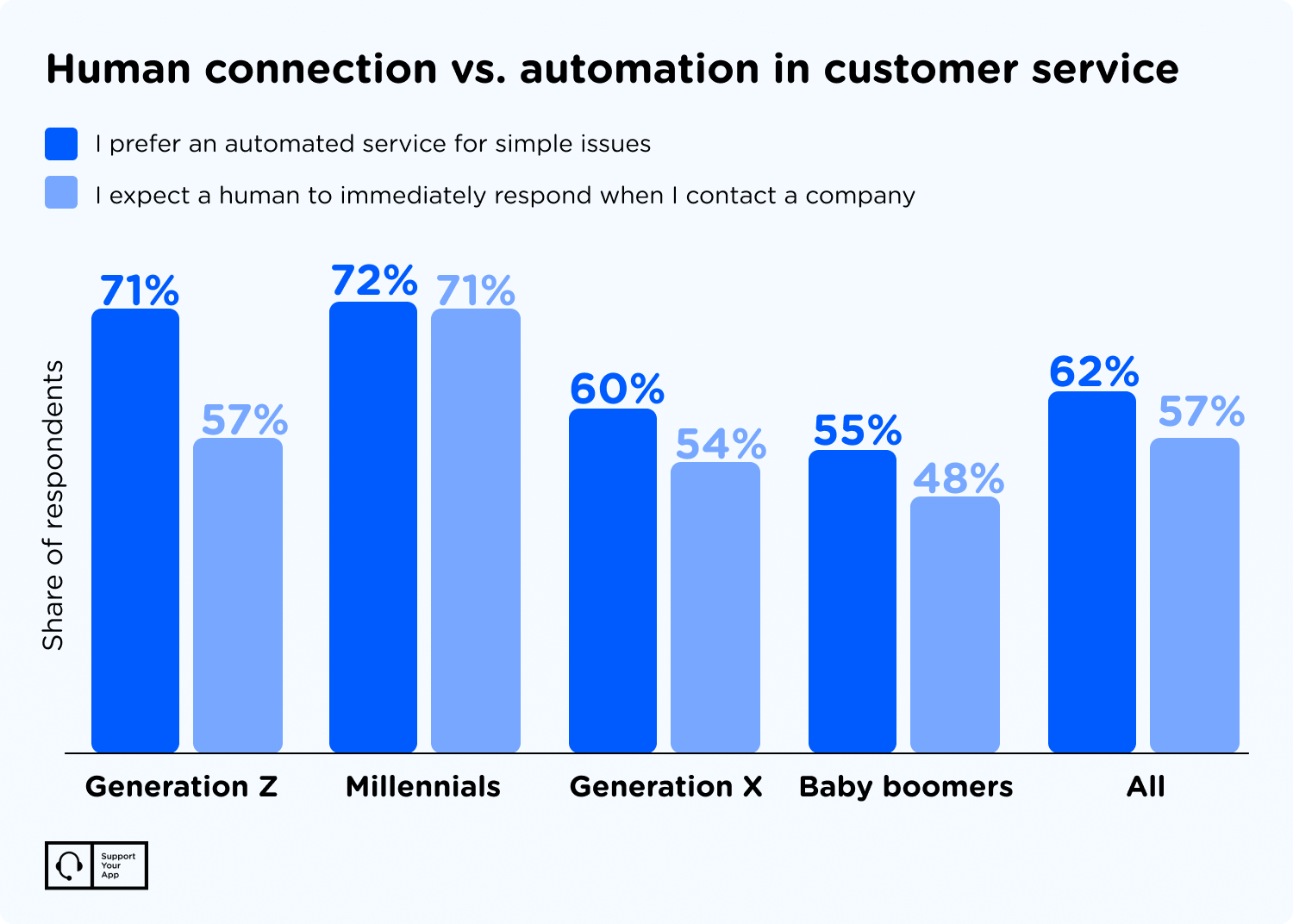
So use automation for routine work, and make the jump to a human quick. Everyone hates a bot that won't let go. Your customer success team should plan for both sides from day one. That's the idea behind SupportResponse, an autonomous AI agent that resolves routine tickets 24/7 and sends complex cases to a person.
Here's how that balance works for a small team. Cocoatech, the company behind the macOS file manager Path Finder, had a two-person support team when a new partnership sent ticket volume up. SupportYourApp and CoSupport AI trained an AI chatbot on Cocoatech's Help Center and internal FAQ. Humans took the complex chats.
Within two months, the AI agent was handling 81% of chat volume, and average resolution time dropped from 8+ hours to 5 minutes. The two agents kept the tricky cases. Nobody needed new hires. You can read the full Cocoatech AI customer service case study for the setup details and the tools the team connected.
Build a Customer-Centric Culture
SaaS businesses depend on loyalty, so the customer has to stay at the center of every decision. Train your team to treat empathy and honesty as core skills. Celebrate customer milestones when you can. When something goes wrong, agents should own the mistake, apologize once, and follow through. Customers forgive honest mistakes.
SaaS Support Models
The right SaaS support model depends on your resources and your audience. Most companies end up mixing several of them. There's no single correct answer. Here are the main options and what each one does well, so you can pick the combination that fits your product.
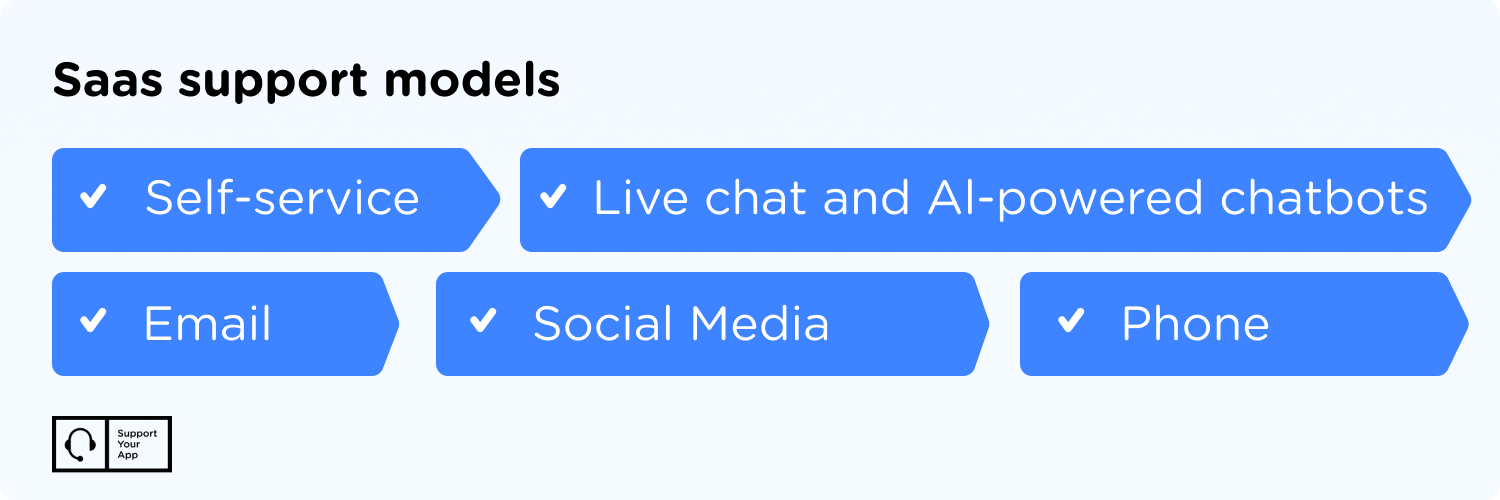
- Self-service. Customers use a knowledge base, FAQ, or help center to solve simple questions on their own. This frees agents from repetitive tickets. Track which help articles people open or abandon, and rewrite the ones that don't help. Keep articles short and current.
- Live chat and AI-powered chatbots. These work well when the help center isn't enough. Chatbots handle basic questions quickly and take pressure off agents. Speed is the main draw. The handoff from bot to human still has to be smooth.
- Email. It's easy to track and still one of the most popular channels. Filters and scheduling keep it efficient. Nothing gets lost there. Support teams can also look up email by name to find past conversations faster and personalize their replies.
- Social media. More companies now treat social channels as a primary support option, since many conversations already happen on Instagram, Facebook, and TikTok. Younger audiences use this channel the most. Some never try email at all.
- Phone. Some teams reserve phone support for premium plans, but every customer group needs it at some point. Certain problems are faster to solve in a conversation. Access to help shouldn't depend on who pays more. Voice still matters to many.
Measuring SaaS Support Effectiveness
Every support team needs a few metrics to know where it stands. Your industry and business model will shape which numbers matter most. Still, these four give most SaaS teams a reliable picture. Track all four together. A single metric on its own can hide problems that the others would reveal.
Customer satisfaction score (CSAT). This is one of the most common metrics. Customers rate their experience, usually right after an interaction with an agent, so you can see how happy they are with the help they got. It's simple to collect. Response rates matter, though.
First contact resolution (FCR). FCR tracks how often your team solves a problem in the first interaction. First-try fixes save money. They also leave customers with a much better impression, because nobody enjoys explaining the same issue to three different agents in a row.
First response time (FRT). FRT measures how long it takes an agent to send the first reply after a customer submits a request. Speed builds early trust. A quick first reply tells customers someone is on it, even when the full fix takes a little longer to arrive.
Average resolution time (ART). ART measures the average time it takes to fully resolve a request, from first message to final answer. A lower ART usually means your team knows the product well. Watch it alongside CSAT, though, since rushed fixes can bring the same customer straight back.
SaaS Support Examples Worth Studying
Some SaaS companies have turned support into part of their brand. Their approaches differ, but they share a habit of listening closely and making help easy to find. That isn't luck at work. Here are three companies to learn from, along with the specific habits you can borrow for your own team.
Slack
Slack built a reputation as a customer-centric company by treating user feedback as product input. Its team pays attention to what people ask for and adjusts the product in response. Slack also answers users on social media. Feedback flows both ways. And it uses AI and automation to make the software easier to use day to day.
Headspace
Headspace designed an onboarding process that reaches both active and inactive users and nudges them back into the app. Users can contact support through email, an in-app help center, and social media. That mix follows the multichannel approach we covered earlier. People get several easy doors.
Zapier
Zapier, a popular workflow automation platform, applies its own product thinking to support. Self-service comes first there. Its Help Center offers video tutorials and step-by-step guides, so many users solve problems without opening a ticket. Like Slack and Headspace, Zapier adds personalized help. It also uses AI in its service.
Summary
Your SaaS product sits at the center of your business, but support keeps customers around once the novelty wears off. It builds trust and protects revenue. It also feeds your roadmap with honest feedback. Support is never finished. Learn from companies that do it well. Then build a setup that fits your product and the pace you're growing at.