



Customer service quality assurance is how a support team checks its conversations against a clear standard and then coaches agents on what the reviews show. This guide is for support leads who see answers drifting between agents or CSAT slipping for no clear reason. It covers standards, scorecards, review sampling, feedback loops, and the choice between running QA in-house or with a partner.
Key Takeaways
- QA only works when its standards match what customers expect, so a strong internal score can still hide unhappy customers.
- A weighted scorecard turns vague ideas like "good tone" into scores that every reviewer applies the same way.
- Reviewing more tickets isn't always better, because the tickets you pick tell you more than how many you score.
- AI can score far more conversations than any human team, but people still decide what those scores mean for coaching.
What Is Customer Service Quality Assurance?
Unhappy customers rarely announce they're leaving. Zendesk's latest customer service research found that 73% of consumers will switch to a competitor after multiple bad experiences, and many never complain first. If nobody tells you what went wrong, you have to go looking for it yourself.
Quality assurance in customer service is that search, done on a schedule. A QA reviewer reads or listens to agent conversations, scores them against agreed benchmarks, and turns the findings into coaching. The scoring covers what the agent said and how they said it, whichever channel the customer used.
Done regularly, QA catches small habits before they harden into patterns. A macro that no longer matches the product is one example, and an agent who sounds curt during a busy shift is another. Fixing those early costs far less than winning back a customer who has already gone to a competitor.
Why QA Matters For Your Support Team
A QA program pays off in more places than the CSAT report. Reviews give managers concrete examples to coach from, and they show agents exactly what good support looks like. Teams usually notice the difference in these areas first:
- Agent morale improves when reviews point out good work as well as mistakes, and agents who feel seen burn out less often.
- Training gets faster because reviewed tickets become ready-made examples for onboarding and coaching sessions.
- Compliance risk drops, since regular reviews show whether agents follow internal policies and industry rules on every channel.
- Customer loyalty grows when support feels the same no matter which agent picks up the conversation.
- Revenue follows retention, because customers who get consistent help are more likely to renew and buy again.
Phone teams get the same benefits from call center quality assurance, where call recordings take the place of written tickets. For the tools and metrics phone teams track day to day, see our guide to quality monitoring in call centers.
Running QA In-House or With an Outsourcing Partner
QA doesn't have to sit inside your own team. Plenty of companies hand customer service quality assurance to the partner that runs their support. That way they skip hiring reviewers and building scorecards from scratch. This works best for startups and smaller companies, especially those without the budget for a dedicated customer support team.
At SupportYourApp, QA is part of support delivery rather than an add-on. Consultants are trained in each client's product and tone of voice, and their conversations get reviewed against those same standards. Clients using our call center outsourcing get recorded calls reviewed and turned into coaching for the consultants who handled them.
Benefits of Outsourcing Customer Service QA
An outsourced QA setup changes who carries the workload and how fast the program starts producing results. These are the gains companies tend to see once a partner takes over:
- Lower cost, because QA comes as part of a service instead of a budget for hiring and managing your own reviewers.
- Specialist knowledge, since outsourced QA teams review conversations every day and know which habits predict a drop in satisfaction.
- Faster setup, with scorecards and reporting already in place from the start.
- Flexible capacity, so review volume can grow during a product launch or holiday peak and shrink again afterward.
Internal vs. Outsourced Customer Support QA
The comparison below sets running QA with your own team against handing it to a partner. Use it to see which costs and trade-offs matter most for your company size and ticket volume.
|
Factor |
In-house QA |
Outsourced QA |
|
Cost |
Higher (hiring, training, overhead) |
Lower and predictable (pay as you scale) |
|
Expertise |
Limited to internal team knowledge |
Access to trained specialists |
|
Efficiency |
Slower ramp-up, resource-heavy |
Faster setup, workflows already in place |
|
Scalability |
Harder to scale quickly |
Team size can be adjusted quickly |
|
Focus |
Diverts attention from core business |
Lets the internal team focus on strategy |
If you're leaning toward a partner, download our support partner evaluation checklist and compare providers on the criteria that matter before you sign anything.
Setting Customer Service Quality Standards
Every company defines quality a little differently. A fintech app may care most about compliance wording, while an eCommerce store watches refund speed. Whatever your definition, you need ways to measure it, and most teams combine the four sources below.
KPIs
Metrics such as first contact resolution and customer effort score show whether quality holds up at scale. They all feed into CSAT, so track them side by side instead of one at a time. Our guide to customer satisfaction KPIs explains how to read each one and what a drop usually signals.
Customer Surveys
Post-conversation surveys tell you how support feels from the other side of the chat window. They often surface problems an internal review misses, like a correct answer that still left the customer confused. Read the comments, not only the scores, because that's where the specific complaints show up.
Employee Surveys
Ask agents how confident they feel about the answers they give. Low confidence in one product area usually points to a gap in the knowledge base or in training. Fixing that gap tends to lift review scores in the same area.
QA Scorecards
A QA scorecard is the tool most teams rely on. It grades each conversation on criteria such as tone, accuracy, empathy, writing style, and procedure, and it works across email, chat, and phone. Templates are easy to find online, and the example below covers email and chat.
|
Name |
Description |
Weight |
|
Voice |
Does the interaction reflect the tone of our company and brand? |
1 |
|
Accuracy |
Did we accurately answer the customer's question? |
1.2 |
|
Empathy & helpfulness |
Did we acknowledge the customer's emotional experience? Did we help them get what they needed, even beyond their direct ask? |
1 |
|
Writing style |
Was the content of the message formatted correctly, did we use correct grammar, and relay the information in a clear manner? |
0.8 |
|
Procedures & best practices |
Were the right tags or categories added? Were the right security policies followed? |
1.2 |
This sample scorecard rates five areas, each with its own description and weight, so soft skills and process adherence count for different amounts. It doesn't measure efficiency, though. Resolution time and post-conversation satisfaction have to come from other reports, so treat any template as a starting point and adapt it to your goals.
For customer care quality assurance in regulated industries, add a critical line to the scorecard. Skipping an identity check or sharing account data with the wrong person should fail the whole review, however polite the rest of the conversation was.
How to Calculate a QA Score
A scorecard turns a reviewer's impressions into a number. It has two parts: a list of questions and a grading scale. Questions sit in categories such as tone or procedure, and each category carries a point value, often on a scale from one to ten.
To get the score, add up the points an agent earned, divide by the points available, and multiply by a hundred. Weighted categories count for more, so a wrong answer about billing can cost more than a missing sign-off. Keep the weights visible to agents, so the score never feels like a mystery.
Scores only mean something when they match what customers expect. If QA results look great while CSAT keeps dropping, the scorecard is measuring the wrong things. Build the criteria from customer feedback and support goals together, and revisit them whenever either one changes.
How Many Tickets Should You Review?
Review too few tickets and you miss patterns. Review too many and reviewers spend hours on routine conversations that teach nothing new. The right number depends on volume and team size. Start with a fixed weekly sample per agent, then adjust it once you see what each review uncovers.
Which tickets you pick matters more than the count. Mix a random sample with targeted picks: conversations with low CSAT, escalations, reopened tickets, and anything handled by agents in their first months. Random tickets show everyday quality, while the targeted ones show where things break.
Analyzing QA Results and Closing the Feedback Loop
Scores sitting in a spreadsheet don't change anything on their own. QA starts paying off when managers combine scorecard results with customer feedback and turn both into regular coaching sessions with each agent.
The Feedback Loop
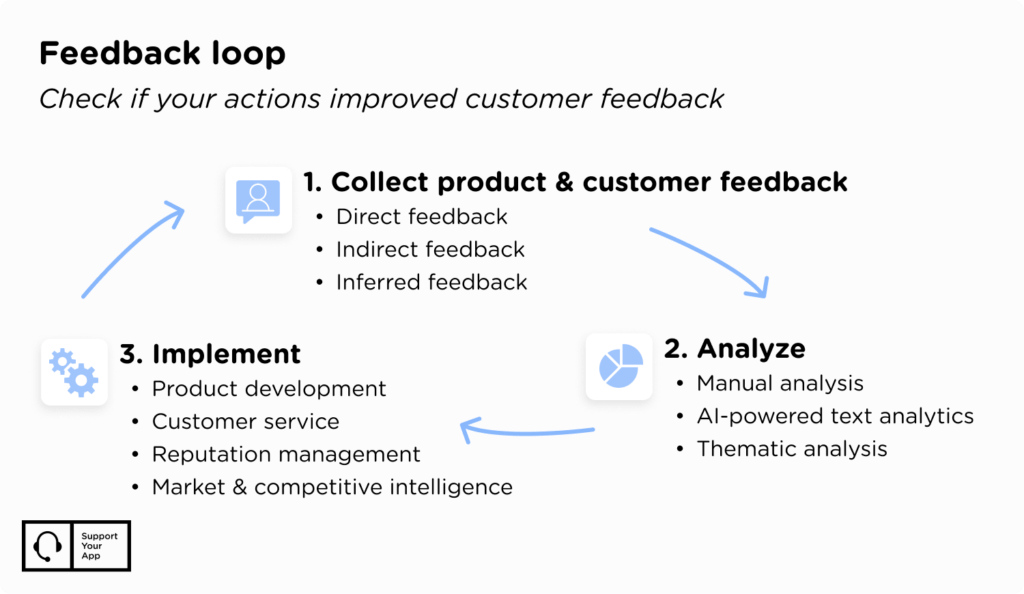
A feedback loop collects input, analyzes it, applies changes, and then checks the results again. Bring agents into review sessions and start with what they do well. People take criticism better when they can also see their strengths written down next to it.
When QA Points to the Process, Not the Agent
Sometimes low scores have nothing to do with how agents write. Our HubSpot Service Hub case study shows this with a vulnerability management platform. Its main SLA workflow checked tickets 10 minutes after assignment, then jumped from a 3-hour alert to a 48-hour one.
That gap left a 21-hour window where a stalled ticket got no automated flag at all. SupportYourApp rebuilt the HubSpot automation and added a workflow that flags any ticket waiting more than 24 hours. Every agent also got a live view of SLA timers. Within the first month, the backlog fell by 99%, from 3,098 tickets to under 25.
If QA keeps flagging slow replies across the whole team, check the workflows before you book more coaching. A broken trigger can drag down every agent's score at once.
Customer Service Quality Assurance Software
Manual review can only cover a small slice of conversations, and QA software fills that gap. These tools plug into your helpdesk, pull tickets for review, and score them without reviewers jumping between programs. Most now use AI to score far more conversations than a human team could read.
The push toward AI keeps growing. In a Gartner survey, 91% of service and support leaders said executives were pressing them to implement AI in 2026. Another Gartner poll found that 95% of service leaders plan to keep human agents.
For QA, this means AI can flag a risky conversation in seconds, while a person still decides what the score means for coaching. Whichever tool you choose, quality assurance customer service work still depends on clear criteria that people wrote and keep updating.
AI also helps before a conversation ever reaches a reviewer. SupportBrain drafts replies from your knowledge base and summarizes long threads, while agents review and send every answer. Replies stay consistent across the team, which later shows up as fewer accuracy flags in QA.
Popular customer service QA tools include:
- AmplifAI, which scores interactions automatically and pairs the results with coaching dashboards that update as reviews come in.
- Zendesk QA (formerly Klaus), a cloud platform with AI-assisted scoring and integrations with most major helpdesks.
- MaestroQA, built around coaching, with custom scorecards and detailed reporting for mid-size and large support teams.
Customer Service Quality Assurance Checklist
A checklist keeps reviewers from skipping the basics when ticket volume climbs. Use the points below as a starting template, then add checks that are specific to your product and industry.
- The agent greeted the customer and used their name where the channel allows it.
- The answer was correct and matched the current knowledge base.
- The agent confirmed they understood the problem before solving it.
- The tone matched your brand voice and stayed calm, even with a frustrated customer.
- The agent followed required steps, such as identity checks and escalation paths.
- The customer knew the next step, and the agent asked whether anything else needed fixing.
- The ticket was tagged correctly and closed with the right status.
Making QA Part of Everyday Support
Customers expect fast answers that take little effort on their side. Customer service quality assurance is how you check they're getting them. Start with clear standards and a scorecard your reviewers trust. Then review a mix of tickets and coach from what you find.
Software now scores more conversations than any team could read, but people still decide what the scores mean. If you'd rather not build all of this yourself, SupportYourApp runs QA as part of its support services for 250+ companies. Get in touch, and we'll show you how a QA program would work with your current setup.