



Customer support vs technical support is a question every growing product team runs into sooner or later. Customer support looks after the whole relationship, from billing questions to account changes. Technical support fixes what's broken inside the product. This guide is for founders and support leads deciding how to split that work. Here's where each team fits.
Key takeaways
- Customer support looks after the whole relationship, while technical support digs into the product itself when something stops working.
- Both teams share the same goal of happy customers, but they need different skills and different escalation paths to get there.
- Tiered technical support keeps simple fixes fast and saves your deepest experts for the problems nobody else can crack.
- AI now takes a big slice of routine tickets, yet the hardest technical cases still come down to a skilled human.
What Is Technical Support?
Picture a customer staring at a frozen checkout page ten minutes before a deadline. A refund policy won't help. They need someone who can read an error log and get that page working again. That person works on the technical side of support, and their job starts right where general product questions end.
Put simply, the technical support definition covers the team that helps users fix software or hardware problems. That includes bugs, crashes, setup and ongoing maintenance. Agents work out what went wrong and walk the user through the fix. Sometimes they fix it remotely. The work is hands-on.
The technical support meaning has also grown wider as companies move more of their operations online. Grand View Research valued the IT service management market at $15.3 billion in 2025. It forecasts a compound annual growth rate of 14.4% from 2026 to 2033. Demand keeps climbing. More software simply means more things that can break.
Customer Support vs Technical Support: Where the Line Falls
Both teams talk to the same customers, so the boundary blurs fast. A billing question can turn into a login bug halfway through a chat. Both functions also aim to improve customer experience, yet they get there in different ways. Focus sets them apart. One team guards the relationship, the other guards the product.
Technical customer service deals with systems more than conversations. Agents diagnose configuration problems and performance errors, then trace each one back to its root cause. They still need patience. Their core goals stay technical. Success means the product works again and the problem doesn't come back next week.
Customer support has a much wider brief. It covers product usage, billing, account changes and order tracking, and it shapes how people feel about the brand. Unlike a technical helpline, it's there for every kind of question. It's about the relationship. Each contact should leave the customer a little happier than before.
In the technical support vs customer support debate, people often assume only customer support cares about experience. That isn't true. Technical agents handle some of the most stressful moments a user goes through, like data that seems lost or a system down before launch. Those moments call for empathy as much as skill. The difference is focus, not care.
Technical Support vs Customer Service at a Glance
Sometimes a quick grid beats a long explanation. The table below lines the two functions up across the points that matter most when you're routing tickets or hiring. Keep it handy. Plenty of teams combine them in the early days, then split them into separate functions once request volume starts to climb.
How the two support functions compare
| Aspect | Customer support | Technical support |
| Main focus | The overall customer relationship and experience | How the product works and why it breaks |
| Typical requests | Billing, orders, account changes, general product questions | Bugs, crashes, installation, configuration, integrations |
| Core skills | Communication, empathy, broad product knowledge | Troubleshooting, diagnostics, deep technical knowledge |
| Main tools | Help desk, CRM, live chat, knowledge base | Ticketing system, logs, remote access, diagnostic tools |
| Team structure | Mostly frontline, with escalation to specialists | Tiered, from self-service to engineering-level help |
| Key metrics | CSAT, response time, retention | First contact resolution, resolution time, escalation rate |
| When a case closes | The customer's question has an answer | The root cause is fixed or passed to engineering |
Importance of Tech Support
A broken product drags every other part of the experience down with it. Good tech support keeps things running, and that keeps customers paying. Nobody renews a subscription for software that crashes every week. The benefits stack up quickly. Here are the main ones worth knowing before you plan your team.
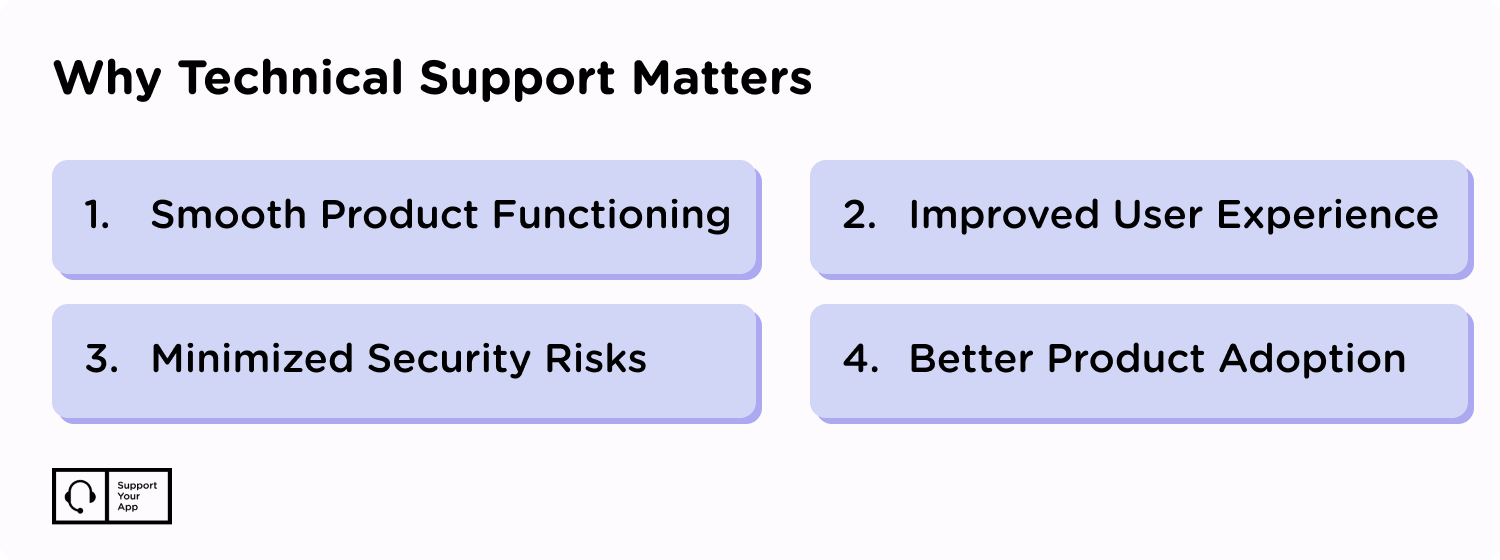
- Smooth product performance. Technical agents make sure the product works as intended, without major disruptions. A dedicated team that tackles issues as they appear keeps your software stable over the long term.
- Better user experience. Few things annoy users more than a bug that won't go away. Software product support keeps the program usable, which lifts satisfaction with the product and the company. It also helps retention and cuts churn.
- Lower security risk. Technical teams patch vulnerabilities and act fast on alerts that call for updates or protection. Stopping breaches and data loss spares businesses painful legal and financial fallout.
- Faster product adoption. Customers still hesitate to try new tools when they aren't sure how well they work. Good technical help guides them through setup with step-by-step instructions and tutorials. It handles the complex questions too. The result is a customer who sticks around.

What Does Technical Support Do? Core Responsibilities
An agent in this role doesn't just patch one thing and log off. The job touches every layer of the software, from the first install to long-term protection. Technical support representatives juggle several duties at once, often within the same shift. These are the most common.
- Step-by-step guidance. This is where the customer support vs technical support split shows most clearly. Technical agents help new users launch and use a program, or explain how their hardware works. They can use any channel to walk people through each step.
- Diagnostics and troubleshooting. Agents identify and analyse the problems customers report. They use diagnostic tools and logs to find the root cause, then apply the right fix so performance stays steady.
- Installation and configuration. Much of the workload lands at the start, when a customer first sets up software or hardware. Every tool also needs tweaking for its specific environment, and agents help customers get those settings right.
- System protection. Agents send timely alerts about upgrades and install regular patches, which keeps systems resilient. A big part of this work is preventing the loss of sensitive information, a serious risk for companies in IT or healthcare. IBM's Cost of a Data Breach Report 2026 puts breach costs at a record high, with lost business among the main drivers.
Levels and Types of Technical Support
Not every problem needs a senior engineer. Some specialists handle quick fixes, while others take on rare and complex cases. Splitting the work this way keeps simple tickets moving fast. It also protects expert time. Here's a quick look at the main support levels most teams use today.
- Tier 0. Users help themselves through the knowledge base and AI chatbots. AI and a well-organised knowledge base can cut repetitive questions noticeably, according to Kartik Jobanputra from Forbes:
“These technologies can handle a wide range of customer queries and provide instant responses. The technology's ability to operate 24/7 ensures customers can receive support at any time, which can enhance their overall experience.”
- Tier 1. Agents get involved here here, mostly for simple requests like password resets or common error messages. Ticketing systems matter most at this stage because they keep every request tracked until someone closes it.
- Tier 2. This level takes more complex issues that need deeper technical knowledge. Anything Tier 1 can't resolve moves up here, sometimes with help from experts in other departments. Agents don't need a degree in the specific technology. But they need to know complex cases inside out.
- Tier 3. This is the top level of IT support, staffed by highly skilled specialists who handle whatever Tier 1 and Tier 2 can't. They train hard and often work with engineering. Many recreate the problem in a test environment to find its root or build a new fix.
Each tier has a job. Together they give customers a clear path from a quick self-service answer to engineering-level help, with both expertise and speed covered. Mixing these types of technical support well is what keeps queues short. Getting the balance right usually takes a little trial and error.
Metrics for Measuring Technical Support Success
You can't improve what you don't measure. Most technical teams borrow their KPIs from general customer service, and they work just as well here. Four metrics matter most. Track them weekly. Patterns show up faster than you'd expect, and small dips become easy to spot.
- First contact resolution (FCR). This tracks the share of issues an agent solves on the first contact. It shows how well agents handle problems without repeat contact, which customers notice more than almost anything else.
- Average resolution time (ART). This measures how long a case takes from first contact to final fix. Slow or unresolved cases hurt the bottom line. The 2025 National Customer Rage Survey puts US revenue at risk from poor complaint handling at more than $596 billion. Averaged over time, ART shows how much capacity the team has for tricky problems.
- Escalation rate (ER). This shows how often cases move from one tier to the next. A high rate can point to an underprepared front line, or to a product that's simply complex.
- Customer satisfaction (CSAT). Teams usually collect this through a short survey after each case. A high score reflects positive interactions and well-handled tickets.
Tips for Providing Great Technical Support
Great technical help doesn't need a huge budget. It needs a clear plan and a few habits your whole team sticks to. These practices keep agents efficient and users happy. Start with the basics. Then build from there as your product grows and your ticket volume climbs.
- Use clear, simple language. In the customer support vs technical support divide, communication styles differ a lot. Customer support keeps things friendly and service-led, while technical agents balance clarity with precision. Customers rarely know your engineers' jargon, so keep language plain at every tier. That speeds up resolution and brings support closer to the user.
- Offer help on every channel. Not every user has time for a call. Some will message you from the middle of a meeting. When customers know they can reach you by email, phone, chat or social media, they're far more likely to get in touch early.
- Follow a structured troubleshooting process. Start with basic checks before moving to complex steps. That keeps escalation smooth and avoids wasting specialist time on problems a quick restart would fix.
- Keep product knowledge current. Agents who know every new release give consistent, high-quality help. Regular training on new features and security updates keeps them sharp.
- Keep it personal. Technical product support isn't about closing a ticket and calling it a day. Using a customer's name and tracking past requests, unresolved ones included, makes people feel like individuals rather than ticket numbers.
- Put technology to work. AI and remote access tools help technical teams work faster. Try using widgets to collect feedback and offer instant help through on-site forms.
If you'd rather not build all this in-house, technical support outsourcing is worth a look. SupportYourApp covers everything from Tier 1 troubleshooting to Tier 3 engineering-level work. The team handles system setup and integration too. You skip the hiring headache.
Future Trends in Technical Support Services
Support is changing fast, and the shifts touch every type of team. AI sits at the centre. It isn't replacing agents. It's making their work sharper, with chatbots and data analysis taking on more of the routine load. Generative AI plays a growing part in software customer support too.
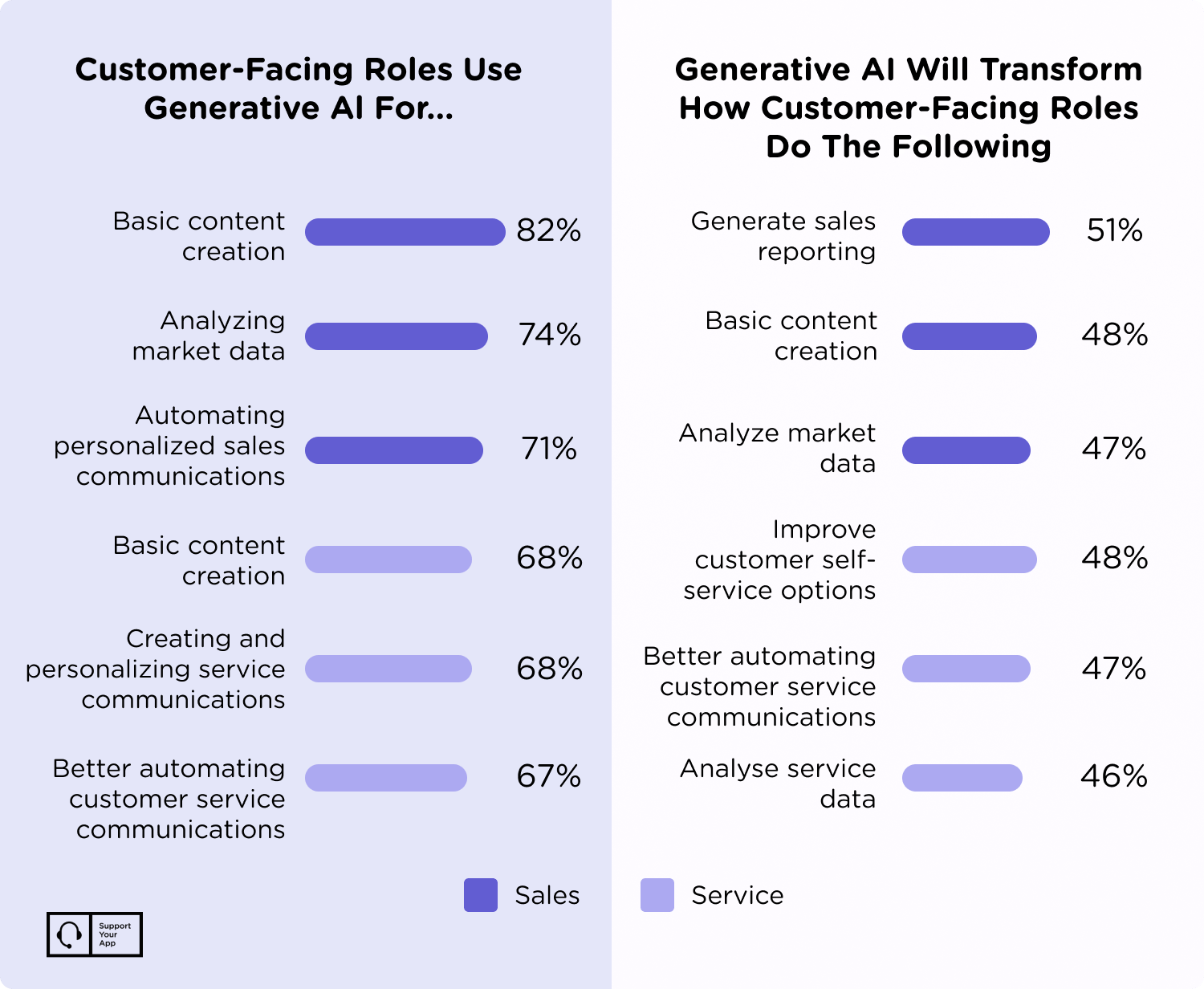
Support is also moving from reactive to predictive. Companies use data analytics and machine learning to spot issues before they happen. Customers will get alerts about likely crashes and upcoming diagnostics instead of waiting in the dark. Fewer surprises follow. That shift saves both sides a lot of frustration over the course of a year.
Remote fixes will grow with the Internet of Things (IoT) too. As more devices connect, technical teams use IoT data to diagnose and solve problems from a distance. Smart devices send live alerts and diagnostic reports. Troubleshooting gets much quicker. Many frustrating, avoidable situations never reach the customer at all.
Customer Service vs Technical Support: Which One Do You Need?
Most growing companies need both, just not in equal measure. Strong technical customer support keeps the product working and customers satisfied. As technology gets more complex and needs constant tweaking, companies have to adapt. It depends on your product. A simple app relies on customer support, while a complex platform needs deep technical tiers.
Whatever mix you choose, the goal stays the same: a user who gets help fast and keeps coming back. Tiered service and a customer-first mindset both move you closer to it. It comes down to people. Find a team that pairs current technical skills with strong soft skills, and your users will feel the difference.









