

If you run a support queue, you know the routine: an agent opens a ticket, scrolls through months of history, and only then starts typing. This guide explains how AI in CRM changes that routine and what to check before you pick a vendor.
TL;DR
- An AI-assisted customer record hands agents the full history and drafts replies they approve.
- Autonomous AI agents take routine chats, emails, and calls, then pass hard cases to people.
- Predictive models push urgent tickets and at-risk accounts to the top of the queue.
- Wrong answers and loose data handling are the two things that can sink the whole setup.
Agentic AI has moved past the pilot stage in many contact centers. Deloitte Digital’s 2026 Global Contact Center Survey found that 35% of contact centers already use agentic AI in operations. Maturity lags behind adoption, though. Intercom’s 2026 Customer Service Transformation Report shows only 10% of support teams have reached mature AI deployment.
What Is AI CRM?
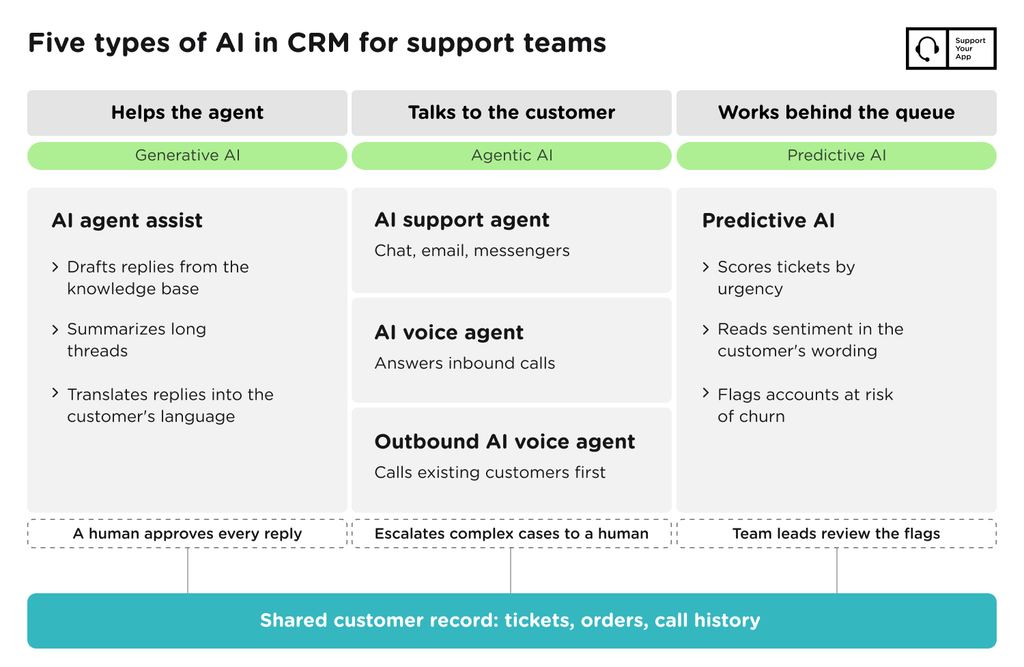
A CRM with built-in machine learning reads and updates customer data instead of only storing it. The models summarize conversations, suggest replies, and rank tickets by urgency, and in some setups they talk to customers directly. For support teams, the payoff is less time spent hunting for context before an agent can answer.
A traditional helpdesk keeps tickets and contact details, but agents still do the reading and typing themselves. An AI powered CRM hands part of that work to software: it pulls the order history and drafts a first answer. AI in CRM is less about storing records and more about turning them into the next useful step.
Types of AI in CRM for Support Teams
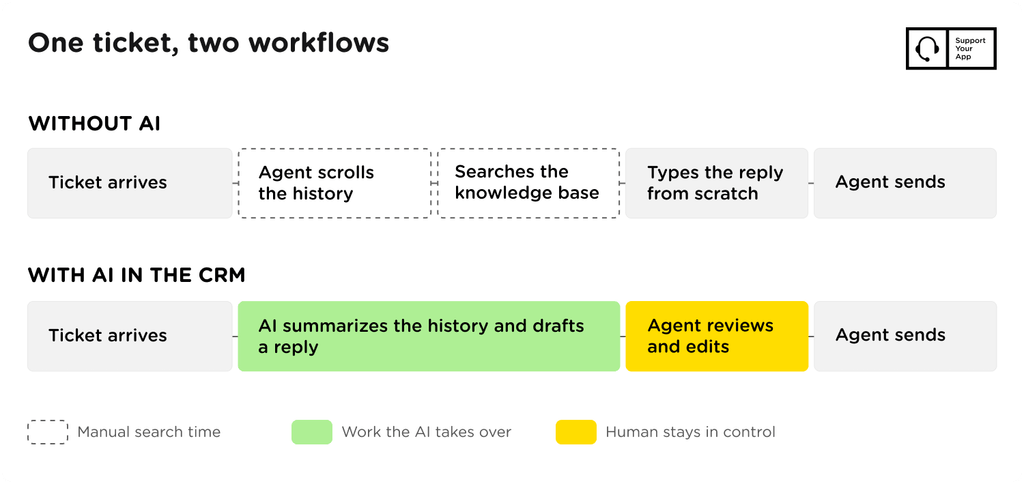
Support teams use five types of AI, and each one covers a different part of the workload. Some help human agents write faster, some talk to customers on their own, and one works in the background ranking tickets. The right mix depends on your channels and your risk tolerance.
AI Agent Assist: a copilot for human agents
AI agent assist works inside the agent’s screen and prepares replies that a person reviews before sending. This is the generative AI CRM layer, where the model writes text instead of only sorting it. It drafts answers, condenses long threads, and translates replies into the customer’s language.
SupportBrain follows this model. It drafts and translates replies, pulls answers from the knowledge base, and summarizes long threads in 3–5 lines. A human agent approves every reply before it goes out, on routine and complex tickets alike. Teams that want an AI CRM assistant without giving up control of tone usually start here.
AI Support Agent: handling routine requests on its own
An AI support agent talks to customers directly and resolves routine requests without a person in the conversation. This is an agentic AI: the software picks a next step and takes it, such as checking an order status or closing a solved chat. Some vendors describe the whole setup as an agentic CRM.
Memory is what separates a CRM-connected agent from a basic chatbot. A chatbot starts every chat from zero. A CRM AI agent reads the customer’s past tickets and recent orders, so nobody has to retell last week’s problem. When a case turns complex or sensitive, the AI agent hands it to a human with the context attached.
SupportResponse works this way on live chat and email, plus messengers such as WhatsApp and Viber. It answers from the knowledge base, triggers custom flows, and auto-closes resolved chats. It covers routine L1 requests around the clock and escalates anything beyond that to a human agent.
AI Voice Agent: inbound calls
An AI voice agent answers inbound calls, works out why the person is calling, and either resolves the request or routes the call. It looks up account data mid-call, and afterward the transcript and summary land in the customer record for the next agent.
SupportYourApp’s AI voice agent, SupportVoice, handles inbound calls 24/7 in 120+ languages. It routes callers by intent, looks up account data, updates records, and escalates complex calls to a person. It’s voice-only and runs on SupportCRM, so call history shows up next to chat and email tickets.
Outbound AI Voice Agent: proactive calls
Outbound calls flip the direction: the AI calls existing customers first. Common jobs include confirming appointments, following up on a failed payment, and checking a delivery address. Each call starts from the CRM record, so the AI knows who it’s calling and what it needs to confirm.
An outbound AI voice agent works best for short calls with one clear goal. The answers go back into the customer record, so the human team sees a changed address or a declined appointment without dialing anyone. When a conversation goes off-script, the AI escalates it to a person instead of improvising.
Predictive AI: prioritizing and flagging risk
Predictive AI doesn’t talk to anyone. It scores tickets by urgency, reads sentiment, and flags accounts showing signs of churn, such as repeat complaints or falling usage. Agents then see the frustrated enterprise customer at the top of the queue instead of in fortieth place.
These AI CRM features need clean historical data. A churn model trained on a year of consistently tagged tickets gives useful flags, while one trained on a messy export gives noise. Treat predictive scores as a sorting aid, and let team leads review the flags before anyone acts on them.
AI CRM Use Cases and Results
The strongest results come from teams that matched one type of AI to one specific bottleneck. Two SupportYourApp client projects show both models at work: agent assist with human approval, and a human agent paired with an autonomous AI agent.
Obris Agency, a web studio, has five in-house agents who support client sites after launch. Agents spent minutes reading long project threads before every reply. Obris connected SupportBrain to its helpdesk to summarize threads and draft replies, with agents approving each one. Here’s how Obris Agency improved its customer support.
Obris Agency, after three months with SupportBrain:
- 45% faster first replies across all requests
- 65% lower average handling time per request
- 94% average CSAT score across client requests
Mailcheck, a UK email verification platform, needed 24/7 multilingual coverage days before a promo campaign. The AI agent learned from Mailcheck’s knowledge base, then took pricing and setup questions. Sensitive or complex requests went straight to the human agent. Here’s how SupportYourApp launched an agent plus AI support setup in 7 days with SupportResponse.
Mailcheck, with one human agent and SupportResponse:
- 81% of routine requests resolved without human intervention
- 3 seconds AI first response time
- 51% faster resolutions across the board
People kept the judgment calls in both projects. The AI took over the reading and the repetitive answering, which is where most handling time goes. In each case, the gain came from AI that had the customer’s history at hand. That access is the main thing AI CRM software adds over a standalone chatbot.
Risks and Limits of AI in CRM
The two biggest risks are confident wrong answers and careless handling of customer data.
Language models can state a refund policy that doesn’t exist or quote last year’s plan limits. The risk grows when the knowledge base is outdated, because the AI repeats whatever it finds there.
Agent assist limits the damage, since a person reads every draft before it reaches the customer. Autonomous agents need tighter guardrails. Restrict them to topics the knowledge base covers, and set clear escalation triggers for billing disputes and complaints. Review a sample of AI conversations every week, and update the knowledge base the day a policy changes.
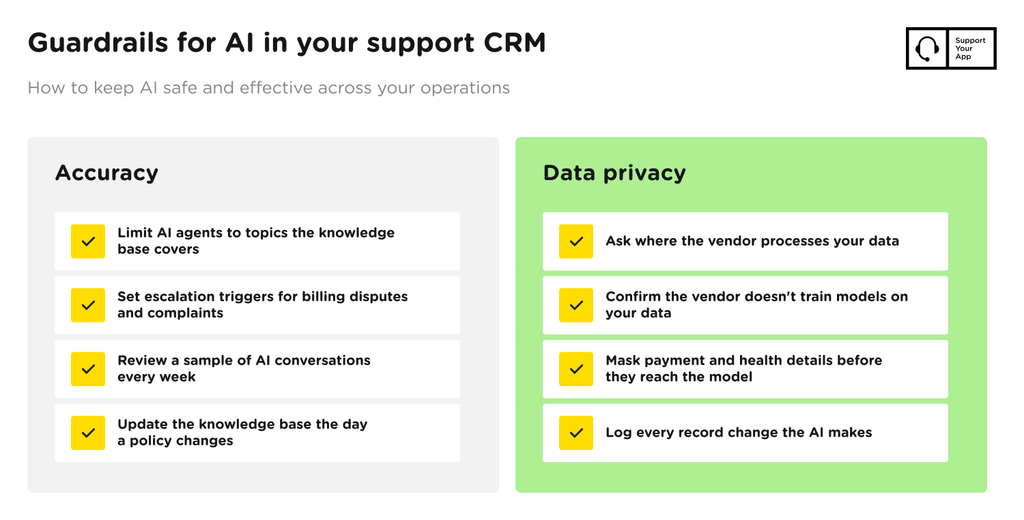
Customers pay attention to what companies do with their data. A 2025 Qualtrics study found that 53% of consumers name misuse of personal data as their top concern about AI-automated interactions. Before you connect any model to customer records, ask where the vendor processes data and whether it trains models on yours.
Check which certifications cover the setup, such as ISO/IEC 27001, GDPR, and CCPA. Mask payment details and health information before they reach the model. Limit each AI agent to the fields its job requires, and log every record change it makes.
How to Choose an AI CRM
Start with the support problem you need to fix, then check how each platform handles your channels and data. A team buried in repetitive chats needs an autonomous agent first. A team with complex technical tickets gets more from agent assist, because accuracy matters more than speed there.
Most vendor demos look alike, so compare platforms on the same five criteria. When you shortlist a CRM with AI, test each criterion on a sample of your own tickets instead of the vendor’s demo data. Your own tickets expose gaps that polished demo scripts hide.
| Criterion | What to check |
| Channels | Chat, email, messengers, and voice in one inbox with shared history |
| Integrations | Connection to your helpdesk, billing, and order systems |
| Quality control | Human approval options, escalation rules, conversation review, analytics |
| Security | ISO/IEC 27001, GDPR, CCPA, data masking, no training on your data |
| Price | Billing by agent seats, chat volume, or call minutes |
Pricing models differ more than headline prices suggest. Agent assist tends to scale by seats, autonomous chat agents by conversation volume, and voice agents by call minutes. Model next year’s volume before signing. A per-conversation price that looks cheap at 2,000 chats a month reads differently at 20,000.
If your agents switch between separate tools for each channel, fix the workspace first. A customer service CRM such as SupportCRM brings email, voice, and chat into one inbox. Most AI CRM tools give better answers when they read from one unified record instead of three disconnected ones.
Summary
AI in CRM pays off when each type of AI matches a specific support job. Agent assist speeds up human replies, autonomous chat and voice agents absorb routine volume, and predictive models sort the queue. The quality of your knowledge base and the limits you set on data access decide how well any of it works.
An AI powered CRM changes what your support team spends time on. If you’d like that mix running on your channels, SupportYourApp pairs trained support agents with AI agents and agent assist.