
Call volume keeps climbing, and customers expect answers at 2 a.m. Hiring another shift starts to feel like the only option, thought it isn't. This guide is for support leaders at SaaS, eCommerce, and fintech companies who are weighing an AI call center. You'll see what it does, what it costs, and how to roll it out without hurting service quality.
TL;DR
- AI answers routine calls and chats around the clock, while people take the hard cases.
- The strongest setups are hybrid, with AI on volume and human agents on judgment and empathy.
- Pricing models differ a lot, so compare them before you sign anything.
- Start with a single use case, measure it, then expand.
By 2029, agentic AI will resolve 80% of common customer service issues without human help, according to Gartner. Gartner expects the change to cut operational costs by 30%. That's a big shift. Teams still staffing phones the old way will feel it first.
What Is an AI Call Center?
Think of it as a phone and chat operation where software handles the first layer of work. An AI call center uses speech recognition, language models, and automation to answer customers and complete simple tasks. People handle anything complex.
That doesn't mean robots replace your agents. In a well-run setup, AI takes routine calls like password resets and passes harder ones to a person with full context. Customers get speed, while agents get fewer repetitive tickets.
Most teams don't build this from scratch. They buy AI call center solutions or work with an outsourcing partner that runs the tech and the agents together. The second route is faster.
The takeaway: It's a hybrid operation. Software handles volume, and people handle judgment.
How AI in Call Centers Works
Under the hood, a handful of technologies do most of the work. Each one covers a different step, from hearing the caller to taking action inside your systems. Here's the breakdown.
Speech Recognition
Speech recognition turns a caller's voice into text as they speak. It lets software understand someone who says "my card got declined twice" instead of pressing 4. Accents are the toughest test.
Natural Language Processing (NLP)
NLP works out what the customer means from what they said. It picks up intent, like "cancel" or "refund," and pulls out details such as order numbers or account emails. Good intent detection separates correct routing from a customer stuck in a loop.
Generative AI
Generative AI writes responses instead of picking lines from a fixed script. It can draft a reply, summarize a long call, or explain a billing policy in plain words. Generative AI in call centers works best when it answers from your own knowledge base. That keeps the replies honest.
Agentic AI
Agentic AI goes one step further. Instead of explaining your return policy, it checks the order, confirms eligibility, and processes the return inside your systems. Picture the difference between a clerk who points at the returns desk and one who hands you the refund.
Automation and Workflows
Automation ties the layers together. Rules decide when AI handles a request alone, when it asks for approval, and when it hands off to a person. AI and automation in call centers pay off only when those handoff rules are clear.
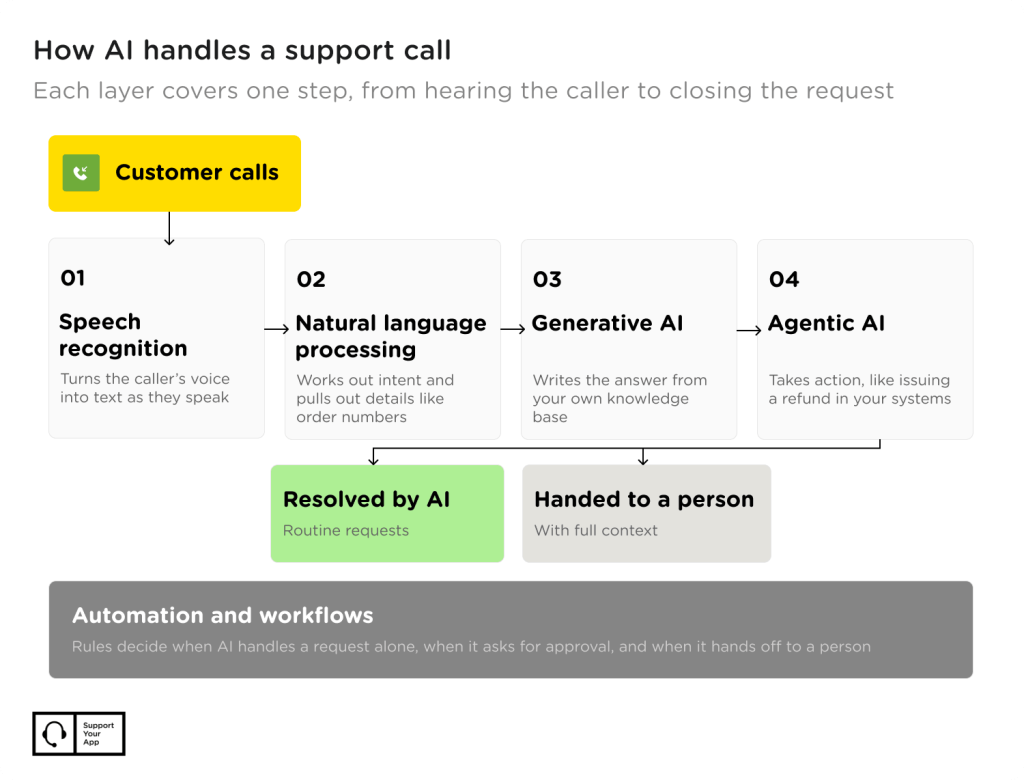
The takeaway: Each layer covers one step. Weak speech recognition or vague handoff rules will drag down everything built on top.
Key Benefits of AI in Call Centers
The upside goes well beyond a lower monthly bill. Here are the gains support teams report most often.
- Lower cost per contact. AI handles routine calls for far less than a live agent's time costs. Your people do higher-value work.
- 24/7 coverage. Night and weekend calls get an answer without a third shift. Time zones stop mattering.
- Easier scaling. Product launches and holiday peaks stop turning into hold-time disasters. AI absorbs the spike while your team handles escalations.
- Higher first contact resolution. Smarter routing sends callers to the right place on the first try. Agents also see account context before they say hello.
- Better CSAT. Shorter waits and fewer transfers make customers happier. Nobody enjoys repeating an order number three times.
- Agent assist. AI drafts replies, finds answers, and summarizes threads while agents talk. New hires ramp up faster.
The takeaway: The biggest benefits of AI in call centers show up first in coverage and speed. Savings follow once routing works.
AI Call Center Use Cases
Most teams start with one or two of these and add more once the first ones prove themselves. Generative AI call center use cases often come first because they're low risk and quick to set up. Agentic tasks usually follow later.
1. Inbound Call Routing
AI listens to why someone is calling and sends them to the right queue. An AI inbound call center can greet every caller, confirm identity, and pick the right team in seconds. Callers skip the phone tree and agents get labeled cases.
2. Ticket Deflection
Plenty of calls ask the same handful of questions, like order status or password resets. An AI call center agent answers those from your knowledge base and closes the conversation. Your team never sees the ticket.
Welcome to Bob, a UK body wash startup, cut support response time by 99.7% with an AI agent on email, without hiring more staff. Read the Welcome to Bob case study.
3. Agent Assist
During a live call, AI suggests answers, pulls up order history, and drafts follow-up notes. The agent stays in charge and decides what to say. That suits sensitive topics. Nothing goes out unchecked.
4. Quality Monitoring
Manual QA teams can only review a small sample of calls. AI scores every conversation against your checklist and flags the ones that need a closer look. Coaching gets faster and fairer.
5. Voice AI for After-Hours Calls
Call center voice AI picks up the phone instantly, day or night. It answers common questions, creates tickets in your CRM, and escalates urgent calls to an on-call person. Overnight voicemail piles disappear.
Softorino, a software company, added an AI voice assistant for 24/7 phone support and saw 95% faster replies. Read the Softorino case study.
6. Sentiment Analysis
AI tracks tone during a conversation and spots frustration early. When a caller's patience runs thin, the system can alert a supervisor or move the call up the queue. You catch churn risks before they turn into one-star reviews.
7. Task Completion
Some AI tools go past answering and finish the job, like processing refunds or pausing subscriptions. They work inside your CRM and billing tools with the same permissions an agent has. Start with low-risk, reversible tasks.
8. Multilingual Chat and Email
The same AI that answers calls can often cover chat and email too. That's handy for teams selling in several countries with a small support crew. One knowledge base feeds everything.
FitXR, a VR fitness platform, automated 76% of support tasks with an AI agent across chat and email in 46 languages. Read the FitXR case study.
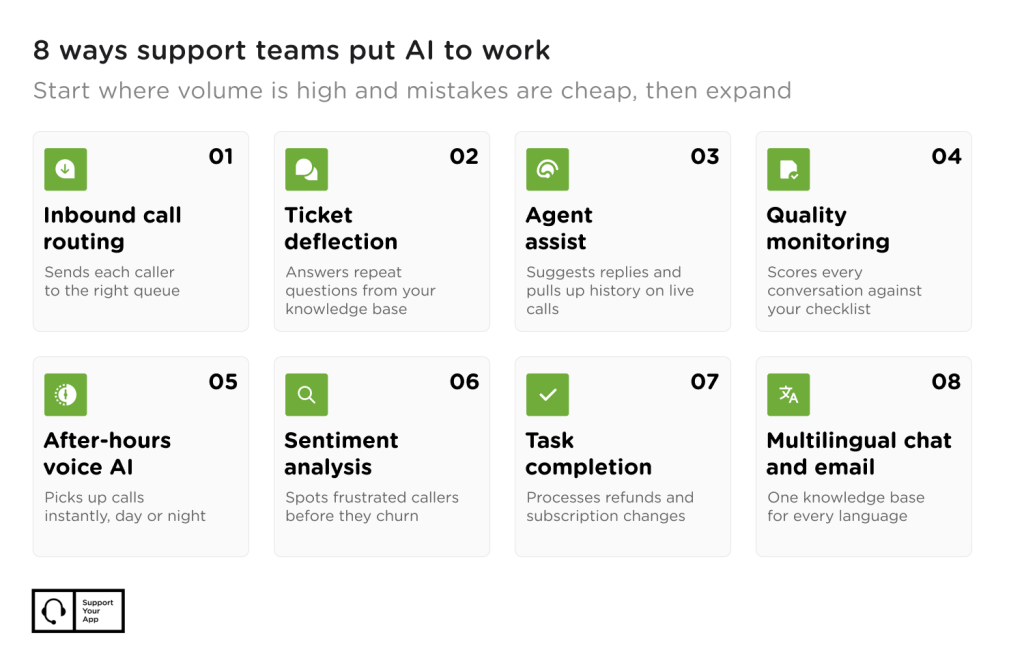
The takeaway: Pick the use case where volume is high and mistakes are cheap. Expand from there.
Agentic AI in Call Centers
Most AI tools in support answer a question and stop there. Agentic AI takes a goal, like "refund this damaged order," and works through every step until it's done. It reads the order, checks the policy, issues the refund, and sends the confirmation.
An agentic AI call center needs write access to your systems, such as billing, CRM, and order management. That access is where the value comes from. So is the risk. Set guardrails first. Cap the refund amount the AI can approve alone, log every action it takes, and route anything unusual to a person. Begin with reversible tasks like rebooking or address changes before you trust it with money.
Agentic tools also make proactive service possible. The AI can spot a failed payment and reach out before the customer even notices. Fewer angry calls follow.
The takeaway: Agentic AI saves the most time and carries the most risk. Clear limits make it safe to use.
AI Call Center vs Traditional Call Center
Each model has a place. The right choice depends on your call volume and how complex your calls get.
| AI-only | Traditional | Hybrid | |
| Availability | 24/7 by default | Limited by shifts and headcount | 24/7, with people on call for escalations |
| Cost model | Usage-based (minutes, conversations, resolutions) | Per agent or per hour | Mix of usage fees and agent costs |
| Complex issues | Weak; needs a handoff path | Strong | Strong, since people take them |
| Scaling speed | Fast | Slow; needs hiring and training | Fast for routine work, steady for complex work |
| Best for | Simple, repetitive requests | High-touch, emotional, or regulated calls | Most growing companies |
For most teams, hybrid wins. AI takes the repetitive calls, and trained agents handle billing disputes and upset customers. Pure AI looks cheap until a frustrated customer can't reach a human and leaves for good.
The takeaway: Hybrid gives you AI speed without losing the human safety net.
How Much Does AI in Call Centers Cost?
Pricing varies a lot, and the sticker price rarely tells the whole story. Match the pricing model to how your support volume behaves. Common structures include:
- Per minute for voice AI, which suits teams with predictable call lengths.
- Per conversation or per resolution for chat and email agents, which ties cost to outcomes.
- Per seat for agent-assist tools that sit inside your helpdesk.
- Setup and integration fees for connecting AI to your CRM, billing, and knowledge base.
Most teams pay for AI in call centers through a mix of these. Volume decides the mix. If you also want AI call center software that puts email, voice, and chat in one workspace, budget for those seats too.
Watch for hidden costs. Someone has to keep the knowledge base current, review AI conversations, and tune handoff rules. Outsourcing partners often bundle that work into one price, which makes budgeting simpler.
The takeaway: Compare total cost per resolved contact, not the headline rate.
Best Practices for Implementing AI in Your Call Center
Rollouts fail for boring reasons. Most problems with AI in call centers come from messy documentation or unclear escalation paths. These six practices prevent them. Each one is easy to skip and costly to fix later.
1. Start With One High-Volume Use Case
Pick a request type that's frequent and simple, such as order tracking. Launch AI for call centers on that single flow, watch the results for a few weeks, then add the next one. Small wins build trust with your team.
2. Clean Up Your Knowledge Base First
AI answers only as well as the content behind it. Outdated help articles turn into wrong answers at scale. Fix them before launch.
3. Design the Handoff Before the Bot
Decide exactly when a call moves to a person and what context travels with it. Customers hate repeating themselves. A clean handoff with the full transcript fixes that.
4. Tell Customers They're Talking to AI
Be upfront about it, and always offer a quick way to reach a human. Transparency builds trust while hiding it backfires the moment the AI gets something wrong.
5. Track the Right Metrics
Containment rate can lie. A customer who hangs up in frustration still counts as contained. Track first contact resolution, CSAT, and escalation quality next to it. Any call center AI project needs all of them to tell the full story.
6. Keep People Training the System
Assign agents to review AI conversations every week and flag bad answers. That feedback loop matters most. Contact center AI improves fastest when the people closest to customers guide it.
The takeaway: Treat AI like a new hire. It needs good training material, a clear manager, and regular feedback.
How SupportYourApp Approaches AI-Powered Call Center Support
SupportYourApp has run support for growing tech companies since 2010, with 1,500+ professionals working in 60+ languages. We pair human teams with our own AI tools, so you get an AI powered call center without building one yourself.
SupportVoice answers inbound and outbound calls 24/7 in 32 languages and hands complex calls to a person. SupportResponse resolves routine chat and email tickets end to end. Complex cases go to people.
For sensitive conversations, SupportBrain drafts replies, finds answers, and summarizes threads, but agents review and send every message. SupportCRM keeps email, voice, and chat in one inbox, so nobody loses context. Security comes built in. Every product runs under ISO/IEC 27001, PCI DSS Level 1, and GDPR, CCPA, and HIPAA compliance.
The Bottom Line
An AI call center works best as a partnership between software and people. Let AI take the repetitive calls and late-night volume. Keep your agents on the conversations that need judgment, and give them AI tools that make those calls faster.
Start small, measure honestly, and expand once the numbers hold up. The teams that get this right don't replace their people. They free them up.