



If you run support at a SaaS, fintech, or eCommerce company and you're comparing vendors, this guide is for you. It shows how to choose a customer support outsourcing partner using 10 criteria that cover security, scalability, AI, pricing, and quality. Each section explains what to ask, what a strong answer sounds like, and which warning signs should end the conversation early.
Key Takeaways
- Picking the wrong support vendor can hurt your brand for months, long before the damage shows up in CSAT, churn, or refund numbers.
- Security and scalability decide whether your outsourced team helps you grow or turns into the bottleneck everyone complains about.
- The strongest partners pair AI for routine volume with trained people for cases that need judgment, and they can explain where that line sits.
- Omnichannel support only works when every agent sees the full conversation history, whichever channel the customer started on.
- A dedicated Service Delivery Manager often separates a vendor that closes tickets from a partner that improves your support over time.
How to Choose a Customer Support Outsourcing Partner Without Costly Mistakes
Imagine a customer writing to you at 2 a.m. about a failed payment. They're frustrated and they want an answer now. The person who replies works for a company you picked months ago, and that reply either keeps the customer or sends them to a competitor. You won't be in the room when it happens.
That's why comparing hourly rates in a spreadsheet won't get you far. You're handing over customer relationships and sensitive data, plus a big piece of how your brand sounds. The 10 criteria below work as a checklist for every vendor on your shortlist. Choosing the right outsourcing partner gets easier when everyone answers the same questions in the same order.
1. Security and Compliance
A support vendor sees your customers' names, payment details, and account histories every day. IBM's 2025 Cost of a Data Breach Report puts the global average cost of a breach at $4.99 million. Handing data to a third party doesn't move that risk off your books. It adds another set of hands that can make a mistake.
Treat ISO/IEC 27001 certification and GDPR and CCPA compliance as the baseline. Then check what your industry adds on top. Healthcare needs HIPAA, and if you process card payments, your shortlist should only include PCI-compliant call center providers. A partner that can't show a current certificate on request isn't ready for regulated work.
Next, look past the paperwork. Ask how they encrypt data in transit and at rest, who can access your systems, and how fast they report an incident. If your customers live in several regions, ask where their data is stored and processed. Vague answers here usually mean nobody owns the topic internally.
Strong providers also keep a tested business continuity and disaster recovery plan. Backup sites, redundant connectivity, and failover procedures keep your queue moving through power outages, cyberattacks, or a local emergency. Ask when they last ran a recovery drill and what broke during it.
Security checkpoint: Request full security documentation during your evaluation. A transparent partner welcomes the scrutiny. If they stall or send a two-page summary instead, move on.
2. Scalability and Team Size
A product launch or a viral campaign can triple your ticket volume in a week. Your partner should be able to add trained agents fast and scale back down when the spike passes. Otherwise you end up paying for idle seats in a quiet month.
Speed isn't the only test. Say you ask a provider to hire 70 agents in a single month. A weaker vendor says yes to win the deal. A stronger one explains what's possible, suggests hiring in waves, and names the risks before you sign. That honesty can cost them the contract, which is why it's worth so much to you.
Timing matters as much as headcount. Mailcheck had a major promo campaign scheduled that would bring a sharp spike in sign-ups within days. The team needed support in place before the surge hit. SupportYourApp paired one human agent with an AI agent and launched the full support setup in 7 days. As Mailcheck's customer base kept growing, the setup grew with it.
Bigger isn't automatically better. Mid-sized providers often give you more attention from senior people while still having room to grow with you. A startup usually needs a small dedicated team that can scale fast. An enterprise needs a provider that already runs large, multi-team operations across regions.
Ask about hiring speed and agent retention, too. How many trained agents can they add in two weeks? What share of agents stay past their first year? High turnover points to deeper problems inside the company, and your customers will feel them first.
Checklist: Is Your Customer Service Partner Ready to Scale?
| Question | Why It Matters |
| How fast can you add trained agents? | Determines response times during spikes |
| Do you maintain a bench of ready agents? | Makes instant scaling possible |
| What is your hiring velocity? | Indicates operational maturity |
| What is your agent retention rate? | High churn means unstable service |
| Can teams scale up and down? | Prevents overpaying during slow periods |
| Have you supported rapid-growth clients before? | Proof of scalability in practice |
Growth guarantee: Put scaling timelines in your SLA, along with the quality targets that must hold while the team grows.
3. How AI and Human Agents Work Together
AI doesn't replace a good support team. It changes what the team spends its day on. A capable partner uses AI for ticket routing, sentiment detection, and routine questions. That frees human agents for billing disputes, angry customers, and bugs nobody has documented yet.
Customers notice the difference. In a 2025 Gartner survey of US customers, 54% said they trust human agents more than AI for product or service recommendations. The goal is the right amount of automation for each type of request, not the maximum amount.
AI also isn't plug-and-play. It needs training on your product, a clean knowledge base, a connection to your helpdesk, and steady tuning based on what customers ask. Partners that run their own AI tools, or have deployed third-party ones many times, know where these projects stall and how to fix them.
Ask what the AI does for agents, too. SupportYourApp's AI assistant for support agents, SupportBrain, drafts replies, pulls answers from the knowledge base, and summarizes long threads. A human agent reviews and sends every reply.
Then test escalation. Can the system spot a frustrated customer and pass the chat to a person automatically? Which of your tools does it connect to? A partner who can't answer clearly is still experimenting on someone else's customers.
Tech check: Ask for a live demo on one of your own ticket types, not a polished sales deck.
4. Pricing Model
Transparent call center pricing models prevent nasty surprises on your invoice. Find out what you're paying for, what sits outside the quote, and when the bill can change. Most providers use one of these structures:
- Per-hour rates are simple to budget, but they don't reward fast resolution.
- Per-ticket pricing rewards efficiency, though it can push agents to rush.
- Monthly retainers keep costs predictable, as long as your volume forecast holds up.
- Hybrid models combine a fixed base fee with a variable part tied to volume.
Hidden costs will take a toll on your budget. Ask whether the quote covers training, technology licenses, and QA. Check for minimum volume commitments and early termination penalties. Then compare at least three vendors on the same scenario, with the same volume and channels, so the numbers line up.
Price is one part of how to choose the right outsourcing partner, but the cheapest quote rarely gives the best value. Track cost per resolved issue instead of the hourly rate. A cheaper agent who needs three contacts to close a ticket costs you more than a pricier one who solves it the first time.
5. Onboarding, Training, and Knowledge Management
Your product knowledge won't transfer by osmosis. A strong partner runs structured training, often 3-4 weeks, before agents talk to live customers. That covers product deep-dives, brand voice, communication practice, and your tools, using materials built around your workflows instead of a generic template.
Knowledge management decides whether answers stay consistent after launch. Gartner found that 58% of service leaders aim to upskill agents into knowledge management specialists, since AI tools and self-service both depend on accurate content. Ask who owns the knowledge base, how often it changes, and what happens when you ship a new feature.
Then look at the work itself. Ask to review the training curriculum, talk to a trainer, and sit in on a mock customer session. Partners who cut corners on training create expensive problems later, mostly in repeat contacts and unhappy customers.
Knowledge Management: What to Expect from a Strong Partner
| Area | What to Expect from a Strong Partner |
| Agent onboarding | Structured 3-4-week training before live support |
| Training scope | Product knowledge, brand voice, communication, systems |
| Customization | Training tailored to your product and workflows |
| Knowledge management | Centralized, searchable, regularly updated KB |
| Knowledge ownership | Dedicated owner maintaining accuracy and updates |
| Ongoing training | Refresher training and certifications |
| Quality signal | Willingness to share curriculum and run mock sessions |
6. Omnichannel Expertise
Customers don't think in channels. They expect one continuous conversation across email, chat, phone, and social media. Your customer service partner has to deliver the same quality wherever they show up, at any hour, without making people start their story over.
Omnichannel customer support means more than having a presence on every platform. Agents need a single view of each customer, so whoever picks up a case sees the full history. That holds even if it started on X, moved to email, and ended in a phone call. The customer never has to repeat their order number.
Judge each channel on its own. Strong phone support says nothing about social media skills. Social replies need to be short and safe to read in public. Live chat needs speed without sloppy answers, and email gives room for detail but punishes weak writing.
Ask for examples from every channel you plan to outsource, plus their average response time per channel. Check which tools they use to keep conversation history in one place. The best partners connect channels into one experience instead of running each one as a separate desk.
7. Industry Expertise
Healthcare support has little in common with SaaS customer support. Agents who know your industry understand your customers' pain points, speak their language, and solve common problems without escalating them. They also know the compliance rules, which shortens training and cuts costly mistakes.
Fintech shows this clearly. SwissBorg needed customer support, payments, and KYC teams built from zero, with clear workflows. SupportYourApp built SwissBorg's fintech support operation with a Support team, a Payments team, and two KYC teams split by complexity. That way, every ticket type had a clear owner. Every team works in the same security tool, and the partnership reached 80%+ CSAT.
Identifying the right outsourcing partner means checking these claims instead of taking them on trust. Request case studies from companies like yours and call a couple of references. Ask which certifications or specialized training their agents have completed for your field.
8. Quality Assurance
Quality monitoring is where good intentions turn into measurable results. Solid providers run QA on several levels: they review recorded interactions, audit samples on a schedule, read customer feedback, and track KPIs every week. Collecting the data is the easy part. The harder part is acting on it within days, not quarters.
Ask how many interactions they review per agent each month, and what happens when an agent's scores drop. Is there a coaching plan with a deadline, or only a warning? Request their customer service QA scorecard to see what they grade, from accuracy and resolution to empathy and brand guidelines.
Anyone working out how to choose a BPO partner should also check the tooling. Strong providers either build their own QA and CRM tools or have hands-on experience with platforms like Zendesk QA and MaestroQA. That experience means fewer integration delays when you go live.
Quality check: Good QA feeds coaching, so that next month's agent replies will be much better than this month's.
9. Dedicated Success Management
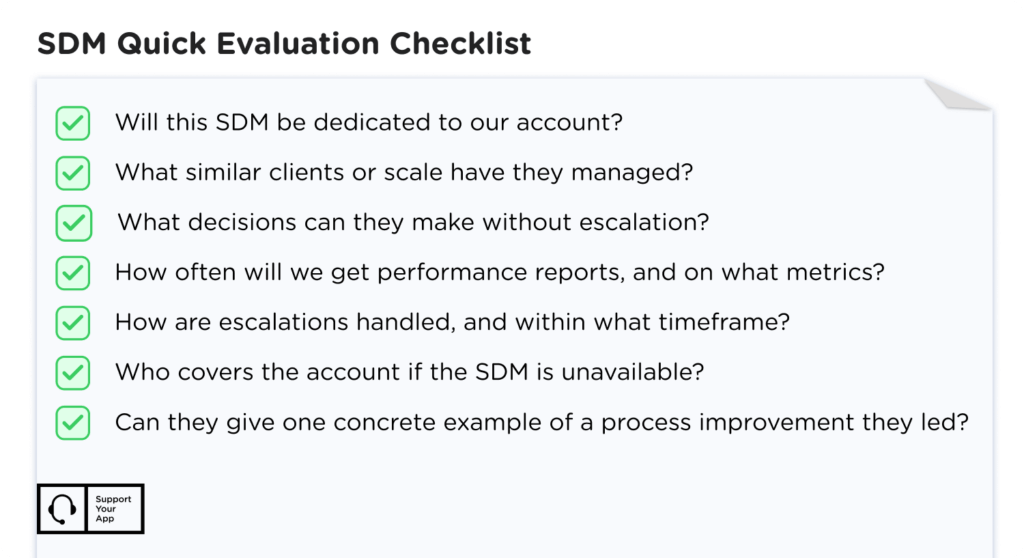
A dedicated Service Delivery Manager (SDM) is your single point of contact. They learn your business, push for your priorities inside the provider, and connect your internal teams with the frontline agents who talk to your customers. When something breaks at midnight, the SDM is the person who already knows the context.
Good SDMs don't wait for you to spot problems. They bring suggestions based on ticket data and what they see across the market. During selection, meet the SDM you'd get, not only the sales team, and judge their experience, communication style, and how they think through trade-offs.
Set expectations early. Agree on how often they report, which escalation paths exist, and who covers when they're on vacation. A capable SDM knows your project and your industry and works comfortably with remote-team and CRM tools. They handle attrition, shrinkage, and performance issues before you have to raise them.
A dedicated manager isn't always necessary, so factor scope into how to choose a customer support outsourcing partner. Complex, high-volume operations that change often need one. Smaller, stable setups with standardized processes usually do fine with a shared manager.
Partnership foundation: A strong SDM turns a vendor contract into a working partnership that gets more valuable every quarter.
10. Culture and Leadership Fit
Mismatched values create friction that no SLA can fix. Look at how the provider's leaders talk about their agents. Do they invest in wellbeing and career growth? How do they handle mistakes, internally and with clients? Their answers predict how your customers will be treated on a bad day.
Reputation tells you a lot about culture. Read employee reviews on Glassdoor, and look for industry awards, client testimonials, and published case studies. High agent turnover usually points to cultural problems, and those problems reach your customers sooner or later.
Communication style belongs in the same check, especially when choosing a CX partner for the long term. Some teams want detailed weekly updates, while others prefer a short monthly summary. Find a partner whose habits match yours, or agree on a reporting rhythm before the contract starts.
Bonus Criterion: Flexible Delivery Models
Where your agents sit matters less than how they're managed. A strong customer service partner can run remote and in-office teams without losing quality or weakening data protection. Ask how they handle devices. Do agents work only on company-issued, centrally managed hardware, or under a secure bring-your-own-device policy?
Clear rules for devices, access controls, and monitoring reduce security risk and keep performance consistent across locations. That flexibility lets you add coverage in new time zones quickly while staying compliant. Ask for the written device policy, not a verbal summary, and check that it covers contractors too.
How Do I Choose a Customer Support Outsourcing Company? A 5-Step Process
Picking a vendor is one of the bigger calls a support leader makes. It's also hard to reverse once agents are trained and your data has moved to a new set of systems. Use the criteria above in this order:
- Define your needs: ticket volume, channels, languages, hours, and technical complexity.
- Shortlist at least three vendors and score each one against all 10 criteria using the same scenario.
- Verify their claims with references, case studies from your industry, and their security documentation.
- Run a paid pilot on a part of your tickets before you commit to a long-term contract.
- Write clear KPIs, scaling timelines, and exit terms into the contract.
That's how to choose a customer support outsourcing partner without betting your support operation on a sales pitch. The lowest price rarely delivers the best value. Look for a partner who understands where your product is heading and can prove they'll keep up as your volume, channels, and markets grow.










