


Most companies get this wrong the first time. They rush the setup, skip the hard parts, and wonder why the agent underperforms. This guide is for product, support, and operations leaders who want to deploy AI customer service agents that actually work in production. Not toy demos. Not "pilot programs" that quietly die after three months.
Here's what we'll cover: how to build an AI support agent correctly, where most teams go wrong, and what separates agents that last from ones that embarrass you live.
TLDR
- Setting up an AI agent takes 10 steps, but most teams skip those that matter most.
- Your knowledge base is the foundation. A weak one means a bad agent, no exceptions.
- Testing isn't a one-time event. It's a commitment that runs every time you update anything.
- Deploying the agent is the beginning of the work, not the end.
Here's a number worth sitting with: according to Gartner, agentic AI will autonomously resolve 80% of common customer service issues without human intervention by 2029, driving a 30% reduction in operational costs.
That means the companies building and refining their AI agents today will have a two-year head start on everyone else. The question isn't whether to build one. It's whether you build it right.
Why Companies Are Deploying AI Agents for Customer Support
The pressure to deploy AI in customer service is real and growing. Salesforce reports that 66% of service organizations are now running AI agents, up from just 39% in 2025. And Gartner finds 91% of CX leaders are under direct executive pressure to deploy.
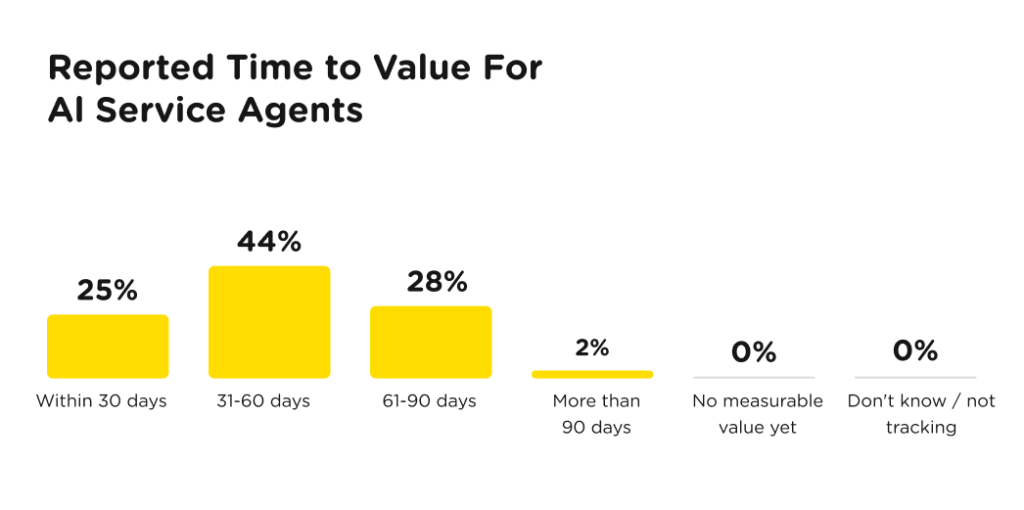
The reasons aren't hard to find. Ticket volumes keep climbing. Hiring and training costs keep rising. Customers expect faster answers than human teams alone can deliver at scale. AI support agents handle the volume that would otherwise require hiring more people, and they do it at a fraction of the cost per interaction. Moreover, 70% of companies using AI agents say they observe measurable value within 60 days of deployment.
But here's what separates the teams winning with AI from the ones quietly walking back their deployments: the winning teams treated setup as a process, not a one-time project. The rest cut corners early and paid for it later.
How to Choose the Right AI Platform for Customer Support
The market is crowded, and most tools look similar at the demo stage. The differences show up in production. Start by defining your primary channel. If most of your support happens via chat and email, you need a text-based agent. If phone support is central to your operation, a dedicated voice AI platform like SupportVoice is worth evaluating separately.
Next, look at how the platform handles knowledge base ingestion. Some tools accept only manual Q&A input. Others, like AI chat platforms Chatbase and SupportResponse, ingest URLs, uploaded documents, and past tickets. The more your product changes, the more that automation matters.
Escalation handling is the third filter. A platform that can't hand off a conversation to a human agent with full context attached is a liability, not an asset. Check whether the escalation is configurable, what context transfers, and whether it works across every channel you plan to support.
Finally, check the compliance posture before you commit. If you handle payments, sensitive user data, or operate in regulated markets, your platform needs to meet the relevant standards. PCI DSS, ISO 27001, GDPR, and HIPAA compliance aren't negotiable for most tech companies. Confirm certifications before signing, not after.
The ten steps below are the process that works.
Step 1: Build Your Knowledge Base
This is the most consequential step in the entire process, and the one that doesn't require any platform at all to get started. Your agent can only be as good as the information it has access to. Garbage in, garbage out. That rule holds here more than anywhere else in tech.
A strong knowledge base includes three categories of content. First, Q&A pairs that map common customer questions to direct answers. Second, your product documentation: guides, API references, troubleshooting flows, and integration notes. Third, internal support materials: escalation paths, resolution playbooks, and known-issue logs.
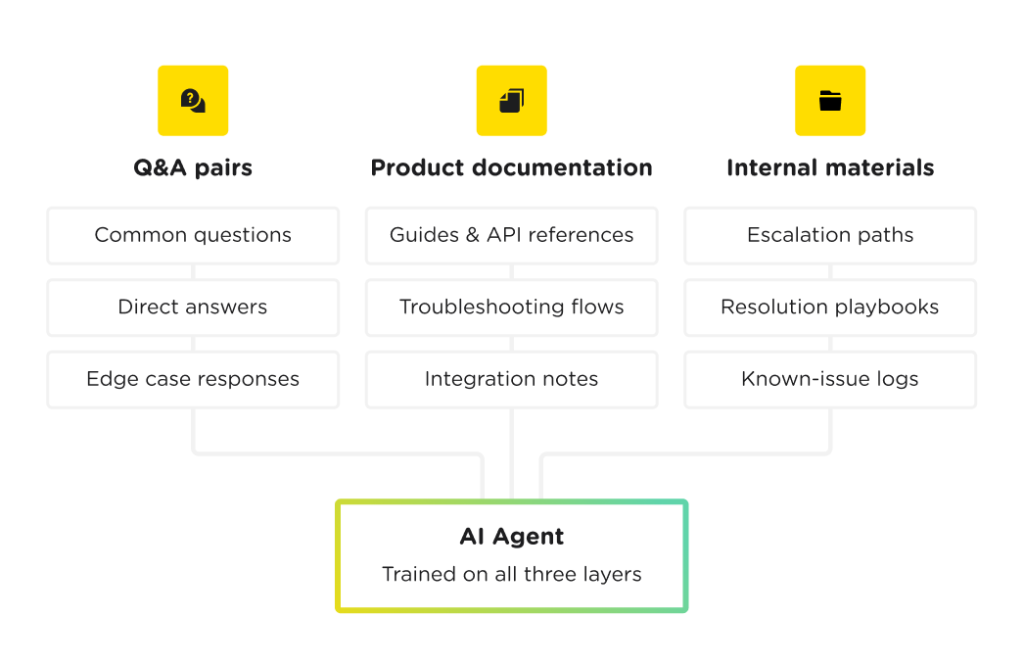
What to remove: outdated content, generic marketing copy, and pages that describe features you no longer offer. Every irrelevant piece of content is a liability. It gives the agent material to confuse customers with.
Step 2: Create an Account and Add Your Website
With your knowledge base ready, choose your platform and connect your website. Tools like Chatbase or SupportResponse scan your URL automatically, pulling in your product descriptions, FAQ pages, support articles, and public documentation.
This gives you a baseline dataset without manual data entry. It's useful, but don't mistake it for a finished foundation. Think of it as scaffolding. It gets you started, but you still have to build the structure yourself.
Before moving to the next step, audit what the system pulled in. Remove outdated pages, deprecated product information, and anything that no longer reflects how your product works today.
Step 3: Customize the Appearance
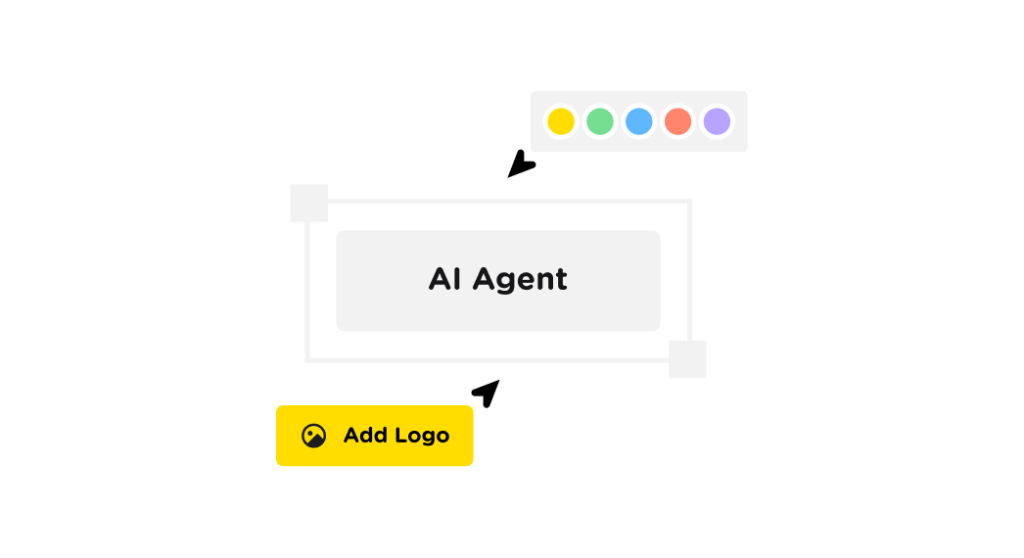
Your AI agent is a customer-facing product. Treat it like one. Set your logo, brand colors, and agent name. Write the starter questions it presents to users. These guide customers toward the most common resolution paths and reduce dead-end conversations.
Some platforms pull your branding automatically from your site. Chatbase does this by default; SupportResponse lets you configure brand voice alongside visual identity. Even when auto-import is available, review every element manually. Auto-imported branding is a starting point, not a finished result.
The name you give the agent matters more than most teams realize. A name that signals "AI assistant" builds the right expectations. A name that sounds like a human support rep creates friction when customers realize they're talking to a machine.
Step 4: Choose Your Model and Train the Agent
With your knowledge base in place, run the training process. Knowing how to train AI for customer support well at this stage is what separates agents that perform from ones that frustrate. Most platforms let you choose between different large language models (LLMs). The choice affects how the agent handles ambiguity, complex technical questions, and edge cases. Voice-first platforms like SupportVoice handle inbound and outbound calls, while text and chat-focused tools like Chatbase or SupportResponse let you shape tone through written custom instructions.
There is no universally correct LLM. The right one depends on your support volume, the complexity of your product, and how much nuance your customers' questions typically require. Test at least two options against your real support scenarios before committing.
Step 5: Set Tone and Escalation Rules
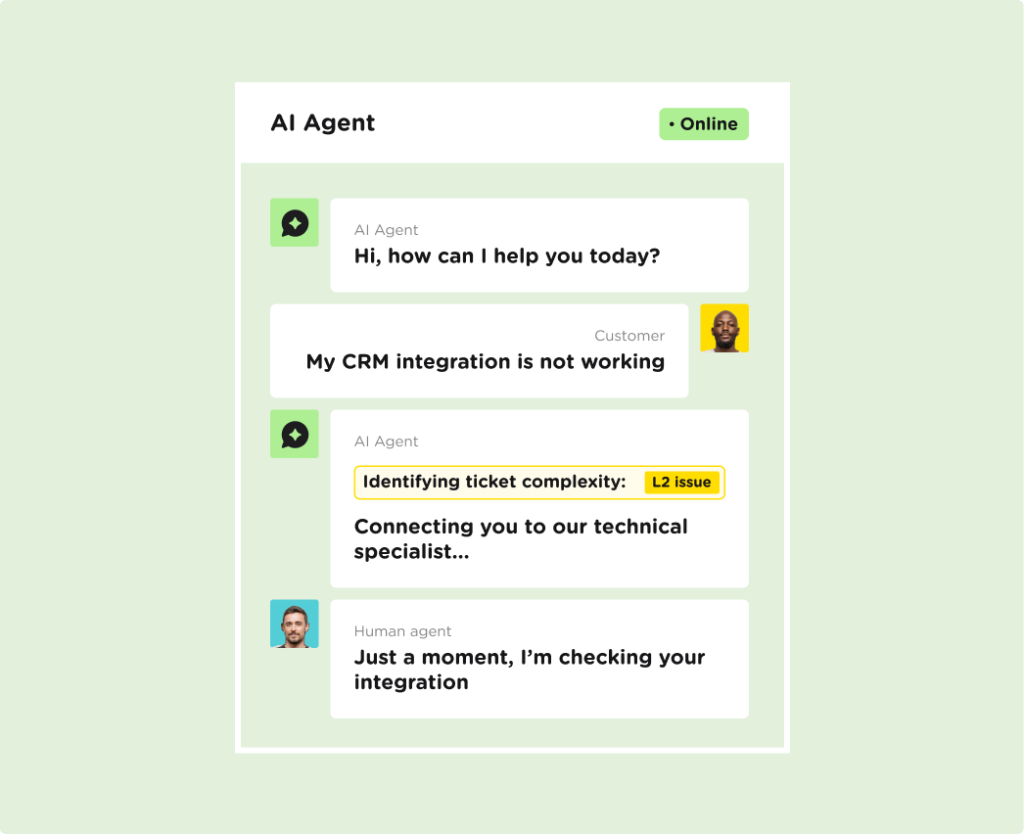
This is where most teams leave performance on the table. Training the model is not enough. You also need custom instructions that shape how the agent behaves in practice. Define how the agent introduces itself, how it responds to frustrated users, what it says when it doesn't know the answer, and when it should escalate to a human.
These instructions are the difference between an agent that feels like part of your brand and one that feels like a generic bot. Don't skip this step. Most teams do. Most teams regret it.
Step 6: Test Before You Go Live
Testing is where most AI agent projects fail. Not because teams skip it entirely. They run some tests. They test the easy questions. The ones they already know the answers to. The ones the agent was practically built to handle.
That's not testing. That's confirmation bias.
Real testing means throwing edge cases at the agent. Unusual phrasing. Multi-part questions. Requests the knowledge base doesn't fully cover. Topics that are close to what you support but not quite. Hostile or frustrated user tones.
Only testing "easy" questions is how bad agents slip through to production, and how you end up with a customer service disaster on your hands after launch.
Document every failure. Fix the knowledge base or the custom instructions, then retest. Repeat until the agent handles the full range of what real customers will actually ask.
Step 7: Deploy
Once testing is complete, deployment is straightforward. Embed the agent code directly into your website, or install it via plugin if you're running on WordPress, Shopify, or another platform-based CMS. Omnichannel platforms like SupportResponse deploy across email, WhatsApp, and social channels from a single setup. If you're also covering phone support, SupportVoice runs alongside it for inbound and outbound calls in 30+ languages, so you aren't running separate systems for separate channels.
For most teams, a two-phase rollout is the smarter path. Deploy to a low-traffic page or customer segment first. Monitor the live conversations for a week before rolling out site-wide. This gives you real-world data without exposing your full customer base to any issues you missed in testing.
Don't go wide on day one. Every edge case you missed in testing will find its way to a live customer conversation.
Step 8: Monitor Live Conversations
Deploying the agent is not the finish line. It's the starting line.
Your platform's dashboard shows you real conversations. Not the simulated ones from your test scripts, but actual exchanges between your agent and your customers. This is the most valuable data you have access to.
Look specifically for three things: questions the agent couldn't answer, responses that technically answered but clearly missed what the customer was asking, and escalations that could have been resolved automatically with better training data.
Step 9: Retrain and Improve
Once you know where the agent is falling short, act on it. Update the knowledge base based on what you find. Add new Q&A pairs for unanswered questions. Revise existing content where the agent's responses show gaps. Adjust your custom instructions where tone or escalation behavior isn't working.
An AI agent that isn't actively maintained will degrade. The world changes. Your product changes. Customer language changes. Your agent's knowledge base needs to keep pace.
Step 10: Test Again After Every Update
Every knowledge base update requires a new round of testing. Every time. No exceptions.
This is the step most teams drop first when they're under pressure. They update the knowledge base, assume things are fine, and move on. Then a change they made to fix one type of question breaks how the agent handles a different type.
Build testing into your update process as a non-negotiable step, not an optional one. Keep a library of your test questions and run through it every time you make a meaningful change to the knowledge base or custom instructions.
The teams with the best-performing AI agents don't have better technology. They have better discipline.
Common Problems (And How to Fix Them)
Even well-built agents run into issues. Here's what to watch for:
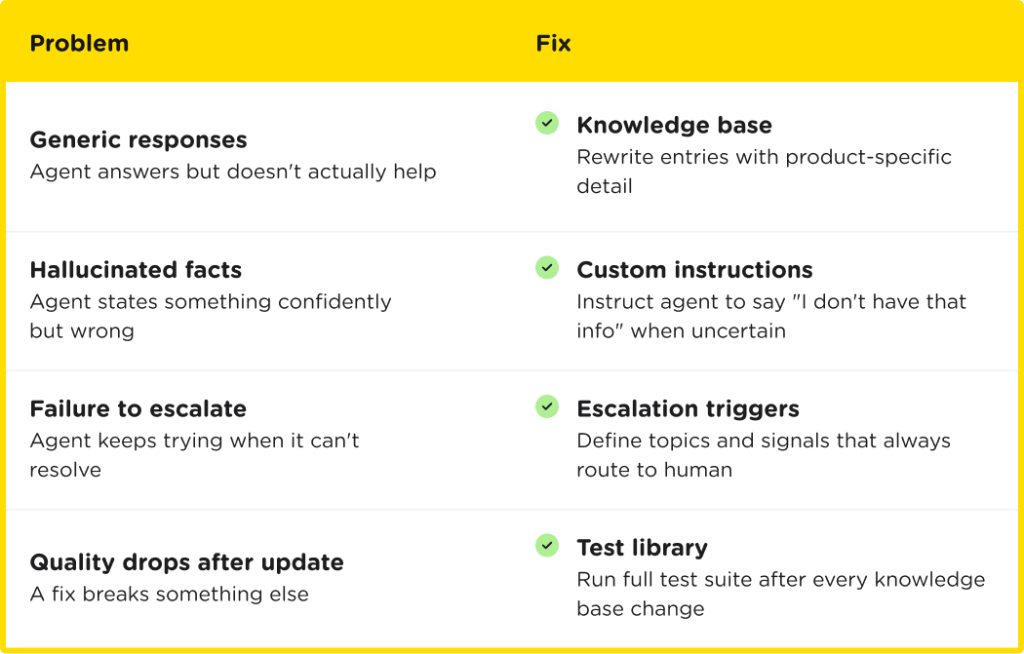
Responses that are too generic. The agent answers the question but doesn't actually help. Usually a knowledge base problem. Content is too broad, not specific enough to your product. Fix: rewrite knowledge base entries with more concrete, product-specific detail.
Hallucinated facts. The agent confidently states something that isn't true. Fix: tighten the custom instructions to tell the agent it should say "I don't have that information" rather than generate an answer when it's uncertain. Also audit for knowledge base gaps that might be prompting the agent to fill in blanks.
Failure to escalate. The agent keeps trying to resolve something it can't resolve, frustrating the customer. Fix: define clear escalation triggers in your custom instructions. Specific topics, specific user language, or specific frustration signals that should always route to a human.
Quality drops after an update. A knowledge base change fixed one thing but broke something else. Fix: maintain a test library and run it after every update. There's no shortcut here.
Build It Yourself. Or Let Us Build It for You.
If you've followed all ten steps, you have everything you need to deploy a well-functioning AI agent. But if you'd rather skip the trial and error and get it right the first time, SupportYourApp can build it for you.
SupportResponse is SupportYourApp's AI agent built for chat, email, and social channels. It learns your product, tone, and workflows from your existing knowledge base, resolved tickets, and documentation. It covers L1 and L2 support autonomously, with smart escalation for anything more complex. It runs in 45+ languages out of the box, deploys across your website, app, WhatsApp, and email from a single setup, and is built on ISO 27001:2022-certified, PCI DSS, and GDPR-compliant infrastructure.
If phone support is part of your operation, SupportVoice handles the voice channel. It picks up inbound calls, makes outbound ones, and runs 24/7 in 30+ languages without a human agent on the line. The same knowledge base that powers your chat agent powers your voice agent, so your customers get consistent answers regardless of how they reach you.
You can set it up yourself using the steps in this guide, or hand it to the SupportYourApp team and we'll configure, train, and deploy it for you. See what a production-ready AI agent for customer support looks like in practice.