
TL;DR:
- AI chatbots handle FAQs, password resets, and order tracking instantly — cutting resolution times from hours to minutes
- Agent-assist tools suggest responses and surface knowledge during live chats, making agents faster without replacing them
- Smart routing directs tickets to the right team automatically based on urgency and complexity
- Voice AI and generative AI reduce writing time from 5 minutes to 30 seconds while maintaining quality
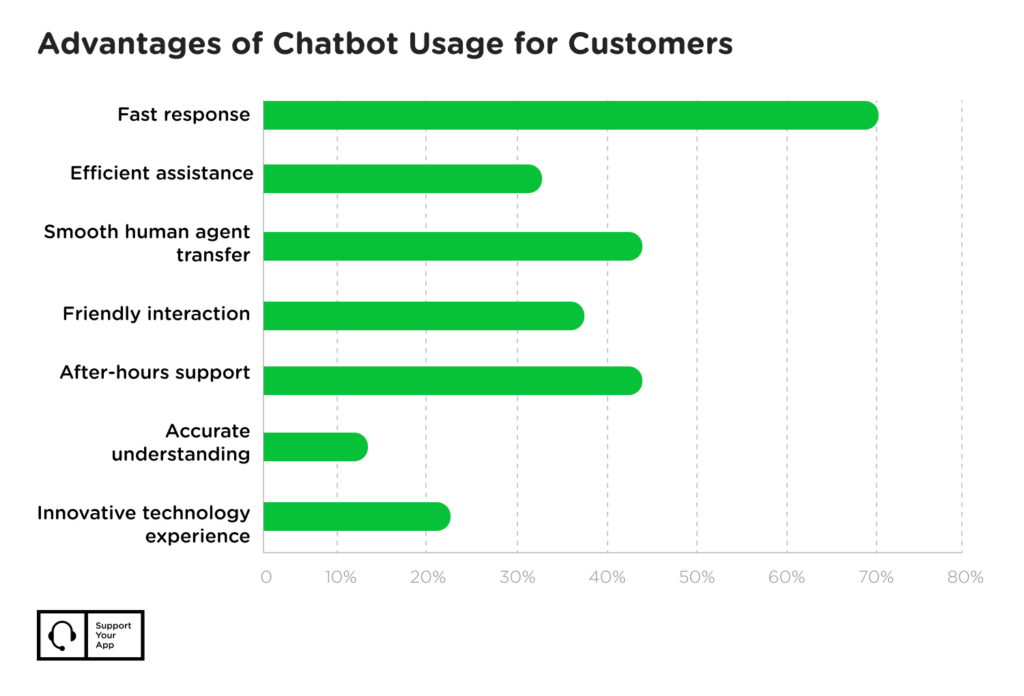
Customer expectations are rising faster than most support teams can handle. Artificial intelligence changed the game. 69% of customers now prefer chatbots for basic issues because they get answers instantly. No hold times, no transfers, no repeating themselves.
And so, businesses rush to implement AI into their customer experience. But you should stop to face a practical question: which AI use cases actually work, and which ones create more problems than they solve?
After reading this guide, you’ll know when and how it’s best to use AI in customer service, what it’ll cost you to implement it, and when you should keep humans in charge instead of automating. Let’s jump into some theory first.
What Is AI in Customer Service?
AI in support combines machine learning, natural language processing, and automation to handle or assist with support interactions. The technology analyzes patterns, understands intent, and responds to customers across chat, email, voice, and messaging channels.
Here’s the headline stat: Gartner reports that by 2029, 80% of customer interactions will be managed by AI without human intervention. That’s not “some” or “many” — that’s most of them.
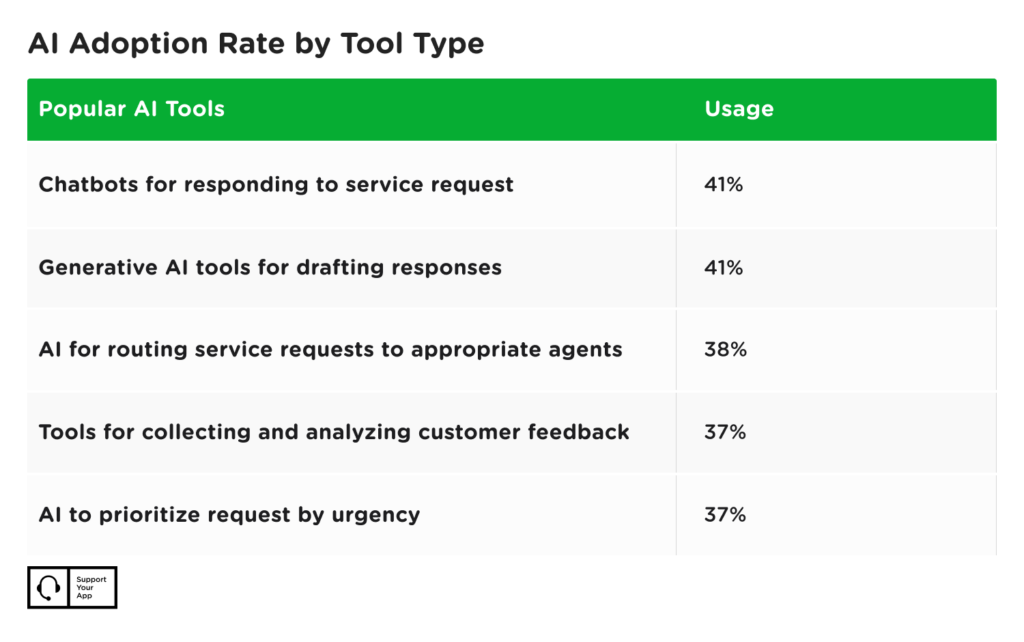
At the moment, the most commonly adopted tools are AI chatbots and generative AI. After that comes smart routing, data analysis, and priority scoring.
The business impact is measurable. Faster response times. Lower cost per contact. 24/7 availability. Consistency across channels. Easier scaling. Reduced agent burnout.
But here’s what actually matters: AI doesn’t replace human agents. It handles repetitive, high-volume, routine tasks so agents can focus on complex cases requiring empathy and judgment.
Google CEO Sunder Pichai puts it clearly: “AI is most powerful when it helps people make better decisions, not when it replaces them.”
How Is AI Used in Customer Service Today?
Modern support teams use AI across nearly every part of the customer journey. It’s not just chatbots anymore. The technology now spans automation, real-time assistance, workflow optimization, prediction, and omnichannel coordination.
AI in customer support breaks down into five categories:
Direct Support Automation: Chatbots and self-service systems handling customer requests without human intervention. These answer questions instantly, 24/7.
Agent-Assist Tools: Real-time suggestions, knowledge surfacing, sentiment detection, and conversation summaries. These tools sit alongside agents during live chats, making them faster and more accurate.
Workflow Automation: Smart routing, priority scoring, auto-tagging, and ticket classification. These systems direct work to the right people without manual triage.
Proactive and Predictive Support: Churn prediction, personalized recommendations, and outreach based on behavior patterns. These catch problems before customers complain.
Voice AI and Omnichannel Tools: Natural language phone systems, cross-channel routing, and unified customer history. These connect every touchpoint into one conversation.
Examples of AI in Customer Service in Action
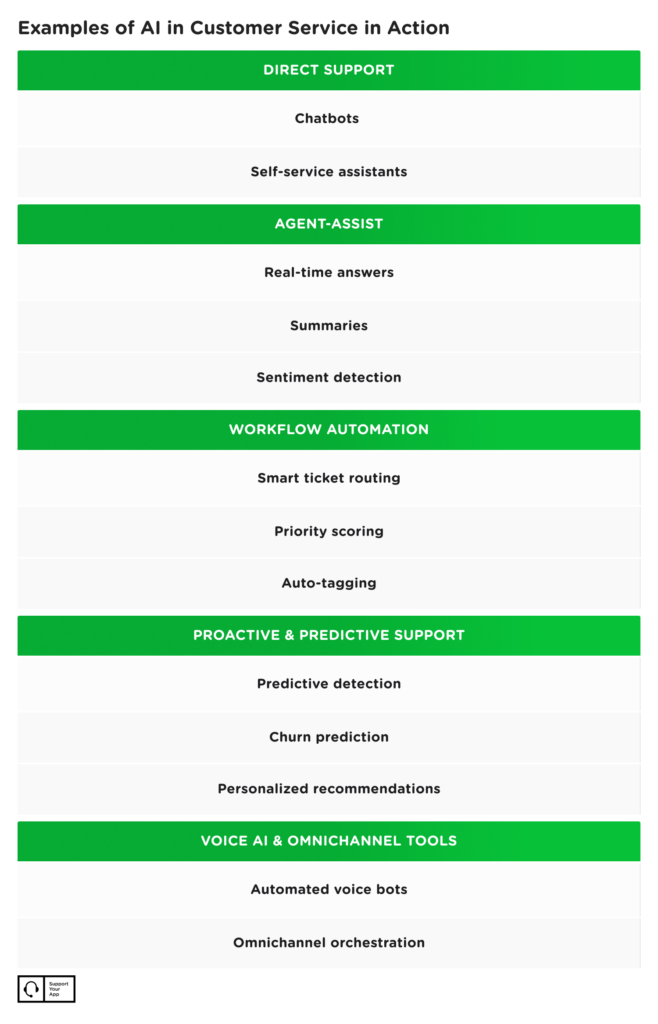
Each category solves different problems. Chatbots reduce ticket volume. Agent-assist improves resolution speed. Smart routing prevents bottlenecks. Predictive systems catch problems early. The key is matching the technology to your specific business challenge.
AI Use Cases in Customer Service
Let’s get practical. Real examples of AI in customer service below show how you can apply AI to solve actual business problems. No theory. No hype. Just what works, what it costs, and when it fails.
Here are seven use cases with measurable results.
1. Conversational AI Chatbots
Most organizations deploy AI chatbots as the first point of contact on websites, apps, and messaging channels. These systems handle basic tier-one support: FAQs, password resets, order tracking, account status, bookings, and information collection.
Natural language processing lets chatbots understand free-text questions. No rigid menu trees. Customers type what they need. The bot responds. When questions exceed its capabilities, it transfers to human agents with full context.
In the following AI chatbot case study, you can see how SupportYourApp helped Cocoatech cut resolution time from 8 hours to 5 minutes. The chatbot handled routine questions instantly. Specialists got the complex technical issues.
When chatbots work best: high-volume, low-complexity questions where answers come from a structured knowledge base.
When they might fail: with nuanced problems, emotional situations, or issues requiring judgment calls.
Implementation reality: Expect 2-6 months to build a custom AI chatbot that meets security standards and integrates with multiple tools. You need clean documentation, regular training data updates, and human review of conversations to catch failures. Budget $20K-$100K depending on complexity and integration requirements.

2. Real-Time Agent Assistance
AI agent assistance is exploding. These tools help agents during live conversations, suggesting responses, surfacing relevant information, detecting customer sentiment, and flagging urgent issues.
While an agent chats with a customer, AI analyzes the conversation in real-time. It recommends responses. Pulls information from the knowledge base. Highlights similar past tickets. Warns when sentiment turns negative.
The technology shines for new agents still learning the product or handling edge cases they’ve never seen. Senior agents use it less but still benefit from sentiment detection and automatic summaries.
The catch: Agent-assist only works if your knowledge base is current and well-organized. Garbage documentation produces garbage suggestions. Fix your content before deploying these tools.
3. Smart Routing and Priority Scoring
Smart routing uses AI to classify incoming tickets and automatically direct them to the correct team or agent. Intent detection analyzes the request. Priority scoring determines urgency based on impact, customer value, and SLA requirements.
Instead of first-come-first-served, AI routes based on need:
- Billing questions → Finance team
- Technical bugs → Engineering queue
- Urgent complaints → Immediate escalation
Smart routing is a prime example of AI in customer service that cuts wait times and prevents misrouting. High-priority issues get attention immediately instead of sitting in a general queue behind routine questions.
Smart routing works when you have clear team divisions and defined escalation paths. It breaks down in small teams where everyone handles everything or situations requiring subjective judgment about priority.
Cost consideration: Smart routing is typically included in modern helpdesk platforms, though advanced AI-powered routing may require higher-tier plans or add-ons. Custom standalone implementations usually range from $10K to $50K+, depending on integration complexity and business logic requirements
4. Gen AI for Response Drafting
Since late 2023, gen AI has moved customer support beyond fixed scripts. These models create original, contextually aware answers in real-time instead of selecting from pre-written templates.
Generative AI use cases in customer service include drafting personalized responses, summarizing long threads, rewriting messages for clarity and tone, and translating across languages.
Here’s how it works: Agent receives a complex question. AI reads the conversation history. Pulls relevant product information. Drafts a complete response. Agent reviews for accuracy. Makes adjustments if needed. Sends. Writing time drops from roughly 5 minutes to 30 seconds.
The technology works for: routine explanations where facts are clear but phrasing varies.
It might fail with: policy exceptions, sensitive situations, or questions requiring company-specific judgment.
Important limitation: Generative AI will confidently produce wrong answers if your training data is incomplete or outdated. Human review remains mandatory. Budget time for agents to verify AI-drafted responses instead of blindly trusting output.
5. AI-Powered Self-Service Systems
AI-powered help centers let customers find answers by typing questions instead of browsing manual categories. The system searches knowledge bases, extracts relevant content, and presents it conversationally.
Some customers prefer self-service options over talking to agents. This cuts ticket volume while giving customers instant access to information 24/7.
The AI understands intent even when customers phrase questions differently. “Where’s my order?” and “Track my shipment” both return the same helpful article about order status.
Self-service works when: you have comprehensive documentation and customers asking predictable questions.
It might fail when: documentation is thin, questions are highly specific, or customers need empathy more than information.
Setup requirement: You need at least 50-100 well-written knowledge base articles before AI-powered search delivers value. Fewer articles mean the system has nothing useful to surface.
6. Voice AI and Phone Automation
Voice AI extends chatbot capabilities to phone channels. These systems use natural speech instead of “press 1 for billing” menu trees. Customers describe their problem in plain language. The AI understands. Responds naturally. Completes common requests.
Here’s a voice AI use case: at SupportYourApp, we’ve helped Softorino achieve 95% faster replies. How? We’ve developed a voice AI agent that provided 24/7 support, ensured instant call pickups, simple question answering, and guided troubleshooting.
The technology provides 24/7 coverage and multilingual support under lower costs than human phone agents. It works best for transactional requests with clear outcomes.
Deployment timeline: An AI voice agent typically takes 4-9 months to implement. You need call flow design, voice training specific to your product terminology, integration with backend systems, and extensive testing. Budget $50K-$200K depending on complexity.

7. Personalization and Churn Prediction
Predictive AI analyzes customer behavior to identify churn risks, recommend personalized actions, and trigger proactive outreach. Machine learning models spot patterns indicating a customer might cancel, experience problems, or need help.
AI use cases in contact centers include flagging customers likely to churn, predicting ticket volume for staffing, personalizing product recommendations based on history, and triggering alerts for shipment delays or service issues.
A real-world AI agent case study featuring SupportYourApp’s partnership with Welcome to Bob shows how proactive support catches problems before customers complain. The system identifies usage patterns indicating confusion, automatically surfaces help resources and routes to specialists when needed.
Prediction makes support proactive. Instead of waiting for customers to report problems, teams intervene early with solutions or guidance.
Data requirement: Predictive models need at least 6-12 months of historical customer data before they produce reliable insights. New companies or those with limited data history should focus on other AI use cases first.
What Most Companies Get Wrong About AI in Customer Service
Most companies treat AI implementation as a technology project. They focus on selecting tools and configuring integrations. Wrong approach.
The companies succeeding with AI in customer support understand something fundamental: AI is only as good as the human systems supporting it. Your knowledge base. Your processes. Your training. Your quality standards. These determine whether AI helps or hurts.
Here’s what high performers do differently:
They clean their documentation first. Before deploying AI, they audit every knowledge base article. Update outdated information. Fill gaps. Standardize formatting. AI trained on messy documentation produces messy results.
They start small and measure obsessively. Instead of implementing AI everywhere at once, they pick one specific use case. Deploy it to a subset of customers. Measure everything. Iterate based on real data. Most failed AI projects skipped this step.
They keep humans in the loop. Every AI interaction includes an easy path to human help. Every AI-generated response gets human review. Every AI decision gets human override capability. An AI support case study on our partnership with FitXR shows this human-in-the-loop model in practice.
They train agents on AI collaboration, not AI replacement. The best outcomes come from agents who understand how to work with AI tools. When to trust suggestions. When to override. How to improve the system through feedback.
They measure customer outcomes, not just efficiency. Tracking resolution time and cost per ticket matters. But so does customer satisfaction, first-contact resolution, and sentiment scores. AI that makes support faster but more frustrating is a failure.
The pattern is clear: AI amplifies your existing support operations. If your documentation, processes, and training are strong, AI makes them stronger. If they’re weak, AI exposes and magnifies those weaknesses.
Key Takeaways
Examples of AI in customer service span the entire support journey. Here’s what actually works:
- Chatbots and self-service systems handle high-volume, routine questions 24/7, reducing ticket load while giving customers instant answers
- Real-time agent assistance provides suggestions, knowledge surfacing, and sentiment detection during live conversations, speeding resolution without replacing human judgment
- Smart routing and priority scoring direct urgent issues to the right teams automatically — preventing bottlenecks and cutting wait times
- Generative AI drafts responses, summarizes conversations, and translates messages — slashing administrative work while keeping communication natural
- Voice AI extends automation to phone channels with conversational assistance — not robotic menus
- Predictive systems identify churn risks and trigger proactive outreach before problems blow up
- Success requires clean documentation, strong processes, human oversight, and measuring customer outcomes alongside efficiency metrics
The future isn’t AI replacing agents. It’s AI handling volume so humans can focus on complexity, empathy, and judgment.
FAQ
What Are Customer Service AI Use Cases?
AI automates routine inquiries through chatbots and self-service systems, provides real-time suggestions and knowledge to agents during conversations, routes and prioritizes tickets to the right teams, predicts customer issues before they escalate, and personalizes support based on history and behavior patterns.
How Can AI Help Customer Service?
AI helps customer service by handling repetitive tasks that don’t require human judgment, providing 24/7 availability, delivering consistent quality regardless of volume or time, reducing costs per interaction, preventing agent burnout, and freeing agents to focus on complex problems requiring empathy and decision-making.
What Are the Examples of Generative AI in Customer Service?
Generative AI in customer service automatically drafts personalized responses to customer questions by analyzing conversation history and pulling relevant product information. An agent receives a query, the AI generates a complete answer, the agent reviews for accuracy and tone, makes adjustments if needed, and sends—reducing writing time from minutes to seconds while maintaining quality.
Looking to implement AI in your customer support operations? SupportYourApp provides AI-powered customer service solutions combining human expertise with automation. We help SaaS, fintech, ecommerce, healthcare, and tech companies deploy chatbots, voice AI, agent-assist tools, and smart routing while maintaining the human touch for complex cases.
❤︎ Like it? — Share: Share on LinkedIn or Share on Facebook

Anna is a Senior Key Account Manager working with international fintech and tech clients, leading distributed teams across regions and time zones. She combines structured operational thinking with strong emotional intelligence, preferring clear communication and disciplined execution. Delivering results while building accountable, high-performing teams is her standard. In her personal time, she loves trying new hobbies, and binge-watching good series.
Posted on LinkedIn